

A page can be well written, nicely designed, and completely invisible. Nobody lands on it, because Google has no reason to show it for anything. That gap between publishing and being found is exactly what SEO in digital marketing exists to close.
SEO, short for search engine optimisation, is how you earn free, ongoing traffic from Google, Bing, and now AI answer engines instead of paying for every click. For a founder, it can mean a sales pipeline that doesn’t switch off when the ad budget does. For a marketer, it’s often the cheapest channel at scale, though also the slowest to start.
This guide covers what SEO is, how search engines work, the main types of SEO, and how to research keywords. It then walks through every tool worth knowing, from Google Search Console to Semrush, Ahrefs, and Screaming Frog, with what each one does and when to use it. You’ll also see how AI Overviews and AI Mode are changing the rules in 2026, plus a simple workflow you can start this week and 10 FAQs at the end.
What Is SEO and Why Does It Matter for Your Business?
SEO, or search engine optimisation, is the practice of improving a website so search engines can find it, understand it, and show it to people searching for related topics. The aim isn’t traffic for its own sake. It’s the right people, arriving at the moment they’re looking for what you sell, teach, or solve.
Take a search like “best sunscreen for oily skin”. Retailers such as Nykaa, review publishers, and dermatology blogs all compete for that one results page. Nobody in the unpaid listings pays per click for their spot. They earned it by building pages that match what the searcher wants.
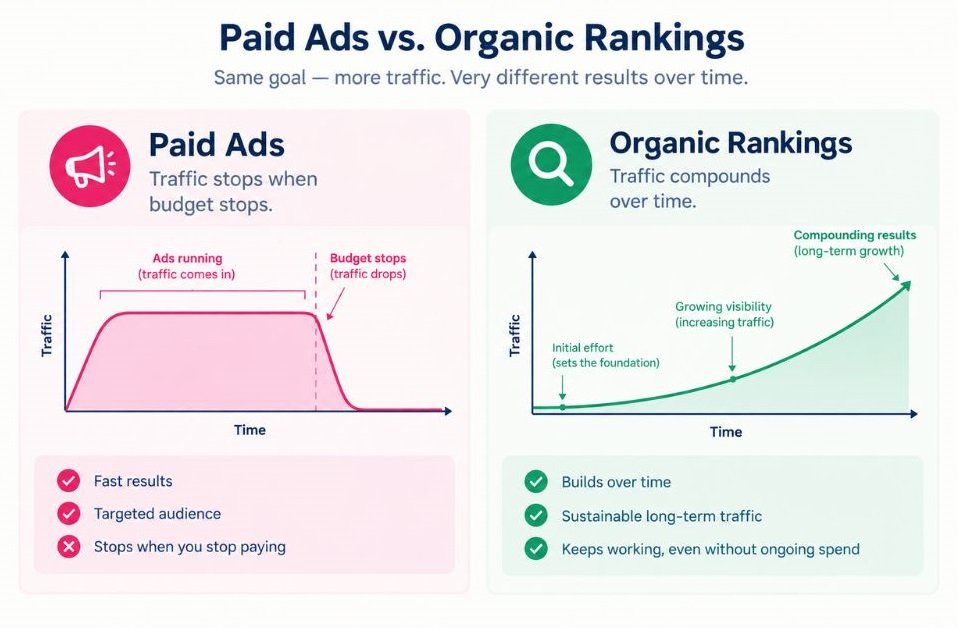
That’s the commercial case. A paid ad stops the second your budget does. A page that ranks keeps working while you sleep, and its cost per visit tends to fall over time.
There are three practical reasons to care:
- Returns compound. One strong page can bring visitors for years with periodic updates.
- Intent is high. People who search are already looking for an answer, a product, or a provider.
- Rankings build credibility. Appearing organically signals that Google considers your page a credible answer, which shapes how searchers see your brand.
Google also publishes its own SEO Starter Guide in Google Search Central. It’s still the best free primer on what the company itself recommends, so read it after this article.
How Do Search Engines Actually Work?
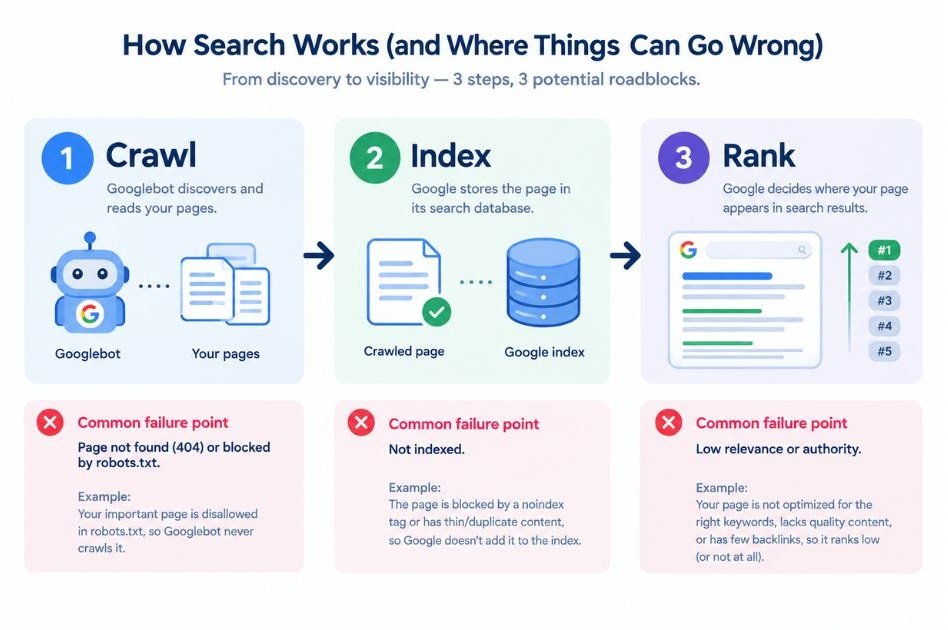
Search engines work in three stages: crawling, indexing, and ranking. Crawlers discover pages by following links, the index stores and organises what they find, and ranking systems decide which indexed pages best answer a specific query.
Crawling
Crawling is the stage where a search engine’s bot, called Googlebot in Google’s case, visits pages by following links and reading sitemaps. If a page isn’t linked from anywhere and isn’t listed in your sitemap, the bot may never find it. Your robots.txt file, a plain text file at the root of your site, tells bots which areas they may visit.
Indexing
Indexing is the stage where Google analyses a crawled page and stores it in its database. Crawled doesn’t mean indexed. A thin, duplicate, or blocked page can be visited and still left out.
One classic beginner trap: a WordPress site launched with the “Discourage search engines from indexing this site” box still ticked. Weeks later, the owner wonders why nothing shows up. Nothing ever reached the index.
Ranking
Ranking is where the engine orders indexed pages for a query, using relevance, content quality, page experience, and context such as the searcher’s location and device. Google doesn’t publish the full list of signals. What it does publish is a framework called E-E-A-T (Experience, Expertise, Authoritativeness, Trustworthiness) inside its Search Quality Rater Guidelines.
To be fair, E-E-A-T isn’t a single score you can measure. But it’s the clearest picture of what Google wants a page to prove. Google can also rank individual passages within a long page, which is why clear, self-contained sections matter more than most beginners expect.
Search engines work by crawling pages, indexing their content, and ranking indexed pages against a query. A page can be crawled but never indexed, and indexed but never ranked, so each stage needs checking separately when traffic is missing.
What Are the Main Types of SEO?
The four main types of SEO are on-page, off-page, technical, and local SEO. Each fixes a different problem, and most websites need all four working together rather than one in isolation.
On-Page SEO
On-page SEO is everything you control on the page itself: title tag, meta description, headings, body content, URL, image alt text, and internal links. The title tag is the clickable headline in search results. The meta description is the summary beneath it, and while it doesn’t directly affect rankings, it strongly affects whether people click.
Content is the heart of it. A page has to match the intent behind the query better than the pages already ranking. HubSpot popularised the topic cluster model for this: one broad pillar page linked to many narrower posts, so search engines see you cover a subject in depth.
Off-Page SEO
Off-page SEO covers signals from outside your site, mainly backlinks, which are links from other websites to yours. Google’s original PageRank idea treated links as votes of confidence, and they remain a strong signal. Quality beats quantity, though. One link from a respected publication in your industry outweighs fifty from directories nobody reads.
Brand mentions, digital PR, and reviews feed this too.
Technical SEO
Technical SEO makes sure search engines can crawl, render, and index your site efficiently. It covers site speed, mobile-friendliness, HTTPS, XML sitemaps, clean URL structure, and structured data, which is code (usually schema.org markup in JSON-LD format) that labels content such as products, reviews, and FAQs.
Google also measures page experience through Core Web Vitals. Largest Contentful Paint (LCP) measures loading and should come in at 2.5 seconds or less. Interaction to Next Paint (INP) measures responsiveness and should stay at or under 200 milliseconds. Cumulative Layout Shift (CLS) measures visual stability and should stay at or under 0.1.
Local SEO
Local SEO helps a business appear for searches with a regional or physical intent, such as “pizza near me”. Those searches are answered by the map pack, the block of three local listings shown above regular results, which draws heavily on Google Business Profile listings. Every Domino’s outlet, for instance, depends on an accurate listing with the right hours, category, and reviews.
Beginners should start with on-page and technical basics. Backlinks are the slowest to build and the easiest to waste money on.
How Do You Do Keyword Research as a Beginner?
Keyword research is the process of finding the words and phrases your audience types into search engines, then choosing which to target based on search intent, volume, and difficulty. Start with intent. A keyword with 50,000 monthly searches is worthless if the people searching want something you don’t offer.
Search intent is the reason behind a query. There are four types, and you should match your page type to the intent before writing a word.
| Intent | What the searcher wants | Example query | Best page type |
|---|---|---|---|
| Informational | An answer or explanation | what is a canonical tag | Blog post or guide |
| Navigational | A specific site or page | Semrush login | Brand or login page |
| Commercial | To compare before buying | best SEO tools for beginners | Comparison or review |
| Transactional | To buy or sign up | buy Screaming Frog licence | Product or pricing page |
Three metrics show up in every tool. Search volume is the estimated number of monthly searches for a keyword. Keyword difficulty is a score estimating how hard it is to rank, and each tool calculates it differently, so a 40 in Ahrefs isn’t a 40 in Semrush. Cost per click (CPC) is what advertisers pay for that keyword, and a high CPC often signals strong commercial value.
Then there are long-tail keywords, which are longer, more specific phrases such as “SEO course for beginners with certificate”. They have lower volume, but also lower competition and clearer intent. A new site should live here for its first six months.
- List 5 to 10 seed topics from your products, customer questions, and sales calls.
- Expand each seed using Google autocomplete, People Also Ask boxes, and a tool such as Google Keyword Planner or Semrush.
- Search the keyword yourself and read page one. If every result is a product page and you’re planning a blog post, the intent doesn’t match.
- Compare difficulty with your site’s strength, and favour low-difficulty long-tail terms if the site is new.
- Map one primary keyword to one page, with two to four supporting variations.
That last step prevents keyword cannibalisation, which happens when two of your own pages compete for the same query and split the signals between them. It’s more common than you’d think on blogs with years of content.
Which SEO Tools Should Beginners Learn, and What Does Each One Do?
A beginner’s SEO toolkit has four layers: free Google tools for first-party data, a keyword and competitor suite for research, a crawler for technical audits, and an optimisation tool for content. Start with the free layer. It shows real data from your own site, which no paid tool can match.
Tools don’t do SEO. You do. They save time and reveal what you can’t see by eye, nothing more. Here’s the full lineup at a glance, followed by what each tool actually does. Pricing changes often, so check each vendor’s page before you commit.
| Tool | Main job | Cost model | Best for |
|---|---|---|---|
| Google Search Console | Search performance and indexing | Free | Everyone |
| Google Analytics 4 | On-site behaviour and conversions | Free | Everyone |
| Google Keyword Planner | Keyword ideas and volume ranges | Free with a Google Ads account | Beginners |
| Google Trends | Demand over time | Free | Topic planning |
| PageSpeed Insights | Speed and Core Web Vitals | Free | Technical checks |
| Google Business Profile | Local listing management | Free | Local businesses |
| Semrush | All-in-one research and audits | Paid, limited free plan | Marketers and agencies |
| Ahrefs | Backlinks and keyword research | Paid, free tools for your own site | Link analysis |
| Moz Pro | Beginner-friendly suite | Paid | Learners |
| Ubersuggest | Budget keyword and site data | Freemium | Small teams |
| AnswerThePublic and AlsoAsked | Question research | Freemium | Content ideas |
| Screaming Frog | Site crawling | Free up to 500 URLs | Technical audits |
| Bing Webmaster Tools | Bing indexing and reports | Free | Extra visibility |
| Yoast SEO and Rank Math | On-page checks in WordPress | Freemium | WordPress sites |
| Surfer SEO and NeuronWriter | Content optimisation | Paid | Writers |
| ChatGPT, Gemini, Claude, Perplexity | Ideation, analysis, AI visibility checks | Freemium | Workflow speed |
Free Google Tools
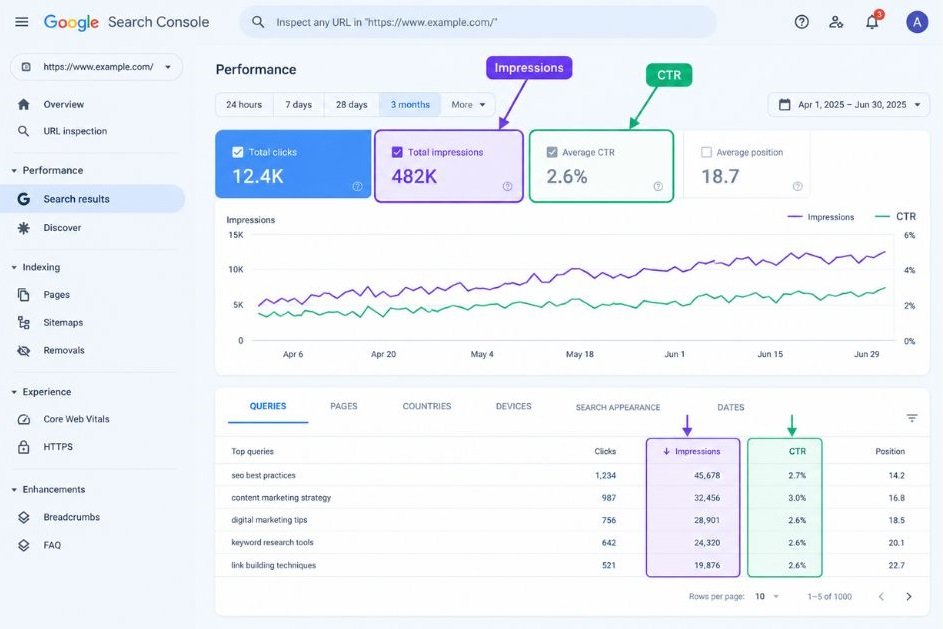
Google Search Console is a free Google tool that shows how your site performs in search and whether Google can index your pages. Verify your site with a DNS record or HTML tag, then submit your XML sitemap. The Performance report shows queries, pages, clicks, impressions, click-through rate (CTR), and average position for up to 16 months.
The Pages report lists which URLs are indexed and explains why others aren’t, and URL Inspection checks a single page and lets you request indexing. One routine pays off fast for beginners: filter for queries with many impressions but a low CTR, then rewrite those titles and descriptions to earn more clicks.
Google Analytics 4 (GA4) is Google’s free analytics platform, and it shows what visitors do after they arrive. Under the Acquisition reports, the Organic Search channel isolates search traffic. Watch engagement rate, average engagement time, and key events, which is GA4’s name for the conversions you define, such as form submissions or purchases.
GA4 doesn’t tell you which keywords brought visitors. That data lives in Search Console, so link the two properties to see search queries next to behaviour.
Google Keyword Planner sits inside Google Ads. You need an account, but you don’t have to run a campaign. Without active ad spend, volumes appear as broad ranges instead of exact numbers. Its two main features are “Discover new keywords”, which generates ideas from seed words or a URL, and “Get search volume and forecasts”. Because it’s built for advertisers, it tends to favour commercial terms, so pair it with another tool for informational topics.
Google Trends shows relative search interest on a scale of 0 to 100, where 100 is peak popularity for the chosen region and period. It isn’t absolute volume. Use it to spot seasonality (searches for “Diwali gifts” climb every autumn), compare two topics, check regional demand, and switch to YouTube Search to see video interest.
PageSpeed Insights tests a URL and reports Core Web Vitals. It shows two kinds of data: field data, collected from real Chrome users over the previous 28 days when a page has enough traffic, and lab data, a simulated test powered by Lighthouse. The opportunities list names fixes such as compressing images or deferring heavy scripts. Lighthouse also lives inside Chrome DevTools if you want to test pages before they go live.
Google Business Profile is the free listing that controls how your business appears in Google Search and Maps. Verify ownership, choose accurate primary and secondary categories, add hours, photos, and services, and keep your name, address, and phone number identical across the web. Replying to reviews counts as local SEO work too. Its Performance data shows calls, direction requests, and website clicks.
Rich Results Test and Schema Markup Validator check structured data. Google’s Rich Results Test tells you whether a page’s markup is eligible for enhanced results such as product ratings. The Schema Markup Validator at schema.org checks general syntax. Worth knowing: Google limited FAQ rich results to well-known government and health sites in 2023, so FAQ markup now helps machines understand a page more than it changes how the page looks.
Keyword Research and Competitor Suites
Semrush is an all-in-one marketing suite and the one most agencies standardise on. Its Keyword Magic Tool produces huge keyword lists grouped by topic, with intent labels and difficulty scores. Keyword Gap compares your domain with competitors to show terms they rank for and you don’t. Site Audit crawls your site for errors, Position Tracking monitors rankings by location and device, and Backlink Analytics maps who links to whom. The breadth is the strength, and also the trap: beginners drown in dashboards. The free plan is limited, so use it for a few focused sessions.
Ahrefs is best known for its backlink index. Site Explorer shows any domain’s backlinks and organic keywords, and Keywords Explorer reports volume alongside estimated clicks, with a Keyword Difficulty score driven mainly by the number of sites linking to top results. Content Gap, Site Audit, and Rank Tracker round it out. Its Domain Rating (DR) is a 0 to 100 score of a site’s backlink strength, and it’s Ahrefs’ own metric, not Google’s. Ahrefs Webmaster Tools is free for sites you verify yourself, which makes it a sensible way to start.
Moz Pro is the most beginner-friendly of the big suites. It created Domain Authority (DA), a 1 to 100 score predicting how well a domain might rank, and Google doesn’t use it. Treat it as a comparison tool, never a goal. Moz Pro also offers Keyword Explorer with a priority score, Link Explorer, Site Crawl, and the MozBar browser extension for checking any page as you browse.
Ubersuggest, created by Neil Patel, offers keyword ideas, SEO difficulty, backlink data, and a site audit at a lower price than the major suites. Its dataset is smaller, so expect fewer details. For a solo founder or student, it’s often enough.
AnswerThePublic and AlsoAsked focus on questions. AnswerThePublic visualises the autocomplete questions and phrases built around a seed keyword. AlsoAsked maps the People Also Ask trees on Google results, showing which questions lead to which follow-ups. Both are excellent for outlines and FAQ sections, because they show the exact wording real people use.
Technical Audit Tools
Screaming Frog SEO Spider is a desktop crawler that behaves like a search engine bot, visiting every URL on your site and recording what it finds. The free version crawls up to 500 URLs. A first crawl typically surfaces broken links (404 errors), redirect chains, missing or duplicate title tags, multiple H1s, missing alt text, and non-indexable pages. Connect it to the Search Console, GA4, and PageSpeed APIs, and each URL gets traffic and speed data next to its issues.
Bing Webmaster Tools is Bing’s version of Search Console. You can import a verified site from Google Search Console in a few clicks. It offers indexing reports, search performance data, SEO reports, and support for IndexNow, a protocol that lets you notify participating search engines the moment a page changes. Bing matters beyond its market share because Microsoft’s search results feed Copilot.
Content and On-Page Tools
Yoast SEO and Rank Math are WordPress plugins that handle the repetitive on-page work. Both generate XML sitemaps, add schema markup, preview how your title and description will look in results, and let you set a focus keyword per page. Their traffic-light scores are a guide, not a ranking promise. A green light with a boring page still loses to a red light with a brilliant one.
Surfer SEO and NeuronWriter analyse the pages already ranking for a keyword and suggest related terms, headings, and a target length. Writers use them to spot subtopics they missed. Use them as a checklist of ideas, not a script, because stuffing every suggested term into a draft produces text nobody enjoys reading.
AI Assistants for SEO Work
ChatGPT, Gemini, Claude, and Perplexity are general AI assistants that speed up the thinking parts of SEO. The most practical use of AI in SEO for a beginner is as a first-draft assistant, not a publisher. Ask one to cluster a keyword list by topic, suggest title and meta description variations, summarise what the top results cover, or draft FAQ ideas.
Check every fact it gives you. Then add what it can’t supply: your own data, screenshots, and experience. Google has said content is judged on helpfulness, not on how it was produced.
These assistants double as a visibility test. Ask Perplexity or Gemini the questions your customers ask, then see which sources get cited. Semrush and Ahrefs have also added features that track how often a brand appears in AI answers, though plans and features change, so verify what’s included before paying.
A beginner’s SEO toolkit starts with free first-party tools, Google Search Console and Google Analytics 4, then adds a keyword suite such as Semrush or Ahrefs, a crawler such as Screaming Frog, and an on-page tool such as Yoast SEO or Surfer SEO. No tool replaces judgement about search intent.
How Is AI Changing Search in 2026?
AI is changing search by answering questions directly on the results page through Google’s AI Overviews and AI Mode. That means fewer clicks on some queries, but more value for pages that get cited. Ranking still matters, and now being quoted inside the answer matters too.
Start with scale. BrightEdge’s tracker saw AI Overviews on 48% of tracked queries by March 2026, up from about 31% the previous year. And a randomised study by researchers at Carnegie Mellon University and the Indian School of Business found that AI Overviews cut outbound organic clicks by 38% on queries where they appear.
AI Overviews and AI Mode aren’t the same thing. AI Overviews are short summaries placed above the usual results. AI Mode is a separate, conversational experience built for longer, multi-step questions. Clicks fall in both, but the visitors who do click are often more qualified.
So is SEO dead? No. Google’s John Mueller has said that SEO best practices remain foundational and that no separate strategy is needed for AI search. That’s why AI in SEO now means two jobs at once: using AI to work faster, and shaping your pages so AI systems choose to cite them.
Google’s ranking systems also keep moving. The March 2026 core update started on 27 March and finished on 8 April. The May 2026 core update ran from 21 May and was marked complete on 2 June. Google says a ranking drop after a core update doesn’t signal a policy violation, and recommends waiting a full week after completion before analysing Search Console data.
What should you do differently? Five habits help with both classic rankings and AI citations:
- Open each section with a direct answer of one to three sentences, then explain.
- Define key terms in a clean, standalone sentence.
- Name entities precisely, such as “Google Search Console” instead of “the tool”.
- Publish original data, examples, or screenshots that competitors can’t copy.
- Add accurate structured data, and keep key pages updated with dates.
None of this replaces the basics. Pages still need to be crawlable, fast, and genuinely useful before any AI system will quote them.
AI Overviews and AI Mode answer queries directly on Google’s results page, reducing clicks on many searches while rewarding pages that are clear, original, and easy to cite. Traditional SEO fundamentals remain the entry ticket, because AI answers pull mainly from pages that already rank and satisfy search intent.
How Does SEO Fit With Paid Search, Content, and Social Media?
SEO earns unpaid rankings on search engines, while search engine marketing (SEM) usually refers to paid ads on the same results pages. Both target the same searchers, but SEO is slower and compounding, and paid search is immediate and rented.
| Factor | SEO | Paid search |
|---|---|---|
| Speed to results | Often 3 to 6 months | Hours to days |
| Cost model | Time, content, tools | Pay per click |
| Durability | Keeps working after spend stops | Stops when budget stops |
| Control | Limited, algorithm-dependent | High, you set bids and targeting |
| Best for | Long-term, low-cost growth | Launches, testing, urgent demand |
Smart teams don’t pick one. Treat SEO in digital marketing as the compounding channel that other channels feed: ads test which messages convert, content gives search engines something to rank, and email and social bring repeat visitors.
Content marketing supplies the pages that SEO ranks. Social media and PR build awareness, and people who recognise a brand often search for it by name later. A brand like boAt can run paid campaigns around a product launch while its product and category pages collect the branded and comparison searches that follow.
What Does a Beginner SEO Workflow Look Like?
A beginner SEO workflow has eight steps: set up measurement, audit the site, fix technical basics, research keywords, create or improve content, optimise on-page elements, earn links, and review results monthly. Do them in that order, because each step depends on the one before it.
- Step 1: Set up Google Search Console, GA4, and Bing Webmaster Tools, then submit your XML sitemap.
- Step 2: Crawl the site with Screaming Frog and export every error it finds.
- Step 3: Fix blockers first, including noindex tags, broken links, redirect chains, slow templates, and mobile display problems.
- Step 4: Build a keyword map with one primary keyword per page.
- Step 5: Write new pages or rewrite weak ones to match search intent, answering the main question in the opening lines.
- Step 6: Optimise title tags, meta descriptions, headings, internal links, image alt text, and schema.
- Step 7: Earn links through original research, digital PR, partnerships, and useful tools. Don’t buy them, because Google’s spam policies treat link schemes as violations.
- Step 8: Review Search Console monthly, then update pages that sit on page two or have a falling CTR.
Be patient. Most sites see early movement within three to six months, though competitive topics take longer. That’s normal, not failure.
How Do You Measure SEO Results?
You measure SEO results by tracking organic visibility, organic traffic, and the business outcomes that traffic produces. Rankings alone are vanity if they don’t lead to sign-ups, sales, or enquiries.
Here are the numbers worth reporting each month:
- Impressions, clicks, CTR, and average position from Google Search Console.
- Organic sessions, engagement rate, and key events from GA4.
- Rankings for your target keywords in a tracker such as Semrush Position Tracking or Ahrefs Rank Tracker.
- Referring domains, meaning the number of unique websites linking to you.
- Branded search growth, which shows rising awareness.
- Mentions and citations in AI answers for your priority queries.
One caution. As AI features expand, impressions can hold steady or grow while clicks fall. Don’t panic when that happens. Compare impressions, clicks, and conversions together, and judge the channel on revenue contribution rather than on sessions alone.
Report trends over quarters, not days. Rankings wobble constantly, and a single bad week usually means nothing.
Which SEO Mistakes Should Beginners Avoid?
The most common SEO mistakes are targeting keywords without checking intent, publishing thin content at scale, ignoring technical basics, and expecting results within weeks. Most of them come from rushing.
- Skipping intent. Ranking for the wrong kind of query brings visitors who leave.
- Mass-producing pages. Google’s spam policies target scaled content abuse, meaning large volumes of pages made mainly to rank rather than to help.
- Ignoring crawl and index checks. If Google can’t index a page, nothing else you do matters.
- Chasing backlinks before the content deserves them.
- Stuffing keywords. Repeating a phrase unnaturally hurts readability and earns nothing.
- Obsessing over tool scores like DA, DR, and green lights in plugins. None of them is a ranking factor.
- Pasting raw AI output. It’s the quickest way to waste AI in SEO, because you add volume without adding anything a reader can’t already find.
Honestly, most of these fail for the same reason. The page doesn’t give the searcher anything better than what already ranks.
Conclusion
Three ideas matter most. Search engines crawl, index, and rank, so check each stage when traffic is missing. Search intent beats search volume every time. And in 2026, being the source an AI answer cites sits next to ranking as a goal, though both still rest on helpful, original, technically sound pages.
Your next move is small. This week, verify your site in Google Search Console, crawl it with Screaming Frog, and write down five long-tail keywords with clear intent. That one session will teach you more than another month of reading.
FAQs
What is SEO in simple words?
SEO is the practice of making your website easy for search engines to find and useful for the people searching. You do it by creating helpful content, fixing technical issues, and earning links from other sites. The reward is free, repeatable traffic from Google, Bing, and AI answers.
How long does SEO take to show results?
Most sites see early movement within three to six months, although a new site targeting competitive keywords can take longer. Low-competition long-tail pages can rank within weeks. Track progress in Google Search Console, where rising impressions usually show up before rising clicks.
What’s the difference between SEO and SEM?
SEO earns unpaid rankings through optimisation. SEM usually means paid search ads, such as Google Ads, on the same results pages. SEO is slower but compounding, while SEM is immediate and stops when your budget does. Most growing businesses run both.
Is SEO dead because of AI?
No. AI Overviews and AI Mode reduce clicks on many informational queries, and a Carnegie Mellon and Indian School of Business study measured a 38% drop in outbound organic clicks where AI Overviews appeared. But those answers draw on ranking pages, and cited brands gain visibility. The skill set has widened, not disappeared.
Do I need to pay for SEO tools to get started?
No. Google Search Console, GA4, Google Keyword Planner, Google Trends, PageSpeed Insights, Bing Webmaster Tools, and the free version of Screaming Frog cover most beginner needs. Add Semrush, Ahrefs, or Moz Pro once you need competitor and backlink data at scale.
How do I do keyword research for free?
Start with Google autocomplete, People Also Ask boxes, and Google Trends. Then check volume ranges in Keyword Planner and real queries in Search Console. Finally, search each keyword yourself and read page one to confirm the intent matches the page you plan to write.
What are Core Web Vitals, and do they affect rankings?
Core Web Vitals are Google’s page experience metrics: LCP for loading, INP for responsiveness, and CLS for visual stability. They’re a ranking signal, but a modest one. Relevance and content quality outweigh them, so fix them to keep visitors happy, not to leapfrog a better page.
Who should invest in SEO first?
SEO suits any business with customers who search before buying: local shops, e-commerce brands, SaaS companies, course creators, and publishers. If your product creates demand nobody searches for yet, pair SEO with paid and social channels. Businesses that need sales this week should lean on ads first.
Why isn’t my page ranking even though I published it weeks ago?
Check three things in order. First, use URL Inspection in Search Console to confirm the page is indexed. Second, confirm the page matches the intent of the query. Third, compare it with the top results for depth and originality. Also remember that new pages often need weeks to settle.
Can I use ChatGPT to write SEO content?
You can use it for outlines, title ideas, and first drafts, but not as a publish button. Google judges content on helpfulness, not on whether AI wrote it. Verify every fact, add your own examples and data, and edit hard. Raw output tends to read like everyone else’s.


15 SEO Competitor Analysis Tools To Find Winning Strategies
October 8, 2026 - 11:54 am[…] analysis in SEO means studying the sites that rank above you for your target keywords, which aren’t always your […]