

Open Seller Central on a Monday morning and count what needs attention. A competitor dropped their price overnight. One ad keyword is burning budget without a single sale. Your best seller has two weeks of FBA (Fulfillment by Amazon) stock left.
Amazon seller tools are software products that automate or speed up repetitive selling tasks, such as product research, ad bidding, repricing, profit tracking, review requests, and shipping. The problem is that most sellers buy them in the wrong order. Many pay for one big suite when a $19 tool would have covered the gap.
This guide covers 15 tools across five jobs, with 2026 pricing, what each one actually automates, and one honest limitation per tool. It also adds Amazon.in context for Indian sellers, including GST (Goods and Services Tax) invoicing and which tools list India support. Prices change often, so treat the numbers as a snapshot and confirm on each vendor’s page before you pay.
Before the list, one question decides everything: which of your tasks are worth automating at all?
What Should You Automate in an Amazon Business, and What Should You Leave Alone?
Automate tasks that follow clear rules and repeat daily: repricing, ad bid changes, review requests, profit reporting, and stock alerts. Keep human judgment on product selection, brand positioning, supplier terms, and the price floors your automation must never cross.
The pressure to automate is real. SupplyKick’s 2026 summary of Amazon’s shareholder letters puts third-party sellers at 61% of worldwide units in Q4 2025. You’re competing with thousands of sellers who adjust prices and bids by the hour, and manual work can’t keep that pace.
Time is the other cost. RepricerExpress estimates that a seller with 500 SKUs (stock keeping units, meaning individual products) spends 15 to 20 hours a month on price checks and updates. That’s a vendor’s own estimate, so treat it as directional. Even at half that number, it’s a part-time job.
Here’s what belongs on the automation list:
- Competitor price monitoring and repricing
- Ad bid and budget adjustments within rules you set
- Review and feedback requests through Amazon’s approved channels
- Profit and fee reporting
- Low-stock and listing-change alerts
What stays human is harder to automate and more expensive to get wrong. Choosing the next product, setting your minimum margin, and deciding when a tool’s recommendation looks off all need you. Amazon even offers a free baseline: its own Automate Pricing feature costs nothing, which makes it a fair benchmark before you pay for a third-party repricer.
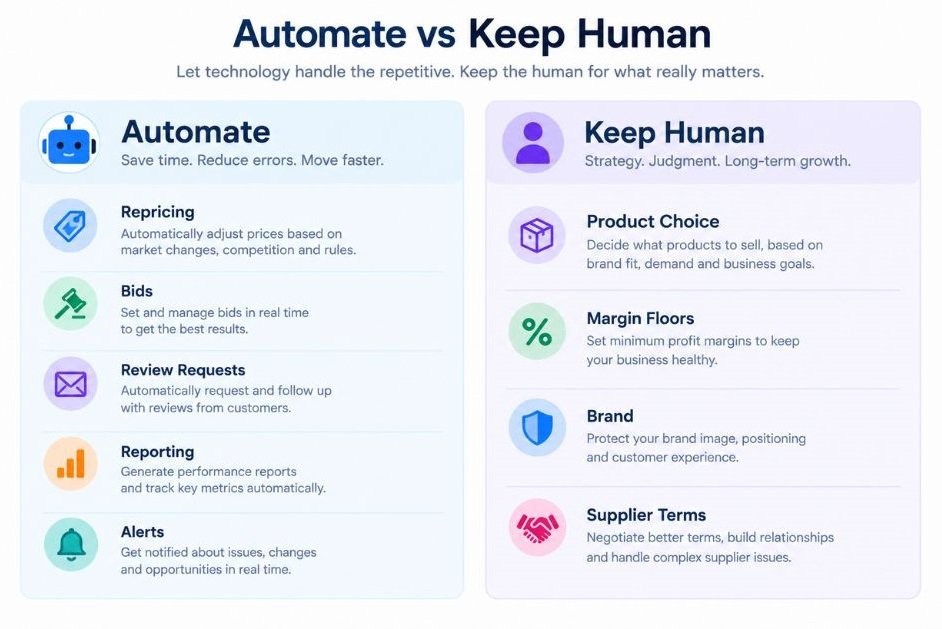
Amazon sellers should automate rules-based, repetitive work such as repricing, ad bid changes, review requests, profit reporting, and stock alerts. Product selection, margin floors, brand decisions, and supplier negotiation still need a human. Amazon’s free Automate Pricing feature is the baseline any paid repricer has to beat.
How We Picked These Amazon Seller Tools
We scored each tool on four things: how much work it automates, what it costs at realistic usage, which marketplaces it covers, and which seller size it fits. A tool that scores well for a $10M brand can be a bad buy for someone with five SKUs.
Automation depth matters most. A research dashboard that shows data is useful, but a repricer or ad tool that acts on the data while you sleep is what the best Amazon automation tools are really for. On pricing, we looked at the monthly cost at typical usage, not the teaser rate, and we flag fees that grow with ad spend or revenue.
Coverage and fit come last but matter just as much. For Indian sellers, whether a tool supports Amazon.in is a dealbreaker, and we say so where sources confirm it.
One honest caveat: this list rests on vendor pricing pages, third-party review sites, and seller feedback as of mid-2026, not on a live-account test of each tool. Where sources disagreed on a price, we say that instead of picking a number.
Which Tools Handle Product Research and Keywords?
Product research tools estimate demand, competition, and keyword volume so you can decide what to sell and how to rank it. The five below range from all-in-one suites to a single-purpose price tracker.
Helium 10
Helium 10 is the default pick for many private-label sellers, and it’s also the one with the most pricing drama. It bundles product research (Black Box and Xray), keyword research through Cerebro, and Helium 10 Ads, the PPC (pay-per-click) tool formerly called Adtomic. Cerebro fully absorbed the older Magnet tool in January 2026.
Pricing moved in April. Helium 10 raised prices across most plans in April 2026, and new signups pay the higher rates. Revenue Geeks reports that paid plans start at $99 a month on annual billing, or $129 month to month, and standard plans top out at $359. Diamond users also pay a 2% fee on ad spend managed through Helium 10 Ads. A free plan exists, but it’s tightly capped.
Best for sellers who want research, listing work, and ads under one login. The limitation is cost creep. Revenue Geeks also reported a 2.1 out of 5 Trustpilot score across 709 reviews, with pricing the most common complaint.
Jungle Scout
Jungle Scout now runs two products. Catalyst is aimed at sellers with up to $5M in annual revenue, while Cobalt serves larger brands and supports 19 Amazon marketplaces. Catalyst covers the classic seller workflow: a product database, keyword research, supplier search, and sales analytics.
On price, Tekpon lists entry plans from $49 a month, or $29 a month with annual billing. There’s no free trial, only a 7-day money-back guarantee on standard Catalyst plans. Treat that guarantee as your trial and test hard in week one.
Best for first-time sellers who want clear, beginner-friendly research data. The limitation matters for Indian sellers: Jungle Scout says some Catalyst features are currently limited to the US. Ask support whether the features you need work on Amazon.in before you pay.
Keepa
Keepa does one thing exceptionally well: it shows price and rank history on any Amazon product page. Sellers use it to spot whether a competitor’s price drop is a one-day promotion or a lasting move, and to check whether a product’s demand is steady or seasonal.
Free charts cover the basics, while Keepa Pro costs €29 a month or €290 a year and adds Sales Rank, Buy Box, stock, and bulk research tools, with no free trial. Its price alerts are the closest thing to automation here.
Best as a cheap second opinion next to a bigger suite. The limitation is scope. Keepa is data, not workflow, so it won’t research keywords, run ads, or reprice anything. It covers multiple regional Amazon sites, so confirm Amazon.in is on the list before paying.
ZonGuru
ZonGuru sits in the middle on price and features. It offers keyword research, product research, and a supplier-sourcing tool called Easy Source. The Chrome extension and Easy Source have unlimited use on both plans.
The Researcher plan costs $49 a month and the Seller plan $79, with a free trial available. The trial lasts 7 days and converts to a paid plan automatically unless you cancel, and standalone tools like the $15 Chrome extension and the $19 Keywords on Fire are sold separately. Set a calendar reminder the day you start the trial.
Best for sellers who want a lighter, cheaper alternative to the big suites. The limitation is usage caps: each plan carries monthly usage limits per tool, so heavy researchers can hit a ceiling mid-month.
SellerApp
SellerApp earns a place here because India is on its supported list. Its country list includes the USA, UK, Germany, UAE, and India among others. It combines product research, keyword research, a listing quality score, a profit dashboard, and AI and rule-based ad automation for PPC campaigns.
A free plan covers basics such as product overview, advertising overview, and listing quality. Paid plans come with a 7-day free trial. Paid pricing is the murky part. Toolradar’s August 2026 check lists it as contact-for-pricing, while older help pages quote a $49.99 entry plan. Ask for a current quote.
Best for Indian sellers who want research and ad automation in one place. The limitation is opaque pricing beyond the free tier.
Product research tools estimate demand, competition, and keyword volume before you commit money to inventory. Helium 10 and Jungle Scout are the broadest suites, Keepa is the cheapest price-history check, and SellerApp is the one in this group that explicitly lists India support. Always test whether a tool’s features work on your own marketplace before paying.
Which Tools Automate Amazon Advertising?
Amazon advertising tools automate bidding, budgets, and keyword harvesting so campaigns adjust faster than you can by hand. The right one depends almost entirely on your monthly ad spend.
First, two terms. PPC means you pay each time a shopper clicks your ad. ACoS (advertising cost of sale) is ad spend divided by ad-attributed sales, and most automation rules aim to hold it under a target you set. If you’re new to the mechanics, start with the basics of Amazon PPC first.
Perpetua
Perpetua is built for brands with real ad budgets. It runs AI-led bidding across Amazon, Walmart, and Instacart, and it connects to Amazon DSP (the demand-side platform for display and video ads) and Amazon Marketing Cloud, a data-clean-room tool. Amazon Ads published a joint case study crediting Perpetua and partner Cartograph with lifting new-to-brand share and return on ad spend for the toothpaste brand Davids.
On cost, Essentials is $695 a month for up to $10,000 in ad spend, and the Growth tier adds an undisclosed percentage of spend above that, with no free trial. Accounts above $500,000 a month get quote-based Premium pricing.
Best for brands spending at least $10,000 a month on Amazon ads. The limitation is the entry fee. One Capterra reviewer reported lower sales and margin during a 90-day trial, a good reminder to set a stop-loss before you hand over bids.
Pacvue
Pacvue is an enterprise platform. It manages retail media across Amazon, Walmart, Target, Instacart, and other networks, with rule-based bidding and budget pacing, and it extends into pricing intelligence and content. Its reach spans 100+ retailers.
Pricing isn’t published, and you book a demo to get a quote. That alone tells you who it’s for. If you sell mostly on Amazon.in or only on Amazon globally, you’d be paying for retailer coverage you won’t use.
Best for large brands and agencies running seven-figure retail media budgets across many retailers. The limitation is fit: it’s overkill for an Amazon-only seller, and the opaque pricing makes budgeting hard.
Teikametrics
Teikametrics sells Flywheel, an AI ad optimizer. It serves brands and agencies on Amazon, Walmart, and TikTok Shop. The system watches campaign data, shifts bids, and tries to weigh advertising against profit and inventory.
The pricing structure is unusual. There’s a free Basic plan without the optimization AI, and paid plans scale with ad spend, with a 3% fee on spend above $10,000. Reviews report a 30-day free trial for first-time users, and sellers above $50M in annual sales get custom pricing. Trial terms differ by plan, so check yours.
Best for mid-size sellers who want a lower entry price than Perpetua. The limitation is that the bill climbs with your ad spend, so it gets more expensive exactly when you grow.
Amazon ad automation is priced mostly by ad spend. Perpetua starts at $695 a month for up to $10,000 in spend, Teikametrics adds 3% above $10,000, and Pacvue quotes enterprise pricing on request. Sellers spending under $10,000 a month usually get more value from a research suite with built-in ads, or from Amazon’s native tools.
Which Tools Handle Repricing and the Buy Box?
A repricer is software that changes your listing prices automatically based on rules and competitor moves, usually to win the Buy Box, the offer Amazon shows by default on a product page. Most Amazon sales go through that one box, so losing it hurts.
Price isn’t the only Buy Box factor. Fulfillment method, seller performance, and stock also count, so a repricer can win on price and still lose the box. That’s why every repricer below lets you set floors and ceilings first.
Feedvisor
Feedvisor targets sellers who want AI to protect margin rather than race to the bottom. It has a public Essentials plan, an AI repricer for growing sellers advertised from $100 a month on a month-to-month basis, and an integrated Feedvisor360 platform sold through custom enterprise quotes. The larger platform ties pricing to advertising, inventory, and market intelligence. rfp
Best for established Amazon sellers with enough SKUs that manual price control no longer works. It has a 15-plus year operating history and enterprise customers. The limitation is that full-platform pricing and implementation fees aren’t public, so expect a sales call.
RepricerExpress
RepricerExpress is a straightforward repricer for Amazon and eBay. It watches competitors around the clock, adjusts listings against your rules, and enforces a floor price on every sale. You also set ceilings so prices stay within Amazon’s fair pricing policy.
The buying terms are friendly. There’s a 14-day free trial with no credit card. It works month by month with no long-term contract, and the company says there are no hidden fees or commissions. Pricing tiers by listing count, and the company’s own comparison page shows about $64 a month for up to 500 SKUs.
Best for small to mid-size sellers who want predictable monthly pricing. The limitation is that entry pricing jumps quickly as your listing count grows, so model your SKU count before you commit.
Informed Repricer
Informed.co, formerly known as AppEagle, now sells under the name Informed Repricer. It moved to flat pricing, with $147 a month on Pro for unlimited listings, or $99 a month on Launch until you pass $5,000 in monthly revenue. Coverage spans 20-plus international Amazon marketplaces plus Walmart.
Note the source: those figures come from a competitor’s July 2026 check of Informed’s pricing page, so verify them directly. The same source notes that Informed has restructured plans more than once, and some sellers on legacy tiers complained about short notice.
Best for sellers with many listings who want a flat fee. The limitation is plan stability: read the terms on how and when Informed can change them.
Which Tools Cover Profit, Reviews, Shipping, and Operations?
Operations tools track your true profit, send review requests, ship orders, and sync inventory so you stop reconciling spreadsheets. They’re the least glamorous Amazon automation tools and often the highest return.
For Indian sellers, this is also where GST and local marketplaces show up, so one of the four tools below is India-built. Profit data also feeds your wider reporting, so it helps to know how marketing analytics fits together. [INTERNAL LINK: marketing analytics → article on marketing analytics and attribution]
Sellerboard
Sellerboard answers one question: how much money did I really make? It’s a profit analytics service with follow-up email campaigns, inventory management, reimbursement tracking for lost or damaged stock, and listing change alerts.
The pricing is the cheapest on this list. Standard costs $19 a month, or $15 a month billed annually, for up to 3,000 orders, and plans rise to $79 for up to 50,000 orders. A one-month free trial needs no credit card. That makes it the easiest first purchase in this guide.
Best for any seller who’s guessing at profit. The limitation: profit reporting only works if you enter accurate costs for COGS (cost of goods sold), shipping, and overhead. Garbage costs in, garbage profit out.
FeedbackWhiz
FeedbackWhiz focuses on reviews and buyer messaging. It automates review requests, monitors listings and reviews, and tracks profits, and it can automate Amazon’s native Request a Review button on eligible orders. Using the native button matters, because Amazon restricts what review-request messages can say.
Pricing starts at $5 a month for five products and scales to custom plans above 5,000 products. It supports 21 Amazon marketplaces and offers a 30-day trial. The modular pricing means your real bill depends on which modules you switch on.
Best for sellers who want alerts on negative reviews and steady review requests. The limitation: it’s weaker on product research and ad automation, so it complements a suite instead of replacing one.
ShipStation
ShipStation is a general shipping platform, not an Amazon-only tool. It pulls orders from your channels, prints labels, and applies shipping rules. It lists a catalog of 300-plus integrations.
The pricing needs a careful read. Starter runs $14.99 a month for 50 shipments, but API access and your own carrier accounts are locked to Standard, which runs from $29.99 at 50 shipments to $149.99 at 1,000. Premium costs $349.99 for inventory and warehouse features.
Best for sellers who ship their own orders in volume. For Indian sellers, check that your couriers are supported before committing, and compare it with Amazon’s Easy Ship program or an India-built logistics tool. The limitation is volume-based pricing that can outgrow your budget faster than expected.
Unicommerce
Unicommerce is the India-built option. Its Uniware platform handles order, inventory, returns, and warehouse management across channels. It integrates with Amazon, Flipkart, Myntra, Meesho and others, and connects to accounting tools like Tally and Busy for GST compliance. Its Amazon India integration is a core part of the pitch.
The company says it serves more than 7,100 clients across India, Southeast Asia, and the Middle East, including Mamaearth, FabIndia, and Lenskart, and it also sells a logistics product called Shipway. Pricing is custom and tied to order volume and feature tiers.
Best for multichannel Indian sellers who sell on Amazon.in alongside Flipkart and their own store. The limitation: it’s built for operations at scale, so a solo seller with a handful of SKUs would be paying for more than they use.
How Do You Choose the Right Stack for Your Stage?
Choose by stage, not by feature list: new sellers need research and profit tracking, growing sellers add review and pricing automation, and scaling sellers add ad automation once monthly ad spend passes about $10,000. Buying ahead of your stage wastes the budget you’d rather spend on inventory.
The table below shows a starter stack for each stage. Monthly budgets come from the vendor prices quoted above, so they’ll shift as pricing does. For general e-commerce growth tactics beyond tooling, see our guide to e-commerce marketing.
| Seller stage | Realistic monthly budget | Starter stack | What to skip for now |
|---|---|---|---|
| Pre-launch or first product | $0 to $70 | One research tool (Helium 10 free plan or Jungle Scout), Keepa free charts, Sellerboard | Ad automation, paid repricers |
| Early traction, under $10K monthly ad spend | About $125 to $180 | Helium 10 Platinum or Jungle Scout, Sellerboard, FeedbackWhiz, Amazon’s free Automate Pricing | Perpetua, Pacvue |
| Scaling, over $10K monthly ad spend | About $900 to $1,200, plus ad-spend fees | Teikametrics or Perpetua, Informed or RepricerExpress, Sellerboard, ShipStation if self-shipping | Enterprise suites until you have a dedicated team |
| Brands and agencies | Custom quotes | Pacvue, Feedvisor360, Jungle Scout Cobalt, Unicommerce | Overlapping tools that do the same job |
| Amazon.in sellers | Varies | SellerApp, Unicommerce, plus any global tool whose India support you’ve confirmed in writing | Tools with US-only features |
One more rule: add one tool at a time and give it a month. If you can’t point to hours saved or margin protected after 30 days, cancel it.
What Mistakes Do Sellers Make When Automating?
The most common mistakes are buying a suite before finding your bottleneck, running repricers without floors, and treating modeled estimates as facts. Each one costs money quietly, which is why they last.
Buying the suite first. Sellers sign up for a $129 plan when their real problem is that they don’t know their profit per unit. Start with the tool that fixes the problem you can name.
No price floor. A repricer without a minimum can chase a competitor straight to a loss. Set your floor from your landed cost plus fees before you switch the rule on.
Trusting estimates as facts. Sales and revenue numbers in research tools are modeled, not pulled from Amazon. Use them to rank ideas, then validate with samples, supplier quotes, and your own test orders.
Letting ads run unattended. Automation optimizes toward the target you set, so a wrong target scales a wrong result. Review the first two weeks daily and compare against profit, not only ACoS.
Paying twice for the same job. Helium 10 includes ads tools, Sellerboard and FeedbackWhiz both touch review requests and profit reporting, and several suites include listing tools. Map features to jobs before you add anything.
Ignoring marketplace support. A tool that works on Amazon.com may only partly work on Amazon.in. Ask before you pay.
The costliest automation mistakes are structural, not technical: buying before finding the bottleneck, repricing without a price floor, trusting modeled sales estimates, and letting ad rules run without review. Add one tool at a time, set guardrails first, and judge each tool by hours saved or margin protected after 30 days.
Conclusion
Three ideas carry this whole guide. First, automate rules-based work and keep decisions for yourself. Second, buy by stage: profit tracking and research early, repricing and review automation next, ad automation once spend justifies the fee. Third, set guardrails before you switch anything on, because automation scales mistakes as fast as it scales wins.
Your next step is small. Pick the one task on your list that eats the most hours or leaks the most margin this week, choose a single tool from the stage table, and test it for 30 days. Measure hours saved or margin protected, and keep it only if the number is real.
FAQ
What are Amazon seller tools?
Amazon seller tools are software products that automate or speed up selling tasks such as product research, keyword research, ad bidding, repricing, profit tracking, review requests, and shipping. Some cover one job, like Keepa for price history. Others bundle several, like Helium 10 or Jungle Scout.
Which Amazon seller tool should I buy first?
Buy the one that fixes the problem you can already name. For most new sellers, that’s either a research tool before launch or a profit tracker like Sellerboard right after. Add ad automation only when monthly spend is high enough that manual bidding costs you real money, which is usually around $10,000.
Helium 10 vs Jungle Scout: which is better?
Helium 10 offers broader tooling, including Helium 10 Ads and refund recovery, but pricing rose in April 2026 and the top tiers cost more. Jungle Scout is simpler and often easier to learn, though some Catalyst features are US-only. If you sell on Amazon.in, test both against your marketplace before choosing.
How do I set up automated repricing without destroying my margin?
Start with your landed cost, Amazon fees, and target margin, and set a floor price from those. Set a ceiling so you don’t break pricing policy. Run the repricer on a small group of SKUs for two weeks, check profit rather than just Buy Box share, and expand only if the margin holds.
Are Amazon seller tools worth the money?
Usually, if you buy for a specific job. A $19 profit tracker pays for itself if it catches one mispriced product. A $695 ad tool doesn’t pay for itself under $10,000 a month in spend. Judge every subscription by hours saved or margin protected after a month.
Can I use Amazon seller tools on Amazon.in?
Some, not all. SellerApp lists India on its supported countries, and Unicommerce integrates with Amazon India for order management and GST workflows. For global tools, confirm Amazon.in support, and which features work there, in writing before you pay.
Is it safe to connect third-party tools to my Seller Central account?
Reputable tools connect through Amazon’s authorization process, and you can revoke access at any time. The risk is using tools that break Amazon’s rules, such as anything that tries to manipulate or incentivize reviews. Stick to tools that automate Amazon’s own Request a Review button.
Do I need separate tools for ads and repricing?
Not always. Helium 10 bundles ads with research, and enterprise platforms like Feedvisor360 combine advertising and pricing. But a dedicated repricer is often more specialized and cheaper, so compare cost against how many SKUs you actually reprice.
Why isn’t my repricer winning the Buy Box?
Price is only one factor. Fulfillment method, seller performance metrics, stock levels, and shipping speed also influence who wins. Check your account health and whether your price floor is too high to compete before blaming the tool.
What do most sellers get wrong when automating?
They automate before they understand their numbers. Without a clear profit per unit and a minimum margin, automation scales losses as easily as gains. Fix your cost data first, then switch on rules.


