

Ask any paid search veteran about the plus sign and you’ll get a knowing smile. For years, putting a + in front of a word was the cleanest way to tell Google that a term had to appear in the search. That feature, the broad match modifier (BMM), no longer exists as its own match type. Yet old campaigns, agency playbooks and half the tutorials online still talk about it as if it does.
That gap costs money. Marketers who follow outdated advice end up with keywords that behave differently than they expect, and search term reports full of queries nobody planned for.
This guide explains what BMM was, when and why Google retired it, how phrase match and broad match work today, and which Google Ads tools help you keep control of your traffic in 2026.
What Was BMM and How Did It Work?
BMM was a Google Ads keyword match type that required every term marked with a plus sign to appear in a search query, either exactly or as a close variant. You wrote it as +running +shoes, and Google showed your ad only when both words, or close versions of them, were in the search.
Think of it as the middle child of the old match types. Standard broad match was loose, because Google could show your ad for a search that merely felt related. Phrase match was tight, because the words had to appear in a set order. BMM sat between the two and gave you reach without total chaos.
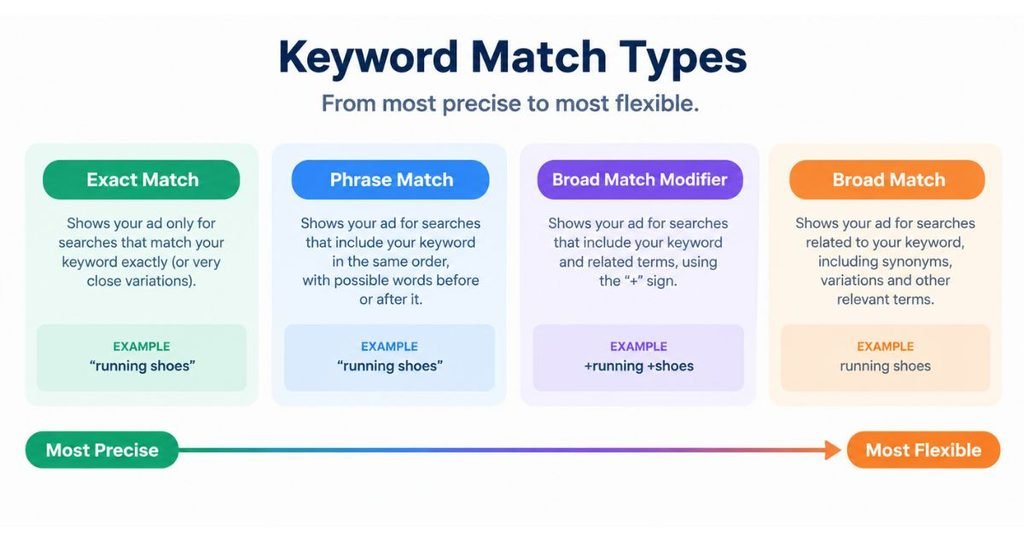
How the plus sign syntax worked
Every term you wanted locked needed its own +. Writing +running shoes made “running” mandatory while “shoes” could be swapped for something related, like “sneakers” or “trainers”. Writing +running +shoes locked both words.
There were no quotation marks and no brackets. Word order didn’t matter, and that freedom was the whole appeal.
What close variants meant for BMM
Close variants are small changes to a keyword that Google treats as the same thing: misspellings, singular and plural forms, word stems like “run” and “running”, abbreviations and accents. BMM allowed all of them.
Because order was free, +running +shoes could match “shoes for running in monsoon” or “best trail running shoes in India”. Extra words could sit before, after or between your locked terms. In 2019, Google also began letting same-meaning close variants trigger both phrase match and BMM, which already blurred the line between them.
A worked example
Picture a Mumbai-based supplement brand (an illustration, not a real campaign) bidding on +whey +protein +isolate. That keyword could match “isolate whey protein for beginners” and “buy whey protein isolate online”. It would not match “whey concentrate”, because “isolate” is missing.
This is why people loved BMM. You got precision and reach in one keyword. The price was upkeep, because serious accounts ended up with hundreds of variations to build and maintain.
BMM was a Google Ads match type that forced every plus-marked term to appear in a search, or a close variant of it, in any order. It sat between phrase match and broad match, offering more reach than the first and more control than the second. Google retired it as a separate match type in July 2021.
Why Did Google Retire BMM?
Google retired BMM to simplify its match types. Phrase match and BMM overlapped so heavily that running both created clutter without adding much control, so Google merged their behavior into phrase match.
Here’s the timeline:
- 2019: Same-meaning close variants start applying to phrase match and BMM.
- February 2021: Google announces that it is folding the broad match modifier into phrase match and begins rolling out the new behavior.
- July 2021: You can no longer create new BMM keywords. Existing ones keep serving under the updated phrase match behavior in all languages.
- May 2025: Google launches AI Max for Search campaigns, which pushes keyword matching even further toward AI-driven systems.
Google’s own help documentation states that, as of July 2021, phrase and BMM keywords share the same updated phrase matching behavior, and that exact match, broad match and negative keyword match types were untouched by the change.
The new phrase match still respects word order where order changes the meaning. Google’s own example makes this clear: a phrase keyword like “moving services NYC to Boston” can now match “NYC corporate moving services to Boston”, which only BMM used to catch. It won’t show for someone moving the opposite way, from Boston to New York.
So what actually changed for advertisers? Phrase match got wider, while BMM lost its separate identity. Accounts that leaned heavily on BMM reported some shifts in traffic, because a few matches that BMM used to allow were filtered out by the meaning-based logic.
There’s a bigger story behind the merger. Google wants advertisers to give it good conversion data and let Smart Bidding decide which auctions are worth entering. Rigid syntax that forces you to hand-pick every variation fits poorly with that vision, which is also why Google keeps recommending broad match paired with automated bidding.
Google folded BMM into phrase match between February and July 2021 to simplify keyword types. Since July 2021, old BMM keywords and phrase keywords share one meaning-based matching behavior that respects word order where it changes intent. Exact match, broad match and negative keywords were not affected.
That’s the history. Now for what you work with today.
How Do Google Ads Match Types Work Today?
Google Ads now has three positive keyword match types: exact match, phrase match and broad match. Each one tells Google how closely a search must relate to your keyword before your ad becomes eligible.
| Match type | Symbol | How it matches | Best for | Main risk |
|---|---|---|---|---|
| Exact |
[running shoes]
Searches with the same meaning or intent as your keyword
High-intent terms and proven winners
Limited reach
Phrase
“running shoes”
Searches that include the meaning of your keyword, with word order respected where it matters
Core terms where you want controlled expansion
Some irrelevant variants slip in
Broad
running shoes
Searches related to your keyword, using extra signals such as landing page and other keywords
Discovery with Smart Bidding and strong conversion data
Wasted spend without good negatives
Exact match
Exact match shows your ad for searches that share the meaning or intent of your keyword, not only the identical wording. A keyword like [running shoes] can match “shoes for running”, so it’s tighter than before but never literal.
Use it for your money terms, the queries you already know convert.
Phrase match
Phrase match is the direct successor to BMM. It covers searches that include the meaning of your keyword, and it keeps word order intact when reversing the order would change the intent.
For most advertisers, this is the workhorse. It gives you the controlled expansion BMM once provided without the plus-sign upkeep.
Broad match
Broad match is the widest option. It can show your ad for searches related to your keyword, even when those searches don’t contain any of its words. Google weighs signals such as the other keywords in your ad group, your landing page and the searcher’s recent activity.
Honestly, this is where most budget horror stories begin. Broad match works well with Smart Bidding and clean conversion tracking. Without them, it can drain a budget by lunchtime.
What about the plus sign?
The + operator no longer creates its own behavior. Existing BMM keywords keep serving under phrase match logic, and once you edit the text of one, Google converts it to phrase match. Stop adding plus signs to new keywords. They don’t do what older tutorials claim.
Google Ads has three positive match types today: exact, phrase and broad. Phrase match took over the role of BMM, matching searches that include the meaning of a keyword while respecting word order when it affects intent. Broad match gives the most reach and needs Smart Bidding and strong negative keywords to stay efficient.
What Happened to Your Old BMM Keywords?
Old BMM keywords didn’t disappear. They kept running, but under the updated phrase match behavior, and you can still change their bids. Edit the keyword text itself and Google converts it to phrase match automatically.
If your account still shows legacy BMM keywords, convert them on purpose rather than waiting for an accidental edit to do it. Here’s the process Google’s help documentation describes:
- Open your Google Ads account and go to Keywords in the left menu.
- Sort or filter the Match type column to find legacy BMM keywords.
- Select the keywords you want to convert and click Edit.
- Choose Change match types, then select Change broad match modifier keywords.
- Pick phrase match, exact match or broad match, and apply the change.
- Check your search terms report two weeks later to confirm traffic quality hasn’t slipped.
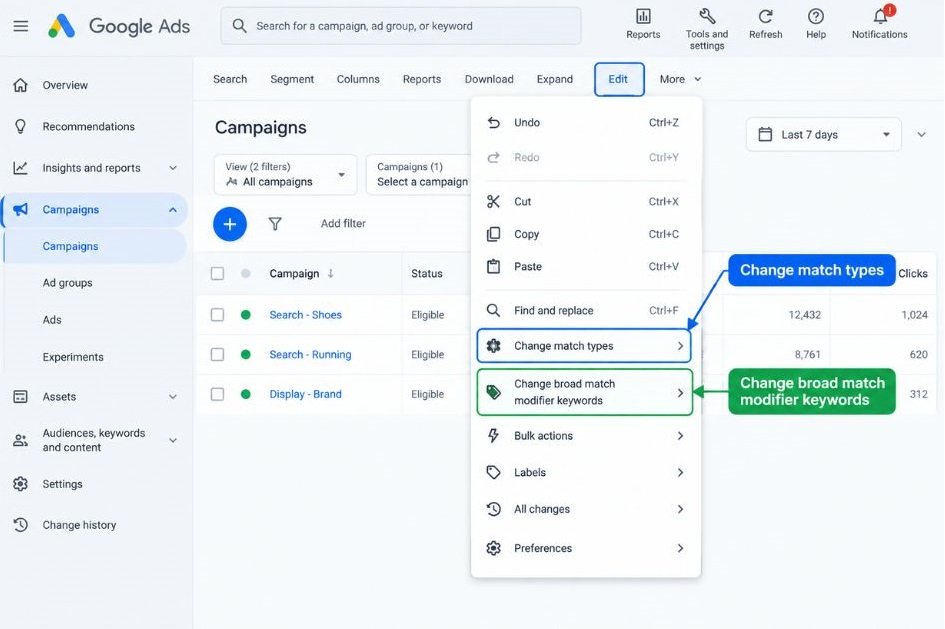
For large accounts, do the same thing in Google Ads Editor, which lets you change thousands of keywords in one pass. We cover that tool below.
One warning. Converting every legacy keyword to phrase match is the safe default, but it isn’t always the smartest move. A BMM keyword with a long conversion history and a clear intent is often better as exact match. Look at performance before you bulk convert.
Which Tools Give You Control Over Match Types Now?
Since the plus sign is gone, control comes from the tools around your keywords. These nine are the ones that matter, and each one covers a different part of the job: finding terms, blocking junk, automating bids, testing changes and keeping a record.
Search terms report
The search terms report shows the actual queries that triggered your ads. You’ll find it under Insights and reports in your campaign menu. Each row shows the search term, the match type that served it, clicks, cost and conversions.
This is your most important tool, and most marketers check it too rarely. Review it weekly. Add queries that convert as exact match keywords, and exclude the ones that drain money.
Newer accounts also get a search term match type segment, which shows whether a query was matched by a keyword or by AI-driven logic. That label matters once AI Max enters the picture.
Negative keywords and negative keyword lists
Negative keywords tell Google which searches should never trigger your ad. They come in three types: negative broad (blocks the search if all your terms appear, in any order), negative phrase (blocks the exact sequence) and negative exact (blocks only that precise search).
Here’s the catch. Negatives don’t expand to close variants, so you need to add plurals, misspellings and alternate spellings yourself. Shared negative keyword lists let you apply one set of exclusions across many campaigns, and Google has also added account-level negatives in settings. Build lists for job seekers, free-seekers and competitor names early.
Keyword Planner
Keyword Planner is Google’s free research tool, found under Tools and then Planning. It suggests new keywords from a seed term or a website, shows search volume ranges and gives bid estimates.
Its forecast feature lets you test a keyword set, with your chosen match types, and see predicted clicks, cost and conversions. Use it to build your starting phrase and exact lists, then let real data take over.
Google Ads Editor
Google Ads Editor is a free desktop application for managing accounts in bulk. You download your campaigns, make changes offline and then post them back to the account.
For match types, it’s the fastest way to convert large sets of keywords, find and replace text across campaigns, and copy keywords between ad groups. If you manage a big account, you’ll use it constantly.
Smart Bidding
Smart Bidding is Google’s group of automated bidding strategies: Maximize conversions, Maximize conversion value, Target CPA and Target ROAS. They set bids at auction time using signals like device, location, time of day, audience and the query itself.
Smart Bidding is what makes broad match workable. It judges each search on its likelihood to convert, so it can bid low on a vague query and high on a strong one. It needs accurate conversion tracking, and results suffer when the data is thin. Set up your Google tag and conversion actions before you switch anything on.
Experiments
The Experiments feature lets you split a campaign’s traffic between your original setup and a test version. You might run phrase match against broad match for the same keywords, for example.
Because both versions run at the same time under the same conditions, you get a fair comparison instead of a guess. Give tests several weeks and compare cost per conversion, not just clicks.
Recommendations and Optimization score
The Recommendations tab suggests changes, and the Optimization score estimates how much room for improvement an account has. Many of those suggestions push toward broad match and automated bidding.
Treat them as ideas, not orders. Some are useful, and some mainly increase your spend. Check the auto-apply settings too, because a switch left on can add keywords or change match types without you noticing.
Change history
Change history logs every edit in your account, including who made it and when. It looks dull until performance drops on a Tuesday and you need to know why.
After converting match types in bulk, use it to line up dates with traffic shifts. It’s the cheapest troubleshooting tool you have.
AI Max for Search campaigns
AI Max for Search is a one-click feature suite Google launched in May 2025 for Search campaigns. It adds keywordless matching, which uses your landing pages and ad content to find queries you never added as keywords, and it expands your keywords with broad match logic. It also includes text customization and final URL expansion.
According to Google’s 2025 internal data, advertisers who turn on AI Max in Search campaigns that get most of their conversions from exact or phrase match keywords see 14% more conversions or conversion value at a similar CPA or ROAS. Treat that as Google’s claim and verify it in your own account. Practitioners also point out that AI Max effectively widens every keyword, so exact match won’t behave as strictly as it used to.
Test it on one or two campaigns first, and watch the match source label in your search terms report to see which queries come from keywords and which come from keywordless matching.
Control in Google Ads now comes from tools rather than the plus sign. The search terms report shows what you’re actually matching, negative keywords block waste, Smart Bidding judges each auction, and Experiments let you test match type changes fairly. AI Max adds keywordless matching on top, so monitoring match sources becomes part of the job.
How Should You Structure Keywords in 2026?
Use exact match for proven terms, phrase match for controlled growth, and broad match only with Smart Bidding and strong conversion data. That mix replaces the old habit of stacking every plus-sign variation in an ad group.
The right setup depends on your account’s maturity and your budget.
If you’re launching a new account
Start with phrase and exact match on your core terms. You don’t have conversion history yet, so you can’t trust automation to spend wisely. Keep ad groups tight, write ads that mirror the keyword theme, and check the search terms report every few days in the first month.
Add broad match later, once you’ve collected enough conversions for Smart Bidding to learn from.
If you’re running a mature account
If you have steady conversion volume, test broad match inside an experiment rather than switching the whole campaign. Keep your exact match keywords for your top performers so they stay protected, and run broad match in a separate campaign or experiment arm so you can read the results cleanly.
A retailer like Nykaa, with thousands of product searches, is the kind of advertiser for whom this makes sense: huge query variety, plenty of conversion data and a real cost to missing long-tail demand. That’s an illustration, not a report on their account.
If you’re on a small budget
Small budgets can’t absorb bad matches. Stick to exact and phrase, build a long negative keyword list on day one, and review search terms often. Broad match on a daily budget of a few hundred rupees is a gamble most small advertisers lose.
This may not hold for every business, but in most small accounts the discipline of tight matching beats the promise of extra reach.
What Do Most Advertisers Get Wrong About Match Types?
The most common mistake is treating old advice as current. Plenty of blog posts from before 2021 still rank well, and they teach plus-sign tactics that no longer work.
Watch for these errors:
- Adding plus signs to new keywords. They don’t create a separate behavior, so you’re typing characters for nothing.
- Switching to broad match without Smart Bidding. Broad match without automated bidding and good conversion data is the fastest route to wasted spend.
- Skipping the search terms report. If you don’t read the queries, you can’t fix them.
- Forgetting negatives don’t cover close variants. Add the plural, the misspelling and the alternate phrasing yourself.
- Accepting every auto-applied recommendation. Some recommendations serve Google’s revenue goals more than yours.
That sounds obvious. It almost never happens in practice, because match type reviews are boring and results arrive slowly.
Conclusion
The plus sign is gone, but the problem it solved hasn’t gone anywhere: you still need to decide how much freedom Google gets with your keywords. Today that decision runs through phrase match for controlled reach, exact match for proven terms, and broad match only when Smart Bidding and clean conversion data are in place.
The habit that separates good accounts from average ones is simple. Read the search terms report every week, keep your negative keyword lists current, and test any change in an experiment before you commit.
FAQs
What was BMM in Google Ads?
BMM was a keyword match type that required each term marked with a plus sign to appear in a search, or a close variant of it, in any order. It sat between phrase match and broad match, offering more reach than phrase and more control than broad. Google retired it as a separate match type in July 2021.
Is BMM still available in Google Ads?
No, you can’t create new BMM keywords. Existing ones continue to serve, but they follow the updated phrase match behavior. If you edit the text of a legacy BMM keyword, Google converts it to phrase match.
What’s the difference between BMM and phrase match?
Before 2021, BMM ignored word order and locked only the terms you marked, while phrase match required an ordered sequence. Today, phrase match covers both behaviors by matching searches that include the meaning of your keyword. It still respects word order where reversing it would change the intent.
How do I convert old BMM keywords to phrase match?
Select the legacy keywords in the Keywords view, click Edit, choose Change match types, and then select Change broad match modifier keywords. Pick phrase match, exact match or broad match and apply it. For large accounts, Google Ads Editor does the same job in bulk.
Does the plus sign still do anything in Google Ads?
Not as a separate behavior. Existing BMM keywords keep running under phrase match logic, but new keywords with plus signs won’t create anything special. Skip the symbol and use phrase match with quotation marks instead.
Which match type should I start with on a small budget?
Start with exact and phrase match. They give you tighter control, and a small budget can’t absorb the wasted clicks that broad match can bring in. Add a solid negative keyword list on day one and review your search terms report often.
Is broad match safe now, or will it waste my budget?
Broad match can work well, but only with Smart Bidding and accurate conversion tracking behind it. Without those, it often matches searches that are only loosely related. Test it in an experiment before you roll it out across a whole campaign.
Why am I seeing irrelevant queries on my phrase match keywords?
Phrase match now covers searches that include the meaning of your keyword, so it reaches further than the quotation marks suggest. Open the search terms report, find the poor queries and add them as negative keywords. If a pattern keeps repeating, move that keyword to exact match.
Do negative keywords work with close variants?
No. Negative keywords don’t expand to plurals, misspellings or synonyms, so you have to add each version you want to block. That’s why a shared negative keyword list needs regular updates from your search terms report.
Do I need AI Max for Search campaigns?
You don’t need it, and it isn’t the right fit for every account. Google reports a 14% lift in conversions or conversion value at a similar CPA or ROAS for some Search campaigns, based on 2025 internal data, but your results may differ. Test it on one or two campaigns, and watch the match source in your search terms report before you expand.


