

Your competitors are publishing pages, earning links and picking up keywords you haven’t noticed yet. Every month you ignore that, the gap gets harder to close. Guessing what they’re doing won’t fix it. The right set of SEO competitor analysis tools, pointed at the right rivals, will.
The market has also shifted. Rankings still matter, but brands now want to know whether a rival gets cited in ChatGPT, Perplexity and Google’s AI answers. Several of the tools below have added that layer in the last year.
This list covers 15 tools, what each one reveals about a competitor’s strategy, where each falls short, and who should pay for it. Pricing is noted where it’s public and stable, and flagged as approximate where it isn’t.
What Is SEO Competitor Analysis and What Should You Look For?
SEO competitor analysis is the process of studying the keywords, backlinks, content and technical setup of the sites that outrank you, so you can find what’s working for them and what they’ve left open.
Your search competitors are often not your business competitors. Take Nykaa. Its commercial rival may be Purplle, but for a query like “best vitamin C serum”, the pages ahead of it are frequently review blogs and publishers. Those are the sites you need to study for that keyword.
Here’s what a proper analysis covers:
- Organic keywords: which terms they rank for, and which ones drive most of their traffic
- Backlinks: who links to them, and how those links were earned
- Content: which pages perform best, how long they are, and how they’re structured
- Traffic sources: how much comes from search, social, referrals and direct
- Technical setup: site speed, internal linking, schema and crawl structure
- AI search presence: whether they’re being cited or recommended in AI-generated answers
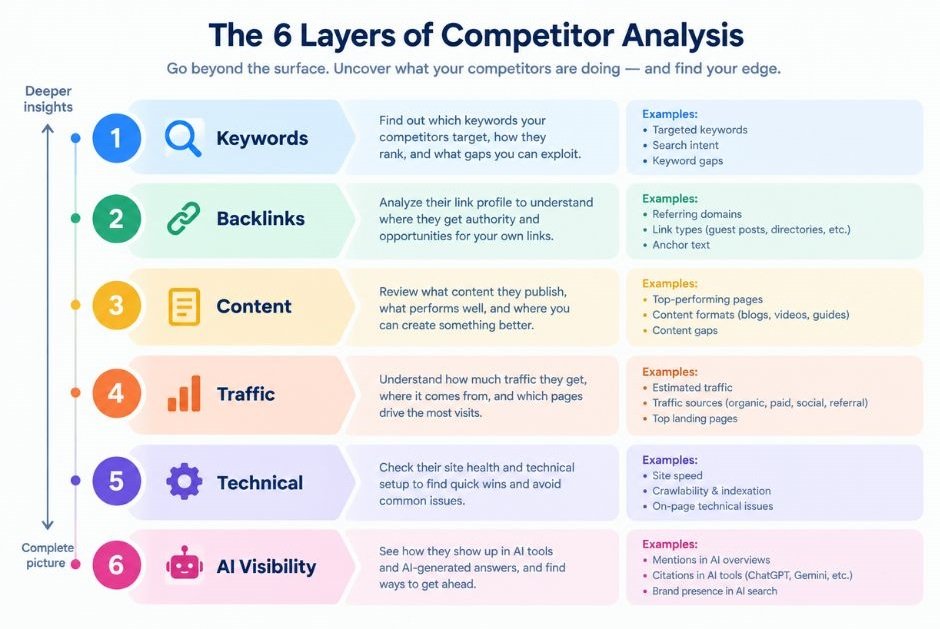
Competitor analysis in SEO means studying the sites that rank above you for your target keywords, which aren’t always your business rivals. The goal is to find keyword gaps, link opportunities and content weaknesses you can act on. Most tools cover some of these layers well and others poorly, which is why many teams run two or three together.
Which Tools Reveal Your Competitors’ SEO Strategies?
The 15 tools below break into all-in-one suites, traffic and market intelligence platforms, backlink specialists, content-focused tools and technical crawlers. Pick by the question you need answered, not by brand name.
1. Semrush
Semrush is the most complete all-in-one platform for studying rivals, and it’s the one most agencies open first. Its Organic Research report shows any domain’s ranking keywords and top pages. Keyword Gap and Backlink Gap show where competitors win and you don’t. Traffic Analytics and Market Explorer estimate how much visitor volume a rival gets and where it comes from.
Semrush has also added an AI Visibility Toolkit that tracks brand mentions in AI search, including ChatGPT, Google AI Overviews and Perplexity. As of mid-2026, the classic plans run $139.95 (Pro), $249.95 (Guru) and $499.95 (Business) per month, with the AI toolkit sold at about $99 per month per domain or bundled in Semrush One plans starting near $199.
The catch is cost and limits. Pro caps your projects and tracked keywords, so agencies usually end up on Guru.
2. Ahrefs
Ahrefs is the tool to open when backlinks are the question. Site Explorer shows a rival’s organic keywords, top pages and full link profile. Content Gap lists keywords competitors rank for that you don’t. Link Intersect finds sites that link to two or three of your competitors but not to you, which makes for a short, high-quality outreach list.
Ahrefs now sells Brand Radar as a separate add-on for tracking brand visibility in AI answers. As of mid-2026, plans run Lite at $129, Standard at $249 and Advanced at $449 per month, with Brand Radar from about $199 per month on top.
It’s premium-priced, and heavy use can burn through credits on lower plans. If you only need rankings and not links, you may be overpaying.
3. Moz Pro
Moz Pro is a friendly option for teams who want clear numbers without a steep learning curve. It’s best known for Domain Authority (DA), a score Moz created to predict how likely a site is to rank. DA isn’t a Google metric, so treat it as a comparison shortcut, not a verdict.
For competitor work, Link Intersect shows who links to rivals but not to you, and Keyword Explorer helps you size up the terms they target. The MozBar browser extension is handy for checking a competitor’s page metrics while you browse the SERP.
Moz is generally mid-priced. Its weakness is competitor depth. Reviewers often rate its keyword and traffic gap analysis below Semrush and SE Ranking.
4. SE Ranking
SE Ranking is the best value pick for agencies and growing teams. Its Competitive Research module shows rivals’ organic and paid keywords, top pages and backlinks. Rank tracking updates daily and lets you add competitors directly to a project, so you can watch your position against theirs on the same keyword list.
White-label reporting is built in, which matters if you send monthly reports to clients. The platform has also added AI visibility tracking for brand mentions in AI-generated results.
It sits in the mid-price range. The backlink database isn’t as deep as Ahrefs, so link-heavy campaigns may need a second tool.
5. Similarweb
Similarweb answers a different question from keyword tools: how big is this competitor, and where do their visitors come from? It estimates traffic by channel (search, social, direct, referral, email and paid), shows which sites send them referrals, and maps audience overlap between brands.
This is useful when you’re sizing a market. Compare Zepto and Blinkit and you can see which channel mix each leans on, not just which keywords they rank for. The free version gives a limited snapshot, while full access is priced at enterprise level, usually via a sales call.
The limit is keyword detail. Similarweb’s numbers are modelled estimates, and for smaller sites they can be loose.
6. SpyFu
SpyFu’s edge is history. It stores years of data on the keywords a domain has ranked for and the Google Ads it has bought, so you can see what a rival tested, kept and dropped. That’s useful because a keyword a competitor has paid for over several years is almost certainly profitable.
Its Kombat feature compares keyword overlap across up to three domains. It’s priced at the low end of the market, which makes it a favourite with small businesses and freelancers.
The trade-off is a narrower toolset. SpyFu focuses on US data and lacks the depth of Semrush or Ahrefs on backlinks and site audits.
7. Serpstat
Serpstat bundles keyword research, rank tracking, site audit and competitor analysis into one platform at a lower price than the big suites. Its Missing Keywords report shows terms your competitors rank for that you don’t. Batch analysis lets you check many domains at once, which saves time when you’re comparing a dozen rivals.
It suits small teams and agencies in markets where the big tools feel expensive. Some users find the interface cluttered at first, and its link database is smaller than Ahrefs or Majestic.
8. Mangools
Mangools is a set of five simple tools: KWFinder, SERPChecker, SERPWatcher, LinkMiner and SiteProfiler. It’s built for people who find the larger suites overwhelming. SERPChecker shows exactly who ranks for a keyword and how strong each result is. LinkMiner reveals a competitor page’s backlinks. SiteProfiler gives a quick view of a rival domain’s authority and traffic.
Pricing starts around $29 to $30 per month, so it’s one of the cheapest ways to get usable competitor data. It’s also easy to learn.
The limit is scale. Data caps and shallower reports mean growing teams usually outgrow it.
9. Ubersuggest
Ubersuggest, created by Neil Patel, is aimed at beginners and small businesses. Enter a competitor’s domain and it shows estimated organic traffic, top pages by traffic and ranking keywords. Its content ideas feature surfaces topics that are doing well for rivals, which makes it a quick brainstorming aid.
It has a limited free tier and has historically offered one-time lifetime pricing alongside monthly plans, so check what’s currently on offer.
Accuracy and depth trail the premium tools, especially for backlinks. Use it for direction, not for final decisions.
10. BuzzSumo
BuzzSumo studies competitors from the content side. It shows which of a rival’s articles earned the most social shares and links, and it can filter by topic, format and date. If a competitor’s “ultimate checklist” keeps attracting links, you’ll see it here.
Content alerts notify you when a competitor publishes something new, and its influencer search finds people who already share content in your niche. That makes it useful for PR and link-building outreach.
It’s not a ranking tool. BuzzSumo won’t tell you what keywords a page ranks for, so pair it with Semrush, Ahrefs or SE Ranking.
11. Screaming Frog SEO Spider
Screaming Frog is a desktop crawler that does what no cloud suite does as well: it crawls a competitor’s site the way Google would. You can pull page titles, headings, word counts, canonical tags, schema and internal links for every URL. Custom extraction lets you scrape specific elements, such as author names or publish dates.
That reveals how a rival structures its site, how often it publishes and which pages get the most internal links. The free version crawls up to 500 URLs, and the paid licence is billed annually at a modest price.
It’s technical. There’s a learning curve, and it gives no traffic or ranking data on its own.
12. Majestic
Majestic is a specialist for links. Its Trust Flow and Citation Flow metrics score a site’s link quality and quantity, and Topical Trust Flow shows which subject areas a domain is trusted in. Clique Hunter compares backlinks across multiple competitors and lists the sites linking to several of them.
If a rival has suddenly climbed, Majestic’s historical view shows when and how their link profile changed. That helps you tell a genuine campaign from a one-off.
It offers little beyond links. There’s no keyword research of note, so most people use it alongside another suite.
13. Surfer SEO
Surfer SEO studies competitors at the page level. Enter a keyword and its SERP Analyzer compares the top-ranking pages on word count, headings, keyword usage, structure and related terms. The Content Editor then scores your draft against those pages.
This is competitor analysis you can act on directly while writing. Instead of wondering why a competitor outranks you, you see what their page covers that yours doesn’t.
It doesn’t replace a backlink or traffic tool, and chasing its content score blindly can produce bloated, repetitive writing. Treat the score as a guide.
14. Sistrix
Sistrix is popular across Europe and built around its Visibility Index, a single score that tracks a domain’s overall search presence over time. That makes it excellent for spotting winners and losers after Google updates. Domain comparison lets you plot your visibility against several rivals on one graph.
It’s strong for market-level monitoring and for reporting to executives who want one clear trend line. It’s less suited to granular keyword work, and coverage is stronger in some countries than others, so check that your target market is well supported.
15. SEO PowerSuite (Rank Tracker and SEO SpyGlass)
SEO PowerSuite is desktop software, not a cloud platform. Rank Tracker monitors your rankings and your competitors’ on the same keyword set. SEO SpyGlass pulls rival backlink profiles and flags link sources worth pursuing. Because it runs locally, it appeals to people who want to avoid monthly per-seat fees.
There’s a free version with limits, and paid licences are priced yearly. Reporting is solid, and the Link Intersect-style analysis in SpyGlass is useful for outreach.
The software relies on third-party data providers and APIs for some metrics, so costs can creep up on large projects. It also feels less polished than the cloud tools.
No single tool covers every part of competitor research. Semrush and Ahrefs lead on all-round depth, Similarweb on traffic by channel, Majestic on links, Surfer on page-level content and Screaming Frog on technical structure. Most teams get the best result from one main suite plus one specialist.
Quick Comparison: Which Tool Fits Which Job?
If you’re short on time, match the tool to the question you’re trying to answer. The table below shows the standout competitor feature and a relative price tier for each.
| Tool | Best for | Standout competitor feature | Relative price |
|---|---|---|---|
| Semrush | All-round research | Keyword Gap and Backlink Gap | Premium |
| Ahrefs | Backlink research | Link Intersect, Content Gap | Premium |
| Moz Pro | Beginners, authority scoring | Domain Authority, Link Intersect | Mid |
| SE Ranking | Agencies, value | Competitive Research plus daily tracking | Mid |
| Similarweb | Market and traffic sizing | Traffic by channel, audience overlap | Premium (custom) |
| SpyFu | PPC and keyword history | Kombat keyword overlap | Entry |
| Serpstat | Budget all-in-one | Missing Keywords, batch analysis | Entry to mid |
| Mangools | Simplicity | SERPChecker, SiteProfiler | Entry |
| Ubersuggest | Small businesses | Top pages, content ideas | Entry |
| BuzzSumo | Content and PR | Top content by shares and links | Mid to premium |
| Screaming Frog | Technical audits of rivals | Custom extraction crawls | Free to entry |
| Majestic | Link quality | Clique Hunter, Topical Trust Flow | Entry to mid |
| Surfer SEO | On-page content | SERP Analyzer | Mid |
| Sistrix | Visibility trends | Visibility Index | Mid to premium |
| SEO PowerSuite | Desktop-based tracking and links | SEO SpyGlass | Free to mid |
Price tiers are relative and change often. Confirm current plans on each vendor’s site before buying.
How Do You Choose the Right Tool for Your Budget?
Choose by the one question you need answered most often, then add a specialist only when that tool leaves a gap. A freelancer on a tight budget can get far with Mangools or Ubersuggest. A growing brand usually does best with SE Ranking, Semrush or Ahrefs as the main platform.
You don’t need all 15 SEO competitor analysis tools. Most teams get 90% of the value from a single suite plus one or two extras, such as Screaming Frog for crawls or Majestic for links.
Ask yourself three things before paying:
- What decision will this data change? If you can’t name one, don’t buy yet.
- Does the tool cover your market? Country coverage and database size vary a lot.
- How many seats and projects do you need? Agencies hit plan limits fast.
Free trials help here. Run the same three competitor domains through two tools and compare what you actually learn. The data won’t match exactly, because every vendor estimates traffic differently, and that’s normal. Look for consistent patterns, not identical numbers.
How Do You Run a Competitor Analysis in Five Steps?
Start by identifying who really outranks you, then work through keywords, links and content in turn, and finish by turning the findings into a short action list.
- Identify your search competitors. Enter your domain in Semrush, Ahrefs or SE Ranking and open the organic competitors report. Pick three to five domains with real keyword overlap, not just brands you know.
- Run a keyword gap analysis. List the terms two or three rivals rank for that you don’t. Sort by volume and difficulty, and flag terms where a weaker site outranks you.
- Study their best pages. Find each competitor’s top pages by traffic. Check format, depth, headings and how often they’re updated. Surfer SEO or a Screaming Frog crawl helps here.
- Audit their backlinks. Find the sites that link to several competitors and not you. Majestic’s Clique Hunter or Ahrefs’ Link Intersect gives you a ready outreach list.
- Turn findings into actions. Pick five or six moves, such as pages to create, pages to rewrite and links to pursue. Then recheck in 60 to 90 days.
Honestly, step five is where most people stall. They collect spreadsheets and never ship anything. Limit yourself to a short list you can finish this quarter.
What Mistakes Ruin Competitor Research?
Most mistakes come from copying without understanding. Copying a rival’s page tells you what they did, not why it worked.
- Treating traffic estimates as exact. They’re modelled figures, so use them to compare, not to forecast.
- Picking the wrong competitors. A big brand with a huge budget isn’t a useful benchmark for a new site.
- Chasing every gap. Target the keywords you can realistically win and that match your product.
- Ignoring AI search. If a rival keeps getting cited in AI answers, check which pages and sources those answers use.
- Never repeating the analysis. Competitors change monthly, so a one-off audit goes stale fast.
Conclusion
Competitor research pays off when it leads to a decision. The best result comes from pairing one main platform with a specialist for links, content or technical crawls, rather than stacking subscriptions you won’t use.
Three points matter most. Match the tool to your question. Compare patterns, not exact numbers. And build a short action list from every audit. Start this week: pick three real search competitors, run a keyword gap report, and write down the five pages you’ll create or improve first.
FAQs
What is competitor analysis in SEO?
It’s the study of the websites that rank above you for your target keywords. You look at their keywords, backlinks, content and technical setup to find gaps you can fill and tactics worth testing. The aim is to make better decisions, not to copy a rival.
Which tool is best for finding competitors’ keywords?
Semrush and Ahrefs are the strongest for this, both offering keyword gap reports that show terms rivals rank for and you don’t. SE Ranking is a good mid-priced alternative. On a tight budget, Mangools or Ubersuggest give a usable starting view.
Is Semrush better than Ahrefs?
Neither wins on every front. Semrush is broader, with stronger PPC, content and traffic tools. Ahrefs is generally preferred for backlink research and has a very large link index. Test both on your own domain before committing.
Are there free tools for competitor analysis?
Yes, though with limits. Screaming Frog crawls up to 500 URLs free, SEO PowerSuite has a limited free version, and Similarweb offers a basic free snapshot. Most paid suites also offer trials or limited free accounts.
How do I see which backlinks my competitors have?
Enter a competitor’s domain into a link tool such as Ahrefs, Majestic or SEO SpyGlass, then open the backlinks report. Filter for referring domains and compare against your own profile. Link Intersect and Clique Hunter highlight sites that link to several rivals.
How often should I analyse my competitors?
Run a light check monthly and a full review each quarter. Fast-moving niches, such as ecommerce or finance, may need more frequent checks. Set alerts in BuzzSumo or your rank tracker so big changes don’t slip past you.
Can I trust the traffic numbers these tools show?
Treat them as estimates. Third-party tools model traffic from clickstream data and keyword rankings, so figures differ between vendors. They’re reliable for comparing sites against each other, but only your own analytics gives exact numbers.
Do small businesses really need paid tools?
Not always. If you compete in a small local niche, free options and one low-cost tool can be enough. Paid suites pay off once you manage several sites, target competitive keywords or report to clients.
Why is my competitor outranking me with fewer backlinks?
Links aren’t the only factor. Their page may match search intent better, load faster, have stronger internal links or be more up to date. Use Surfer SEO or a Screaming Frog crawl to compare the pages directly, then check intent against the live results.
How do I track competitors in AI search?
Use the AI visibility features now offered by Semrush (AI Visibility Toolkit), Ahrefs (Brand Radar) and SE Ranking. They track whether brands appear in ChatGPT, Perplexity and Google’s AI answers. Coverage and pricing vary, and most are paid add-ons.


