

LinkedIn’s built-in search stops being useful the moment you want to do real sourcing. Free accounts run into a commercial use limit that throttles heavy searching, filters are shallow, and the good stuff sits behind Recruiter or Sales Navigator licences that cost serious money. So a lot of recruiters, B2B sales teams, and founders do something sneaky. They search LinkedIn from Google instead.
That trick is called LinkedIn XRay Search. You write a Boolean string that tells Google to look only inside LinkedIn’s public profile URLs, and Google returns matching profiles without you logging in to anything.
It still works in 2026, but the rules have shifted. Google retired the cache: operator in 2024 and, in September 2025, stopped honouring the &num=100 parameter that once showed 100 results on one page. Plenty of guides online haven’t caught up.
This article covers how the method works, which operators survive, how to build a string step by step, copy-ready examples, every major tool worth using, and the legal lines you shouldn’t cross. Whether you’re hiring a growth marketer in Bengaluru or building a prospect list for a SaaS launch, you’ll leave with strings you can run today.
What Is XRay Search and Why Do People Still Use It?
Xray search is a technique that uses a search engine’s operators to look inside one specific website without using that website’s own search box. Google has already crawled and indexed the public pages, so you’re querying Google’s index instead of the site’s database.
Why bother? Money and reach. LinkedIn reports more than 1.2 billion members worldwide (LinkedIn Newsroom, 2025), but its native search rations access. Free accounts hit a commercial use limit, the filters are shallow, and the number of results you can browse is capped. Paid plans like Sales Navigator and Recruiter fix most of that, at a price many freelancers, startups, and small agencies won’t pay.
Picture a talent lead at Nykaa who needs a category manager with beauty retail experience in Mumbai. Inside LinkedIn, that’s a stack of filters and possibly a paywall. On Google, it’s one line of text that returns public profiles in seconds.
There’s a catch, and you should know it now. You only see profiles that are public and that Google has indexed. Someone who changed their headline last week might still appear under the old one. Anyone with tight privacy settings won’t show up at all.
Xray search uses a search engine’s operators to search inside one website, such as LinkedIn, without using that site’s own search. It returns only public, indexed pages, so results lag behind live profile edits and exclude private profiles. Its main advantages are zero licence cost and flexible Boolean logic that works across the whole index.
How Does XRay Search Work on LinkedIn Profiles?
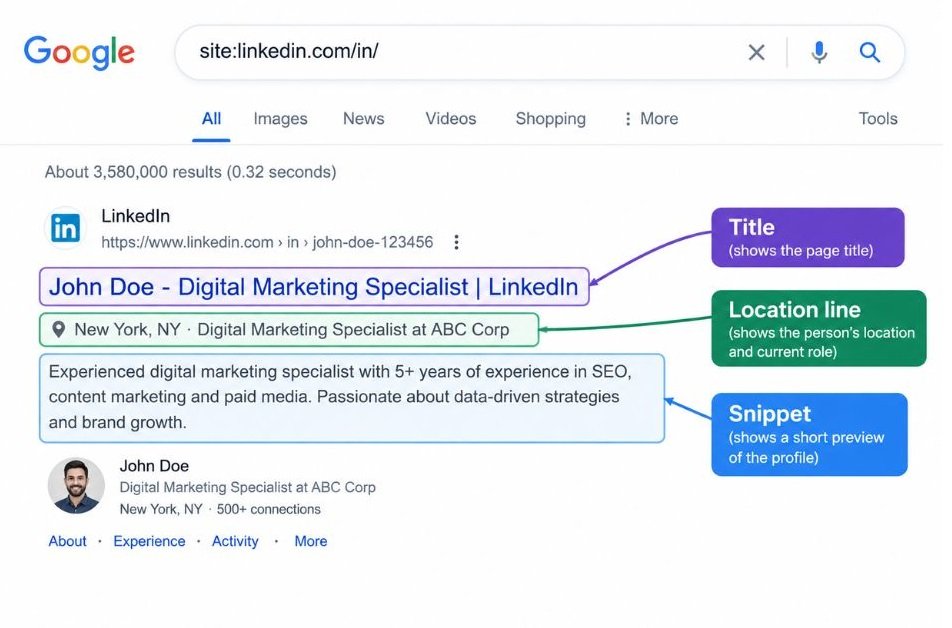
Google indexes public LinkedIn profile pages under URLs that begin with linkedin.com/in/, and the operator site:linkedin.com/in/ restricts your results to exactly those pages. Everything else you add narrows the pool further.
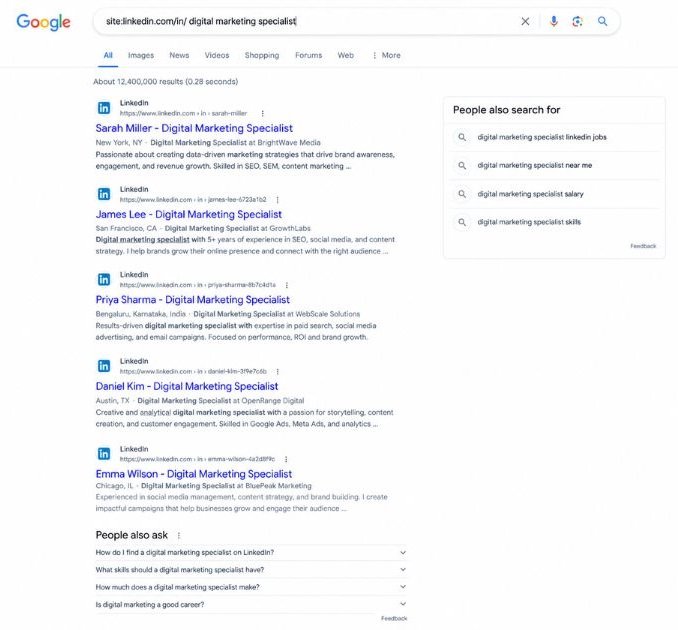
Look at what a result gives you. The title usually follows the pattern Name - Headline - Company | LinkedIn, and the snippet underneath often shows a location, a current role, and a fragment of the About section. Google matches your keywords against the visible text and the page’s body copy. That’s why a keyword buried in someone’s third job entry sometimes matches and sometimes doesn’t.
Other LinkedIn URL patterns are searchable too:
- linkedin.com/company/ for company pages
- linkedin.com/jobs/view/ for individual job posts
- linkedin.com/posts/ for single posts
- linkedin.com/pulse/ for long-form articles
Older results occasionally appear under country subdomains such as in.linkedin.com, and you’ll sometimes see directory pages under /pub/dir/. Those directory pages are useless for sourcing, so we strip them out later.
Which Google Operators Matter, and Which Ones Are Dead?
Five operators do most of the work: site:, quotation marks, OR, the minus sign, and parentheses. Learn those and you can run most of the strings in this article.
| Operator | What it does | Example | Status |
|---|---|---|---|
| site: | Limits results to a domain or URL path | site:linkedin.com/in/ | Reliable |
| “quotes” | Matches an exact phrase | “product marketing manager” | Reliable |
| OR | Matches either term; must be capitalised | (“SEO” OR “organic growth”) | Reliable |
| – (minus) | Excludes a word or phrase | -recruiter | Reliable |
| ( ) | Groups terms so OR logic stays contained | (“Meta Ads” OR “Google Ads”) | Reliable |
| intitle: | Requires a word in the page title | intitle:”data analyst” | Reliable for most queries |
| inurl: | Requires a word in the URL | inurl:/in/ | Sometimes inconsistent |
| AROUND(n) | Finds two terms within n words | “SEO” AROUND(4) “lead” | Unofficial, hit or miss |
| * | Wildcard for unknown words | “head of * marketing” | Works loosely |
| cache: | Showed Google’s saved copy | cache:example.com | Removed in 2024 |
| related:, link:, info: | Similar sites, backlinks, site summary | none | Removed |
AND is implied between terms, so typing it adds nothing. Capital OR is the one that trips people up: lowercase or is treated as an ordinary search word.
A few operators have disappeared, and guides that still teach them will waste your afternoon. Google retired cache: in 2024 and related: in 2023, while link: and info: went years earlier. Skip all four.
The bigger change for sourcers arrived in September 2025. Google stopped honouring the &num=100 URL parameter and told Search Engine Land the parameter wasn’t something it formally supported. You now get 10 results per page and have to page through. For Xray work that means tighter strings. A string that returns 4,000 matches is useless when you can realistically scan 50.
One fix helps. Add &udm=14 to a results URL, or pick the Web filter under More, and Google strips out AI Overviews and extra panels so only plain links remain. Bookmark a search URL with it already attached.
Five Google operators handle most Xray work: site:, quotation marks, OR, the minus sign, and parentheses. Google removed cache: in 2024 and the &num=100 parameter in September 2025, so older tutorials that rely on them are out of date. Adding &udm=14 to a results URL gives a plain list of web links without AI Overviews.
How Do You Build an XRay String Step by Step?
You build a string by starting with the site restriction and adding one clause at a time, testing after each addition. That order matters. Stack ten clauses before your first test and you’ll never know which one killed your results.
- Define the person. Write down the job title and its common variants, two or three must-have skills, the location, and anything you want to exclude. Example: performance marketer, Meta Ads, Bengaluru, no agencies.
- Start with the base:
site:linkedin.com/in/. Run it alone to confirm Google returns profile pages. - Add titles inside quotes and group the variants with OR:
("performance marketing manager" OR "growth marketing manager"). - Add skills or tools the same way:
("Meta Ads" OR "Google Ads"). - Add the location, spelling variants included:
("Bengaluru" OR "Bangalore"). Indian cities love a second name, so check Gurugram and Gurgaon, Mumbai and Bombay too. - Exclude noise with the minus sign:
-recruiter -"talent acquisition". - Read the first 20 results, tighten or loosen the string, then save the version that works.
Joined together, the string looks like this:
site:linkedin.com/in/ ("performance marketing manager" OR "growth marketing manager") ("Meta Ads" OR "Google Ads") ("Bengaluru" OR "Bangalore") -recruiter -"talent acquisition"Too few results? Remove the skills clause first, because skills are the most fragile match. Too many? Add a second skill group or a seniority word like “senior” or “head”.
Which Ready-to-Use Search Strings Should You Copy First?
Start with one of five patterns: title plus city, company background, skills and tools, junk filters, or pages other than profiles. Swap the example terms for your own and test. Every string below assumes you begin with site:linkedin.com/in/ unless it says otherwise.
Find people by title and city
site:linkedin.com/in/ ("product marketing manager" OR "PMM") ("Pune" OR "Pune, Maharashtra") -intern -"looking for"Short acronyms like PMM pull in noise, so keep the full title in the OR group as an anchor.
Find people with a specific company background
site:linkedin.com/in/ ("category manager" OR "category lead") ("Zepto" OR "Blinkit" OR "Swiggy Instamart")This surfaces people who mention those brands in their headline or experience. They may be current or former employees, so read each profile before you assume anything.
Find people by skills and tools
site:linkedin.com/in/ "SEO" ("Screaming Frog" OR "Ahrefs" OR "Semrush") ("technical SEO" OR "SEO lead") "India"Tool names work well as filters because people list them in their About sections and skills.
Strip out the junk
-inurl:/pub/dir/ -intitle:"profiles" -"open to internships"Google sometimes returns LinkedIn’s aggregated directory pages, titled along the lines of “40+ marketing manager profiles”. Those aren’t people. Append this string to any search above to remove them.
Search companies, posts, jobs, and articles
site:linkedin.com/company/ "D2C" "beauty" "Mumbai"
site:linkedin.com/posts/ ("we're hiring" OR "hiring") "SEO manager"
site:linkedin.com/pulse/ "marketing attribution"
The first finds companies to pitch. The second finds hiring managers who announced a role. The third finds experts who write long-form pieces, which is handy when you need guest authors or speakers.
Look for contact details people chose to publish
site:linkedin.com/in/ "SEO consultant" ("@gmail.com" OR "@outlook.com")This only works when someone typed an email into their public text, which most people don’t. Use it sparingly and read the legal section below before you contact anyone.
Which Tools Make XRay Searching Faster?
The tools worth using fall into four groups: search engines, string builders, contact finders, and LinkedIn’s own paid products. You don’t need all of them. Here’s what each one does and where it falls short.
Google Search
Google is the main engine because its index is the largest and its operator support is the most predictable. If you don’t like typing syntax, open google.com/advanced_search and fill in the exact-phrase, any-of-these-words, and site fields. It builds the string for you.
Google Alerts adds a useful trick. Paste a finished string into an alert and Google emails you when it finds new matching pages. Operator support in alerts isn’t guaranteed, and new profiles take time to be indexed, so treat it as a slow trickle, not a live feed.
The main limits are 10 results per page and the occasional “unusual traffic” CAPTCHA if you search too fast. Slow down when it appears.
Bing
Bing keeps its own index, so the same string can surface people Google misses. It accepts site:, quotation marks, and Boolean operators typed in capitals, and it often tolerates longer strings before it starts ignoring terms. Run every important string on both engines and merge the lists.
DuckDuckGo and Brave Search
DuckDuckGo supports site: and quotes, but it draws much of its web results from Bing, so don’t expect many new profiles. Brave Search runs an independent index and also handles site: and quotes. Operator support on both is patchier than on Google, so test before you trust a result count. Both are useful as backups when Google starts throwing CAPTCHAs.
Google Programmable Search Engine
Programmable Search Engine is a free Google tool at programmablesearchengine.google.com. You create an engine, add linkedin.com/in/* as the only site to search, and get a clean search page limited to profiles. Teammates who don’t know Boolean can use it without touching operators.
Google has closed whole-web engines to new users, so you can only restrict the engine to specific sites. For LinkedIn that’s all you need. Results may differ slightly from the main Google page, and the free version can show ads.
Xray string builders
Builders like Recruitin’s Xray tool and the string generators on the BooleanStrings community site work as forms. You pick a site, type titles, skills, and a location, and the tool assembles the Boolean string and often opens the search for you. They save time and cut syntax mistakes.
The downside is that generated strings are generic. They won’t know that your market writes Bengaluru three different ways. Features and pricing change, so check each tool’s current version before you rely on it, and learn the syntax anyway.
AI assistants
AI assistants such as Claude, ChatGPT, and Gemini are good at the boring part: listing synonyms for a job title, translating titles across industries, and drafting several string variants at once. A prompt that works:
Write five Google Xray search strings for site:linkedin.com/in/ that find senior SEO managers in Pune with 5+ years of experience. Include title synonyms, tool names, and exclusions for agencies and recruiters. Use capital OR and parentheses.
Check every string before you run it. Assistants sometimes use lowercase or, invent operators, or revive dead ones like cache:. Also think before pasting real candidate details into any public AI tool.
Contact-finding browser extensions
Hunter, Lusha, ContactOut, and Apollo.io all try to surface email addresses or phone numbers. Hunter focuses on work emails by company domain. Lusha and ContactOut run as extensions that show contact details while you view a profile. Apollo.io pairs a contact database with outreach sequences.
Two cautions. First, accuracy varies, so verify addresses before you send. Second, LinkedIn’s User Agreement bans scraping and software that automates activity on the platform, and some extensions read profile data automatically. LinkedIn can restrict accounts that trip its detection. Weigh that risk honestly.
LinkedIn’s own paid tools
Sales Navigator gives sales teams saved searches, lead alerts, and deeper filters. Recruiter and Recruiter Lite add InMail messaging, candidate pipelines, and ATS integrations. Prices change, so check LinkedIn’s current plans.
Think of it this way: Xray search finds people, and the paid tools help you engage and manage them. Upgrade when you need live data, team collaboration, or messaging volume that free methods can’t handle.
A simple tracking sheet
A Google Sheet beats a messy bookmarks folder. Use columns for name, profile URL, role, the string that found them, date, and status. Log every string that performs well, and you build a library you can reuse for the next role.
The most useful Xray tools are Google and Bing for searching, a Programmable Search Engine for team-friendly search pages, and AI assistants for drafting string variants. Contact-finder extensions add emails but vary in accuracy and can conflict with LinkedIn’s terms. LinkedIn’s own paid tools remain better for live data, messaging, and team workflows.
Is It Legal and Ethical to Search LinkedIn This Way?
Searching Google for public web pages is legal in most places, but what you do with the results can still break LinkedIn’s rules or privacy law. The search itself is the low-risk part.
Start with LinkedIn’s terms. The User Agreement prohibits scraping and software that automates activity on the platform. Typing a string into Google and reading the results isn’t scraping. Running a script that harvests every result, or an extension that copies profile data in bulk, can be. The long-running hiQ Labs v. LinkedIn dispute, which ended in a 2022 settlement, is the case people cite, and it’s a reminder that public doesn’t mean free to harvest.
Then comes privacy law. If you contact people in the EU or UK, GDPR expects you to have a lawful basis for holding their data and to tell them how you got it. India’s Digital Personal Data Protection Act, 2023 adds its own duties as its rules phase in. Keep only what you need, store it securely, and delete it when the search ends.
None of this is legal advice. Talk to counsel if you source at volume or across borders. One habit keeps you out of most trouble: use Xray search to find people, then contact them like a human who respects their time.
What Mistakes Waste the Most Searches?
Most failed strings die from three problems: they’re too long, they miss synonyms, or they treat Google like a database. Fix these first:
- Writing OR in lowercase. Google reads it as a plain word and your logic collapses.
- Demanding every keyword at once. Three or four groups is plenty. Google only matches against part of each profile, so every extra phrase drops good people.
- Forgetting variants. Think Bengaluru and Bangalore, “SEO” and “search engine optimisation”, “VP” and “vice president”.
- Leaning on inurl: and AROUND. They work sometimes. Never build a string that fails without them.
- Stopping at page one. Scan at least three pages before you rewrite a string.
- Skipping the save step. A string that worked last month is worth keeping.
- Messaging everyone with the same template. Personalise or don’t bother.
Honestly, the third mistake hurts people most. Real profiles are messy, and the headline you expect rarely matches the one they wrote.
Conclusion
Three habits separate people who get value from Xray strings from people who give up after ten minutes. Build short strings and add one clause at a time. Run the same string on Google and Bing, since their indexes differ. And keep your behaviour on the right side of LinkedIn’s terms and privacy law.
LinkedIn XRay Search won’t replace a paid licence for heavy hiring, and it was never meant to. What it gives you is a free, flexible first pass that puts a shortlist on the table in minutes.
Pick one open role or prospect segment this week. Build a string with the seven steps above, save it in a sheet, and review the first 20 profiles. Then refine. Your second string will almost always beat your first.
Search tricks like this change faster than most guides admit, and Google’s quiet changes in 2024 and 2025 caught plenty of people off guard. The Crystal Clear Newsletter tracks shifts like these and sends you marketing tactics you can use the same day.
Frequently Asked Questions
What is Xray search on LinkedIn?
It’s a way to search LinkedIn’s public pages through Google or Bing instead of LinkedIn’s own search bar. You add site:linkedin.com/in/ and Boolean terms to a normal search, and the engine returns matching public profiles. You don’t need a LinkedIn login or a paid plan to see the results list.
Is Xray searching LinkedIn legal?
Searching public pages through Google is generally legal. The risk comes from what you do next. Bulk scraping or automated tools can breach LinkedIn’s User Agreement, and storing or messaging people’s data can trigger GDPR or India’s DPDP Act duties. Treat it as sourcing, not harvesting, and ask a lawyer if you operate at scale.
Do I need a LinkedIn account to use it?
Not to see the results. Google shows titles and snippets without a login. Clicking through to a full profile often brings up a sign-in prompt or a trimmed view, so a free account is handy for reading profiles in full.
What’s the difference between Xray search and LinkedIn Recruiter?
Xray search finds people through Google’s index of public profiles. Recruiter searches LinkedIn’s live database with dozens of filters, sends InMail, and tracks pipelines for teams. Xray costs nothing but gives partial, sometimes stale data. Recruiter costs money and gives fresher, fuller data. Many sourcers use both.
Why am I getting no results, or the wrong ones?
Usually the string is too strict, with too many quoted phrases that all have to match. Remove the skills clause, check for lowercase or, and add spelling variants for places and titles. If you see directory pages, add -inurl:/pub/dir/. Still stuck? Run the same string on Bing.
Can I find email addresses with Xray search?
Sometimes. A few people type an email into their public headline or About section, and a string with "@gmail.com" can surface them. Most profiles won’t have one. Contact-finder tools fill the gap but vary in accuracy, so verify addresses before you send anything.
Is Xray search still worth it in 2026?
Yes, with adjusted expectations. Google dropped cache: in 2024 and the 100-results-per-page parameter in 2025, and AI Overviews clutter the page. Those changes make Xray slower, not useless. If you need a free way to build a first-pass shortlist, nothing beats it. If you need fresh, exhaustive data, pay for LinkedIn’s tools.
Who should use Xray search?
Recruiters and talent sourcers use it most. It also helps B2B sales teams building prospect lists, founders hunting for early hires or advisors, PR teams finding experts, and marketers looking for guest authors or speakers. Anyone who needs to find specific professionals quickly can get value from it.
Does it work on Bing, DuckDuckGo, and other search engines?
Yes. The basic pattern works on Bing and, to a lesser extent, on DuckDuckGo and Brave Search. Operator support differs, so test strings before you trust them. Bing keeps its own index, which means it can surface profiles Google misses.
What do most people get wrong about Xray strings?
They write long, rigid strings and expect perfection. Real profiles use messy titles, mixed spellings, and keywords you didn’t predict. Start short, add one clause at a time, include variants, and treat the first page of results as a test sample, not the final answer.


