
You can pay for a premium SEO suite and still miss the one report that explains why your traffic dropped last month. You can also pay nothing and get most of the way there. The data that matters for rankings, backlinks, and keywords is mostly free, if you know where it sits.
SEO review tools are software products that audit a website’s search performance by showing where its pages rank, which sites link to it, and which keywords bring it traffic. Some come straight from search engines. Others come from commercial vendors who give away a slice of their paid product to hook you.
The catch is that every free tier has a ceiling. Some cap the number of searches per day. Others only show data for sites you own. This article walks through 10 tools, what each one does well, exactly where it stops, and how to combine them into a routine that costs nothing. All limits were checked in October 2026, but vendors change them often, so confirm before you build a process around any number.
What Should a Free SEO Tool Actually Tell You?
A useful SEO tool answers three questions: where do your pages rank, who links to you, and which keywords are worth targeting. Technical health is the fourth question, because a slow or broken site can’t rank no matter how good your content is.
Most people judge tools by feature count. That’s the wrong filter. The best SEO review tools are the ones whose data you trust and actually open every week, not the ones with the longest menu. A tool that shows 20 metrics you ignore is worse than one that shows three you act on.
Two types of data sit behind everything you’ll read below. First-party data comes from search engines about your own site, like Google Search Console. It’s accurate but limited to what you already own. Third-party data comes from vendors who crawl the web and estimate. It’s the only way to see competitors, but it’s modelled, so treat the numbers as directional.
Here’s a rule that saves time. Use first-party data to judge your own performance. Use third-party data to judge the market around you. Mixing them up is how people end up arguing with a dashboard.
Free SEO tools fall into two groups. First-party tools from Google and Bing give accurate data about your own site. Third-party tools from vendors like Semrush, Ahrefs, and Moz estimate data about any site, which makes them useful for competitor research but less precise.
Which Free Tools Check Your Rankings?
Google Search Console, Bing Webmaster Tools, and the free Semrush account all report ranking data without a payment. Search Console is the most accurate because it reports positions straight from Google for your own pages. The other two add Bing coverage and a limited keyword tracker.
Quick note before the tools. Many free SEO rank checkers online simply scrape results and show a single position number. That number changes by location, device, and personalisation. The tools below are more reliable because they use real search engine data or a stable tracking method. Free SEO review tools that rely on scraping often break without warning, so be careful with anything that asks you to paste a keyword and promises an instant “exact rank”.
Google Search Console
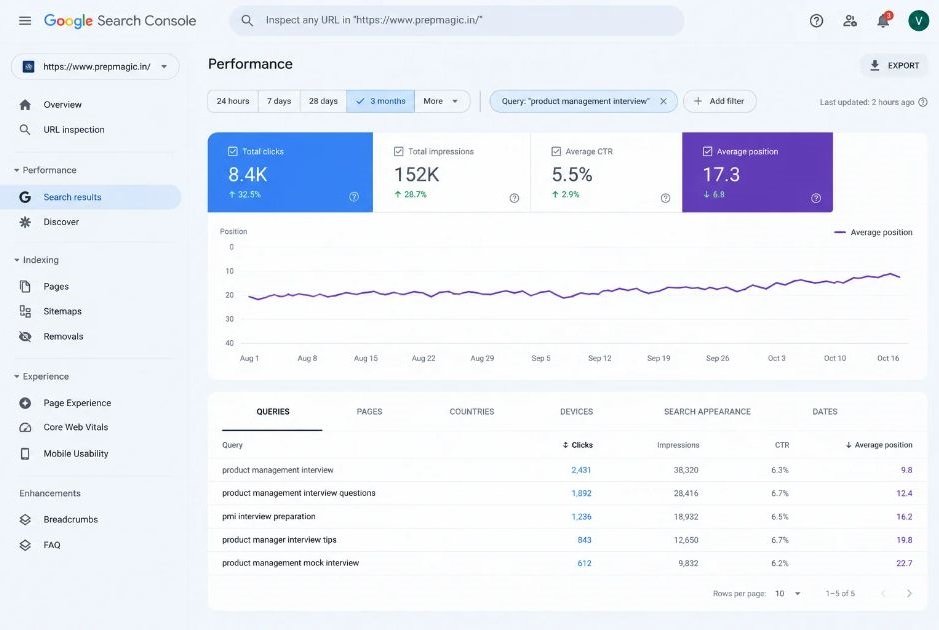
Google Search Console is a free service from Google that shows how your site performs in Google Search, including clicks, impressions, click-through rate, and average position for every query and page.
You have to verify ownership first, usually by adding a DNS record or an HTML tag. After that, the Performance report becomes your ranking dashboard. Open it, switch on Average position, and filter by a specific query or page. You’ll see which searches trigger your pages and where those pages sit.
The Pages report under Indexing tells you which URLs Google has indexed and why others were left out. The URL Inspection tool lets you check a single page and request indexing after an update. The Links report lists your top linked pages and top linking sites, which makes it a free backlink starting point too.
There’s a newer feature worth knowing about. Google began rolling out a generative AI performance report in Search Console in early June 2026, and according to Search Engine Roundtable it was available to all sites worldwide by August 31, 2026. It sits as a tab under the main Performance report and shows impressions, pages, countries, devices, and dates for your URLs in AI features across Search and Discover. It doesn’t show clicks or query data, so it tells you that you appeared, not what searchers typed. Sites with too little data may not see the tab yet.
Now the limits. Average position is exactly that, an average across every impression, so a page can show position 8 while sometimes ranking 2 and sometimes 30. Search Console also hides some rare queries for privacy, and it only reports keywords where you already got impressions. It can’t tell you about keywords you’ve never ranked for.
Bing Webmaster Tools
Bing Webmaster Tools is Microsoft’s free dashboard for monitoring how a site performs in Bing search results and Microsoft’s AI answer experiences.
Setup is quick. If your site is already verified in Search Console, you can import it with a few clicks instead of repeating verification. From there you get a Search Performance report with clicks, impressions, and average position, plus a site scan that flags on-page issues and a way to submit URLs for faster discovery through IndexNow.
Bing also added an AI Performance report, which shows how often your content appears and gets cited in Bing’s AI-generated answers. One thing to watch: on and around June 1, 2026, many site owners saw sudden jumps in impressions in this report. Microsoft’s Krishna Madhavan described it as regular data backfilling with no anomalies, and suggested looking at trends instead of single-day spikes. That’s good advice for any new report.
Why bother with Bing at all? Because Bing traffic tends to convert differently from Google traffic on some sites, especially for desktop-heavy B2B audiences, and its AI surfaces are a separate visibility channel. It’s also free. Ten minutes of setup is a cheap bet.
Its limit is obvious. Bing’s market share is smaller than Google’s, so the data covers less traffic, and it won’t replace Search Console for most Indian sites.
Semrush Free Account
Semrush is a paid SEO platform with a free account that gives limited access to its rank tracking, keyword, backlink, and audit tools.
According to Semrush’s own free account page, updated December 10, 2025, the free plan includes these limits:
- Domain Overview, Keyword Research, Competitor Research, and Backlinks: 10 queries per day each
- Site Audit: 100 pages
- Position Tracking: 10 keywords
- On Page SEO Checker: 1 campaign covering up to 10 pages or keywords
- Websites to monitor: 1
- SEO Writing Assistant: 1 piece of content
For rankings, Position Tracking is the feature to use. Add your domain, enter up to 10 keywords you care about, and pick a location and device. Semrush then tracks those positions over time. For a store like Nykaa selling skincare, that could be your ten highest-value category keywords.
The tradeoff is that 10 keywords is a tiny sample. It works for a small business with a handful of money terms. It won’t work for a content site with 200 articles.
Which Free Tools Show Your Backlinks?
Ahrefs Webmaster Tools and Moz Link Explorer are the two most useful free backlink checkers. Ahrefs shows backlinks for sites you’ve verified, while Moz shows link metrics for any URL within a small monthly allowance. Google Search Console’s Links report is a third source for your own site.
Backlinks are links from other websites to yours, and search engines treat them as a vote of trust. Quality matters far more than count. Twenty links from respected sites in your niche beat 2,000 from directories nobody reads.
Ahrefs Webmaster Tools
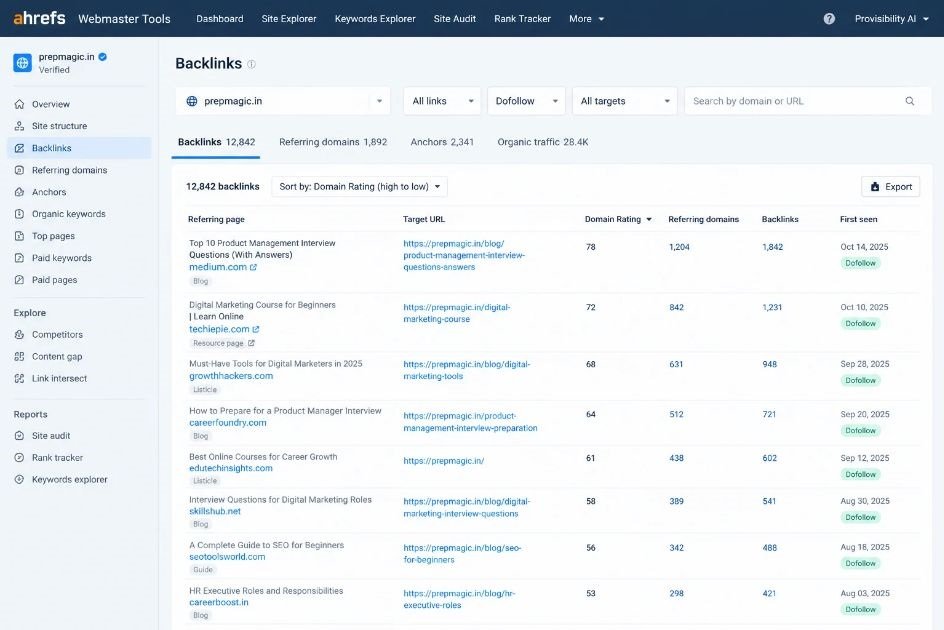
Ahrefs Webmaster Tools is a free product from Ahrefs that lets verified site owners see their own backlinks, organic keywords, and technical issues. The company now labels it Ahrefs Free on its site.
You must verify ownership of every site you analyse. Once you do, you can add an unlimited number of verified sites. Per Ahrefs, the free plan includes:
- Site Audit that checks for more than 170 technical and on-page issues, with 5,000 crawl credits per project each month
- Site Explorer with backlinks and organic keywords, showing up to 1,000 backlinks and 1,000 keywords at a time
- Web Analytics for up to 1 million events per project
- One free document per month in the AI Content Helper
Open the backlinks report for your site and sort by Domain Rating. Look first at new and lost links. A sudden loss of links from strong domains often explains a ranking drop. Then check the anchor text report to see how others describe you.
The limit that matters: you can’t analyse competitors without a paid subscription. That’s a real gap, because competitor backlink research is where link building ideas come from. Think of Ahrefs Webmaster Tools as a health check on your own link profile, not a spying tool.
Moz Link Explorer
Moz Link Explorer is a backlink analysis tool from Moz that reports a site’s linking domains, anchor text, top pages, and authority metrics such as Domain Authority and Spam Score.
A free Moz account gives you a small number of Link Explorer lookups each month. Moz changes that allowance from time to time, so check the number on your account page before you plan around it. The advantage over Ahrefs’ free plan is that you can look at any domain, including competitors, even if the volume is small.
Here’s how to spend a handful of lookups well. First, check your own domain once to see your baseline. Then check your top two competitors and review their linking domains. Pull the sites that link to both competitors but not to you. Those are your warmest outreach targets.
One thing to be clear about. Domain Authority is a Moz score on a 1 to 100 scale. Google doesn’t use it, and a high score doesn’t mean you’ll rank. Use it to compare sites against each other, never as a goal on its own.
Free backlink analysis works best as a two-step process. Use a verified-site tool like Ahrefs Webmaster Tools to monitor your own links, then spend limited lookups in Moz Link Explorer on competitors to find link gaps. Authority scores such as Domain Authority are third-party metrics, not Google ranking factors.]
Which Free Tools Find the Right Keywords?
Google Keyword Planner, Google Trends, and Ubersuggest cover free keyword research. Keyword Planner gives volume ranges from Google, Trends shows how interest changes over time, and Ubersuggest generates ideas quickly but caps you at a few searches a day.
Keyword research tells you what people type, how often, and how hard it’ll be to rank. For a brand like Zepto or Swiggy Instamart, it also shows when demand spikes, such as festival weeks or the first week of the month.
Google Keyword Planner
Google Keyword Planner is a research tool inside Google Ads that suggests keywords and reports their search volume, competition, and bid ranges.
You need a free Google Ads account, but you don’t have to run ads. Open Tools, then Planning, then Keyword Planner. You’ll see two options. Discover new keywords builds ideas from seed terms or from a competitor’s website. Get search volume and forecasts checks metrics for a list you paste in.
Without an active campaign, Google often shows broad ranges like 10K to 100K searches instead of exact numbers. Running even a small campaign can give you more precise figures, but for most SEO work the ranges are enough to rank keywords against each other.
Use the competitor URL option. Enter a rival’s product or blog page and Keyword Planner returns the keywords Google associates with it. Filter by search volume range and competition level to narrow the list.
Know its biases. The tool is built for advertisers, so it leans toward commercial terms and may group close variations together. Volume figures reflect broad match by default, which can overstate how many people search the exact phrase. Volume also tells you nothing about intent, so always read the actual search results before you commit to a keyword.
Google Trends
Google Trends is a free Google tool that shows how search interest in a topic changes over time and across regions, scaled from 0 to 100.
It doesn’t give volumes. It gives relative interest, which turns out to be the more useful signal in many cases. Type in two or three keywords and compare them. Switch the region to India, then drill into states or cities. Change the time range to five years to spot seasonality.
Say you sell gifting products. Compare “rakhi gifts” and “diwali gifts” across five years and you’ll see exactly when to publish, update, and promote each page. That timing advantage is worth more than most paid features.
The Related queries and Related topics boxes surface rising searches, flagged as breakout terms when growth is sudden. You can also change the property from Web Search to YouTube, Google Shopping, or News to see where attention lives.
The limit: Trends works best for comparing terms, and it hides low-volume keywords entirely. Niche long-tail phrases often show no data. Pair it with Keyword Planner so you get both timing and size.
Ubersuggest
Ubersuggest is a keyword and SEO tool from Neil Patel’s company that offers keyword ideas, content ideas, backlink data, and a site audit, with a free plan that restricts usage.
A 2026 pricing review by Spike reports the free plan allows 3 searches per day, 1 user and 1 domain, 25 tracked keywords, site audits of 150 pages per crawl, and 3 months of backlink history. The same review calls the tier a demo and says it lacks historical keyword data and deep backlink results. I’d agree with the demo comparison, but a demo is still useful.
Use your three daily searches wisely. Start with a seed keyword and look at the keyword ideas list for suggestions, questions, and prepositions. Then open the content ideas view for a topic to see which pages already get the most shares and estimated visits. That tells you what format works in your niche.
The free Chrome extension is also worth installing, since it overlays keyword data directly on Google results pages.
Where it falls short: three searches vanish quickly, and the data is modelled. Cross-check any keyword you plan to build a page around against Google Search Console and Keyword Planner.
Which Free Tools Catch Technical Problems Before Google Does?
Screaming Frog SEO Spider and Google PageSpeed Insights are the two best free technical checks. Screaming Frog crawls up to 500 URLs and lists broken links, redirects, and missing tags. PageSpeed Insights measures real-world speed and Core Web Vitals for any URL.
Technical issues don’t show up in rankings reports until the damage is done. A redirect chain, a noindex tag left on by mistake, or a page that takes six seconds to load can quietly erase months of content work.
Screaming Frog SEO Spider
Screaming Frog SEO Spider is a desktop crawler that scans a website the way a search engine bot would and reports technical and on-page issues for every URL it finds.
Per Screaming Frog’s pricing page, the free version has a crawl limit of 500 URLs. Its feature list matches the paid version, including JavaScript rendering and Search Console integration, and the only difference the page highlights is the crawl cap. A paid licence is £199 per year with no fixed URL limit, though memory and storage set a practical maximum.
Install it, paste in your domain, and press Start. When the crawl finishes, work through the tabs:
- Open Response Codes and filter for Client Error (4xx) to find broken links.
- Check Redirection (3xx) for chains that waste crawl budget.
- Review Page Titles and Meta Description for missing, duplicate, or over-length entries.
- Look at H1 for pages with none or several.
- Open Canonicals and Directives to spot pages accidentally set to noindex.
If your site has more than 500 URLs, crawl by section. A boAt style store could crawl the headphones category, then the speakers category, each under the cap. It takes longer, but it’s free.
It’s a desktop program, so it has a learning curve. The sheer number of columns overwhelms first-time users. Start with the response codes and titles tabs and ignore the rest until you’re comfortable.
Google PageSpeed Insights
Google PageSpeed Insights is a free tool that analyses the speed and user experience of a web page on mobile and desktop, using both lab tests and real user data.
Paste a URL and you’ll get two layers of data. The lab data comes from a Lighthouse test run at that moment. The field data comes from the Chrome User Experience Report, which collects real visits from Chrome users over the previous 28 days. When the two disagree, trust the field data, because it reflects what your visitors actually experience.
The three Core Web Vitals are Largest Contentful Paint, which measures loading and should be 2.5 seconds or less, Interaction to Next Paint, which measures responsiveness and should be 200 milliseconds or less, and Cumulative Layout Shift, which measures visual stability and should be 0.1 or less. Anything beyond those lines is flagged as needing improvement.
Check mobile first. Most Indian search traffic arrives on phones, often on mid-range devices and variable networks, so a page that looks fine on your office Wi-Fi may fail in the real world. The Opportunities and Diagnostics sections list specific fixes, like compressing images or deferring unused JavaScript.
PageSpeed Insights tests one URL at a time, and small sites without enough traffic may only get lab data. Test your homepage, your top category page, and your best-selling product page rather than every URL.
Technical SEO checks catch problems that ranking reports miss. A desktop crawler such as Screaming Frog finds broken links, redirects, and missing tags across up to 500 URLs for free, while PageSpeed Insights measures Core Web Vitals using real Chrome user data from the previous 28 days.
How Do These Free Tools Compare at a Glance?
No single tool among these free SEO review tools covers rankings, backlinks, keywords, and technical health on its own. The right mix depends on whether you own the site, how many pages it has, and whether you need competitor data. The table below shows what each tool does best and where its free tier stops.
| Tool | Best for | Key free limit | Needs site ownership? |
|---|---|---|---|
| Google Search Console | Real rankings and clicks | Only your own site; no unranked keywords | Yes |
| Bing Webmaster Tools | Bing rankings and AI citations | Smaller traffic share | Yes |
| Semrush Free | Rank tracking and quick checks | 10 queries per day; 10 tracked keywords | No |
| Ahrefs Webmaster Tools | Backlink and site audit on your own site | 1,000 backlinks and keywords visible; no competitors | Yes |
| Moz Link Explorer | Competitor link research | Small monthly lookup allowance | No |
| Google Keyword Planner | Keyword volume ranges | Ranges without an active campaign | No |
| Google Trends | Seasonality and regional demand | Relative interest only; no low-volume data | No |
| Ubersuggest | Fast keyword and content ideas | 3 searches per day | No |
| Screaming Frog | Technical crawl | 500 URLs per crawl | No |
| PageSpeed Insights | Speed and Core Web Vitals | One URL at a time | No |
So which should you pick? If you only have time for three, choose Google Search Console, Ahrefs Webmaster Tools, and Screaming Frog. Together they cover your real rankings, your own link profile, and your technical health. Add Keyword Planner and Trends when you plan new content, and use Moz when you need a competitor snapshot.
Some of the best SEO review tools for small teams aren’t the flashiest. They’re the ones that come from the search engines themselves, because they cost nothing and the data is first-party.
How to Run a 30-Minute Weekly SEO Review With These Tools
A weekly review works best as a fixed sequence, so you never skip a step or wander into rabbit holes. Run the same checks in the same order each week, and you’ll spot problems while they’re still small.
- Open Google Search Console’s Performance report and compare the last 7 days with the previous 7. Note pages with the biggest drops in clicks or position. (5 minutes)
- Check the Pages report for new indexing errors or pages that dropped out of the index. (3 minutes)
- Open Ahrefs Webmaster Tools and look at new and lost backlinks. Flag any lost links from strong domains. (5 minutes)
- Run Screaming Frog on your most important section and check for new 4xx errors or missing titles. (7 minutes)
- Test your top three URLs in PageSpeed Insights, mobile first. (4 minutes)
- Use Keyword Planner or Trends to log one keyword idea for next week’s content. (4 minutes)
- Record the week’s numbers in a simple sheet so you can see trends over months. (2 minutes)
Keep a log. Free tools rarely store long histories, and Search Console keeps 16 months of data. Without your own record, you lose context fast.
If you manage several sites, do this per site. An agency running ten small client sites might rotate: two sites per weekday, one deep check each.
Mistakes That Make Free SEO Data Misleading
Free data is only useful if you read it correctly. Most bad SEO decisions come from misreading a number, not from lacking a tool.
Treating third-party estimates as facts. Traffic and keyword numbers from Ahrefs, Semrush, Moz, and Ubersuggest are modelled. Two tools can give different answers for the same site, and both can be off. Use them to compare, not to forecast.
Chasing authority scores. Domain Authority and Domain Rating are vendor metrics. A link from a relevant, trusted site in your niche beats a link from a high-score site that has nothing to do with you.
Ignoring the date range. Search Console’s default view shows three months. Seasonal sites, like those selling festive gifts, need at least a full year to compare properly.
Checking rank from your own browser. Your results are personalised and location-based. Searching your own keyword on your own laptop in Delhi tells you little about what a searcher in Mumbai sees. Use Search Console’s country and device filters instead.
Running audits and never fixing anything. A crawl that finds 400 issues is useless unless you sort them by impact. Fix indexing blocks and broken pages that earn traffic first. Cosmetic issues can wait.
Using free tier limits to judge a tool. A tool that gives you 10 queries a day isn’t bad. It’s built to let you test. If you hit the ceiling every week, that’s useful information about whether you need a paid plan.
Final Thoughts
You don’t need a big budget to review a site properly. Google Search Console gives you real rankings, Ahrefs Webmaster Tools shows your own links, Screaming Frog finds technical faults, and Keyword Planner and Trends tell you what to write next. Add Bing, Moz, Semrush, Ubersuggest, and PageSpeed Insights as needed.
The limits are real, though. Most free tiers cap queries, hide competitors, or estimate their numbers. Knowing those limits is what makes SEO review tools useful rather than misleading.
Pick three tools from this list this week. Set up Search Console and Ahrefs Webmaster Tools today, run your first crawl tomorrow, and write the results in a log. In a month, you’ll know more about your site than most owners ever do.
Frequently Asked Questions
What are the best free tools to check my website’s keyword rankings?
Google Search Console is the best starting point because it reports real positions from Google for your own site. Add the free Semrush account to track up to 10 specific keywords over time, and Bing Webmaster Tools to see how you perform in Bing. Together they cover most small sites without any cost.
Can I check backlinks for free?
Yes. Ahrefs Webmaster Tools shows backlinks for any site you’ve verified, and Google Search Console’s Links report lists top linking sites. Moz Link Explorer lets you check other domains with a limited number of free lookups each month. You’ll need a paid plan for deep competitor backlink research.
What’s the difference between Ahrefs Webmaster Tools and Semrush’s free plan?
Ahrefs Webmaster Tools only works on websites you’ve verified, but it gives you full site audits and up to 1,000 backlinks and keywords at a time. Semrush’s free account lets you query other domains, but caps you at 10 queries per day for most reports. Ahrefs suits monitoring your own site, while Semrush suits quick competitor checks.
How do I find keywords for free?
Start with Google Keyword Planner for volume ranges and ideas, then use Google Trends to check seasonality. Ubersuggest adds quick idea lists, though the free plan only allows 3 searches per day. Also check Search Console’s Performance report to find queries you already rank for on page two, since those are the quickest wins.
Is Google Search Console accurate for rankings?
It’s the most accurate source for your own site, because the data comes straight from Google. The catch is that it reports average position, which blends every impression and every location. A page showing position 8 may rank 3 for some searchers and 20 for others. Use it to track direction, not to chase an exact number.
Why is my page not showing in Google even though I published it?
First, check the Pages report in Search Console to see whether Google has indexed it. Use the URL Inspection tool to test the live URL and request indexing. If it says the page is excluded, look for a noindex tag, a canonical pointing elsewhere, or a block in robots.txt. A Screaming Frog crawl will find all three quickly.
Is it worth paying for an SEO tool if free ones exist?
For a small site with under a few hundred pages, free tools usually do the job. You’ll want a paid plan when you need competitor data at scale, large keyword lists, daily rank tracking for hundreds of terms, or white-label reports for clients. If you keep hitting daily limits, that’s your signal.
How often should I run an SEO check?
A short weekly review catches issues early, and a deeper monthly audit covers technical health and backlinks. After a site migration or a big redesign, check daily for the first two weeks. Seasonal businesses should also run a review before each peak period.
What is Domain Authority, and does Google use it?
Domain Authority is a score from 1 to 100 created by Moz that predicts how well a site might rank compared with others. Google doesn’t use it as a ranking factor. Treat it as a comparison metric between sites, similar to Ahrefs’ Domain Rating, not as a target.
What do most people get wrong when using free SEO tools?
They treat estimates as facts and skip the fixing step. Traffic numbers from third-party tools are modelled, so two tools will disagree. And many people run a crawl, see hundreds of warnings, and fix nothing. Pick the three issues that block indexing or hurt your best pages, fix those, and recrawl.

