
Most people meet generative AI the same way. Someone shows them a chatbot that writes an email in four seconds, and the next question is obvious: what is this thing actually for? The answer decides whether you use these tools well or burn a year on demos. The main goal of generative AI is to produce new, useful content (text, images, code, audio, video, even molecules) from plain instructions, so people spend less time on first drafts and more time on judgment.
That sounds modest. The scale isn’t. Stanford’s 2026 AI Index found that generative AI reached 53% population adoption within three years of its mass-market debut, faster than either the personal computer or the internet managed at the same stage. Yet McKinsey’s 2025 State of AI survey found that only 39% of organisations could point to any profit impact from AI at all. Everyone is using it. Far fewer are getting paid for it.
This guide covers what generative AI is really trying to do, the benefits that survive scrutiny, and ten tools explained one by one. You’ll also see real examples from marketing, software, healthcare and Indian consumer apps, the risks worth planning for, and a six-step plan to start using it at work.
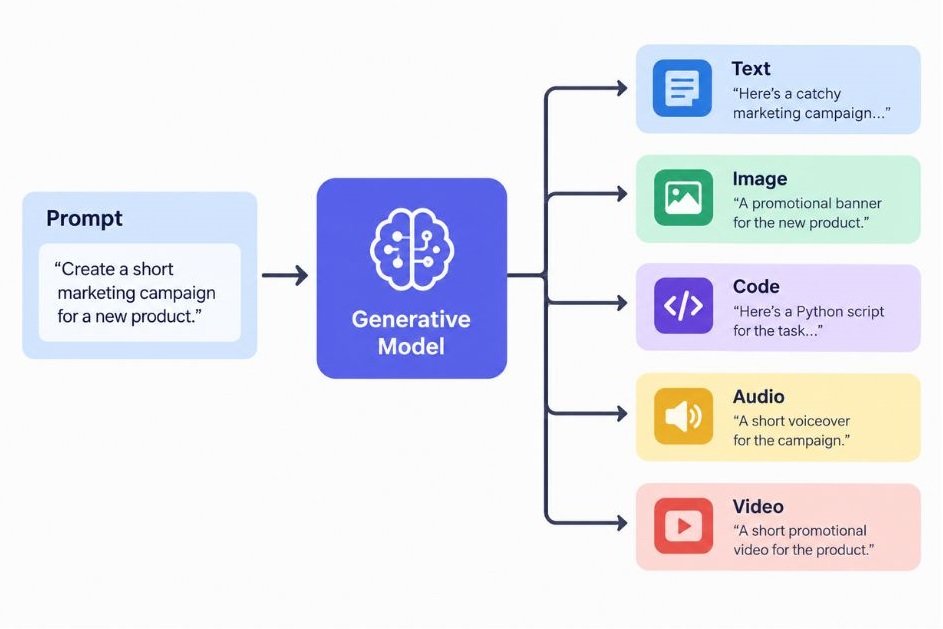
What Is Generative AI Actually Trying to Do?
Generative AI is software that creates new content, such as text, images, code, audio and video, by learning patterns from large datasets and predicting what should come next. Its purpose is to turn a plain-language instruction into a usable first draft, which shortens the gap between an idea and a finished output.
Compare that with the AI most of us met earlier. A spam filter decides whether an email is junk. A recommendation engine ranks what you might watch next. Those systems label or sort things that already exist. A generative model writes the reply, draws the thumbnail or drafts the function.
Two terms come up constantly, so here are both. A large language model (LLM) is a neural network trained on huge volumes of text to predict the next word, which is what lets it write, summarise and answer questions in full sentences. A diffusion model is an image or video generator that starts from random noise and removes it step by step until a picture matching your prompt appears.
So where does this leave the main goal of generative AI? Put simply, it is to extend what one person can produce in a day, without replacing the judgment that decides whether the output is any good. That second half matters. Models are fast and fluent, but they don’t know your brand, your customer or your margin. You do.
In practice, that goal breaks into three working aims:
- Speed up the creation of first drafts, designs, code and summaries
- Lower the skill barrier so a marketer can prototype an app or a founder can edit a video
- Personalise content for thousands of people without writing thousands of versions
Generative AI creates new text, images, code, audio and video by learning patterns from large datasets, unlike older AI that only classifies or ranks existing data. Its practical purpose is to extend how much one person can produce while humans keep control of judgment, accuracy and taste. Stanford’s 2026 AI Index reports that it reached 53% population adoption within three years of its mass-market launch.
What Are the Real Benefits of Generative AI?
The benefits that hold up in practice are faster first drafts, lower cost per output, personalisation at scale and wider access to skills such as design, coding and translation. They show up most clearly in repetitive knowledge work and least in tasks that need original thinking or verified facts.
Speed and Lower Cost per Output
A product description that took 20 minutes now takes two, plus a human edit. Multiply that across a catalogue of 5,000 SKUs and the maths changes your hiring plan. McKinsey’s 2025 survey found that 80% of organisations list efficiency as an objective of their AI work, which tells you where most budgets are pointed.
Personalisation at Scale
Email, ads and landing pages used to be written once and sent to everyone. Generative models make it practical to adjust the opening line, the offer or the language for each segment. For a brand selling across Indian states, producing the same campaign in Hindi, Tamil and Marathi no longer needs three separate agency briefs.
Access to Skills You Don’t Have
This is the benefit people underrate. A solo founder can draft a contract outline, generate a logo concept and debug a script in one afternoon. Stanford’s 2026 AI Index estimates the value of generative AI tools to US consumers at $172 billion a year by early 2026, and it notes that four in five US high school and college students already use AI for schoolwork. Much of that value comes from people doing things they couldn’t easily do before.
The Honest Caveat
Here’s the problem. Benefits at the task level don’t automatically become profit at the company level. McKinsey’s 2025 data shows 88% of organisations using AI in at least one function, but only 6% qualify as high performers earning 5% or more of EBIT (earnings before interest and taxes) from it. Those high performers were nearly three times as likely to have redesigned workflows around AI instead of bolting it onto old ones.
Bolting a chatbot onto a broken process gives you a faster broken process.
Generative AI’s clearest benefits are faster first drafts, lower cost per output, personalisation at scale and wider access to specialist skills. McKinsey’s 2025 State of AI survey found 88% of organisations use AI, yet only 39% report any profit impact and just 6% earn 5% or more of EBIT from it. Companies that redesign workflows around AI see the biggest gains.
Which Generative AI Tools Are Worth Knowing in 2026?
The generative AI tools worth knowing fall into five groups: general assistants (ChatGPT, Claude, Gemini), workplace copilots (Microsoft 365 Copilot, GitHub Copilot), image and video generators (Midjourney, Adobe Firefly, Google Veo), voice tools (ElevenLabs) and scientific models (AlphaFold). Pick by the job you need done, not by the loudest launch.
Model names and pricing change every few months, so check each vendor’s own page before you commit budget.
1. ChatGPT (OpenAI)
ChatGPT is OpenAI’s conversational assistant, launched in November 2022 and now the most used generative AI product in the world. OpenAI said in early 2026 that it had passed 900 million weekly users.
It handles writing, summarising, brainstorming, data analysis on uploaded files, image generation, voice conversations and web search. Custom GPTs let a team save a prompt and a set of instructions as a reusable assistant, which is handy for repeat jobs like drafting sales replies in your house tone.
Best for: all-round everyday work and quick experiments. Watch out for: confident answers that are wrong, so verify any number or citation before it goes into a client deck.
2. Claude (Anthropic)
Claude is Anthropic’s assistant family. The current lineup includes Claude Sonnet 5.5 for everyday work, Claude Opus 5.5 for harder tasks and Claude Haiku 5.5 for speed, with Claude Fable 5.1 above them.
Claude is known for working well with long documents, careful writing and coding. You can upload a 60-page report and ask for a structured summary, or use Claude Code, Anthropic’s tool for software engineers, to work inside a codebase. Projects let you keep files and instructions together for ongoing work.
Best for: analysis of long documents, editing and code. Watch out for: like every model, it can miss facts, so give it source material instead of asking it to recall.
3. Gemini (Google)
Gemini is Google’s model family and assistant. Its edge is reach: it sits inside Gmail, Docs, Sheets and Search, so a lot of people meet it without installing anything. It is multimodal, which means it can read text, images, audio and video in the same conversation.
Google also builds sibling models around it, including Imagen for images, Veo for video and Lyria for music. If your team already lives in Google Workspace, Gemini is usually the lowest-friction place to start.
Best for: teams on Google Workspace and anyone who needs to mix text with images or video. Watch out for: feature names and plans change often, so confirm what your account includes.
4. Microsoft 365 Copilot (Microsoft)
Microsoft 365 Copilot puts a generative assistant inside Word, Excel, PowerPoint, Outlook and Teams. It draws on your organisation’s own files and emails, subject to existing permissions, so it can summarise a Teams meeting you missed or build a first-draft deck from a Word brief.
The practical win is not the writing. It’s removing the copy-and-paste between your documents and a separate chat window.
Best for: companies already standardised on Microsoft 365. Watch out for: messy permissions. If your shared drives are a free-for-all, the assistant can surface things people shouldn’t see, so tidy access first.
5. GitHub Copilot (GitHub and Microsoft)
GitHub Copilot is an AI pair programmer that suggests code, explains unfamiliar functions, writes tests and, in newer versions, carries out multi-step tasks on a repository. Microsoft CEO Satya Nadella said on the company’s July 2026 earnings call that Copilot had reached 50 million users.
The productivity evidence is mixed, and that’s useful to know. In a controlled experiment GitHub published in 2022, developers using Copilot finished a coding task 55% faster. A 2026 BlueOptima analysis of more than 30,000 developers found a smaller 5.4% uplift on average, higher for the heaviest users. And a two-year study at Norway’s NAV IT found no statistically significant change in commit activity, even though developers felt more productive.
Best for: boilerplate, tests and exploring unfamiliar code. Watch out for: accepting suggestions without review.
6. Midjourney
Midjourney generates images from text prompts and is widely loved for its visual style. Designers use it for concept art, mood boards, ad concepts and hero images where look and feel matter more than exact control. It works through a web app and offers tools to vary, upscale and remix results.
Its weak spots are predictability and rights. Outputs are raster images rather than editable vectors, and its training data is less transparent than some rivals’, which matters if your legal team wants a clean story.
Best for: ideation and striking visuals. Watch out for: using it for final commercial assets without checking your licence and risk appetite.
7. Adobe Firefly (Adobe)
Adobe Firefly is Adobe’s family of generative models, built into Photoshop, Illustrator, Premiere Pro and Express. Its best-known feature is Generative Fill in Photoshop, which lets you select an area, describe a change and get new pixels that match the surroundings.
Adobe says its models are trained on licensed content such as Adobe Stock, and it offers IP indemnification to some paid enterprise customers, which is why many brand teams prefer it for commercial work. Firefly can also generate vectors, something Midjourney doesn’t do.
Best for: production design work inside the Adobe stack. Watch out for: credit limits on lower-priced plans.
8. Google Veo
Veo is Google DeepMind’s video generation model. Veo 3, introduced at Google I/O in May 2025, added native audio, so a generated clip can include dialogue, sound effects and ambient noise instead of arriving silent. Google also folded Veo, Imagen and Lyria into Flow, an AI filmmaking tool for assembling scenes.
Marketers use text-to-video models for B-roll, product teasers and rapid concept tests before paying for a shoot. Clips are short, and consistency across shots is still the hard part.
Best for: concept videos and social snippets. Watch out for: uncanny details, and the need for a human editor to stitch scenes together.
9. ElevenLabs
ElevenLabs makes synthetic voices. You paste a script, choose or clone a voice, and get natural-sounding narration in dozens of languages. It also offers dubbing, which translates a video’s speech into other languages while keeping the speaker’s voice character.
For an Indian creator or a course business, that can turn one Hindi video into versions for other regions without a recording studio. Best for: voiceovers, audiobooks and localisation. Watch out for consent: only clone a voice when the person has clearly agreed, and disclose synthetic audio where the law or platform rules require it.
10. AlphaFold (Google DeepMind and Isomorphic Labs)
AlphaFold predicts the three-dimensional shape of proteins from their amino-acid sequence. AlphaFold 3, released in May 2024, extended this to how proteins interact with DNA, RNA and drug-like molecules, and it uses a diffusion approach to generate those structures. The work behind AlphaFold shared in the 2024 Nobel Prize in Chemistry.
This one isn’t a tool you’d use for your newsletter. It’s here because it shows the same technique reaching beyond content. Isomorphic Labs, the Alphabet-backed spin-off built on this research, raised $2.1 billion in May 2026, according to Reuters, and says it expects first clinical trials by the end of 2026.
Best for: researchers and drug-discovery teams. Watch out for: treating predicted structures as proof. They still need lab validation.
| Tool | Best for | Output | Main limitation |
|---|---|---|---|
| ChatGPT | All-round everyday work | Text, images, voice, analysis | Confident errors |
| Claude | Long documents, editing, code | Text, code | Needs source material for facts |
| Gemini | Google Workspace teams | Text, images, video input | Plans and features shift often |
| Microsoft 365 Copilot | Office documents and meetings | Drafts, summaries, decks | Depends on clean permissions |
| GitHub Copilot | Software development | Code, tests, explanations | Gains vary by team |
| Midjourney | Concept art and hero images | Raster images | Less control, less transparency |
| Adobe Firefly | Commercial design work | Images, vectors, video edits | Credit limits |
| Google Veo | Concept video and B-roll | Short video with audio | Shot-to-shot consistency |
| ElevenLabs | Voiceovers and dubbing | Synthetic speech | Consent and disclosure |
| AlphaFold | Biology and drug discovery | Molecular structures | Needs lab validation |
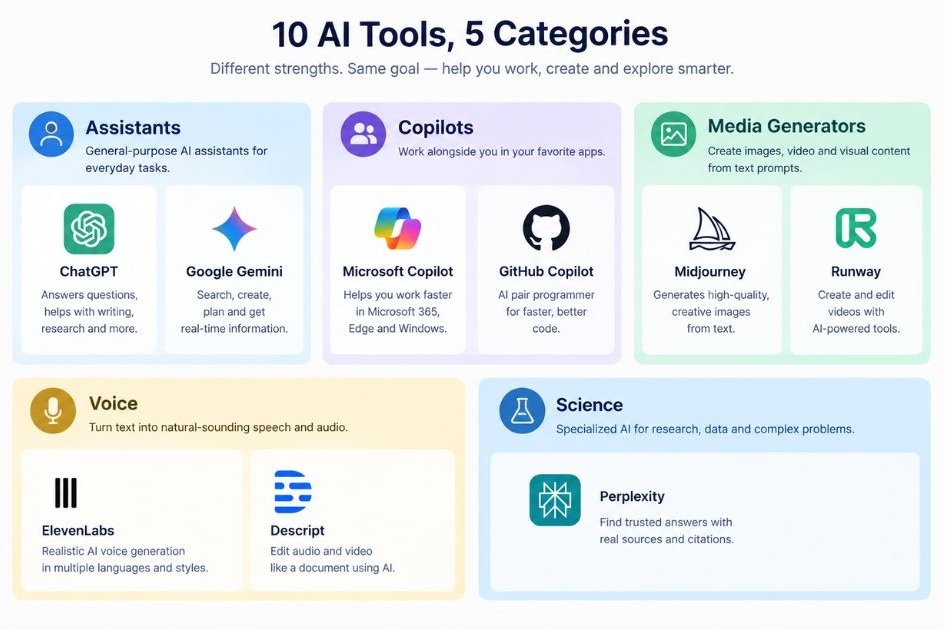
The most useful generative AI tools fall into five groups: general assistants such as ChatGPT, Claude and Gemini; workplace copilots such as Microsoft 365 Copilot and GitHub Copilot; image and video generators such as Midjourney, Adobe Firefly and Veo; voice tools such as ElevenLabs; and scientific models such as AlphaFold. Choose by the job to be done, and verify pricing and model versions on each vendor’s site.
Where Is Generative AI Being Used in the Real World?
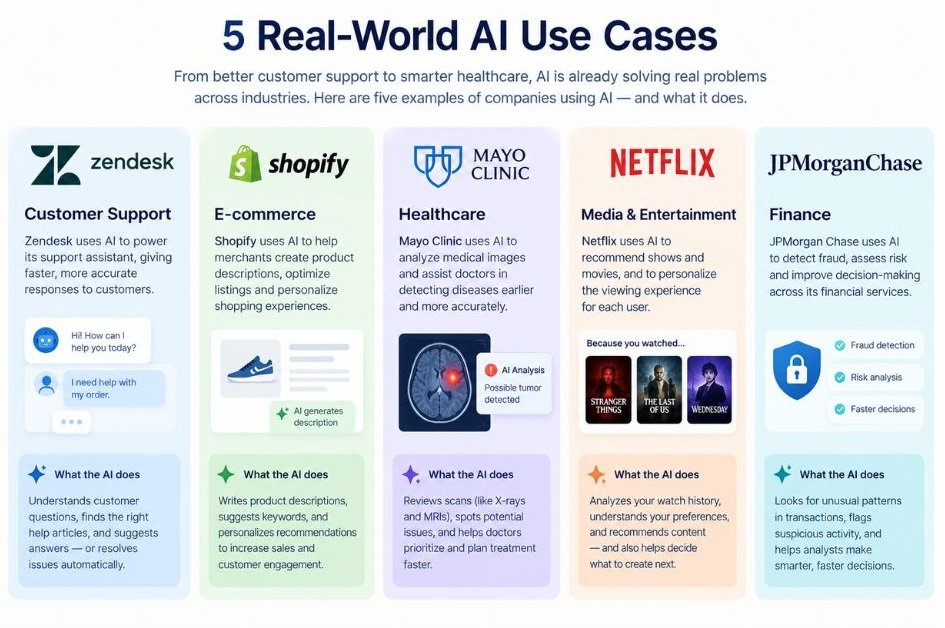
Generative AI is already used in marketing, software engineering, drug discovery, customer support and Indian consumer apps. The pattern across all of them is the same: the model drafts, and a person decides.
Marketing and Content
Coca-Cola’s 2024 holiday campaign remade its classic “Holidays Are Coming” ad with generative AI, and drew public criticism for its look. It’s a useful lesson: the tool made production faster, but audience reaction still depends on taste, which a model doesn’t supply.
Day to day, the more typical use is quieter. Teams use Adobe Firefly to extend backgrounds and resize creative across formats, and use ChatGPT, Claude or Gemini to draft subject lines, ad variants and briefs that a strategist then sharpens.
Software Development
Developers are the heaviest early adopters. Microsoft says GitHub Copilot passed 50 million users by July 2026, and the 2022 GitHub experiment cited earlier measured 55% faster task completion. The independent studies are more cautious, so treat vendor numbers as a ceiling, not a promise.
Healthcare and Drug Discovery
This is where the main aim of the technology looks least like content. Isomorphic Labs builds on AlphaFold to design drug candidates in oncology and immunology, and has partnerships with Eli Lilly and Novartis. It first said it would reach clinical trials by the end of 2025. In January 2026, CEO Demis Hassabis moved that to the end of 2026. Slower than the headlines, which is normal for medicine.
Customer Support
Klarna said in 2024 that its AI assistant was handling about two-thirds of its customer chats. In 2025 its CEO acknowledged that cost-cutting had gone too far on quality and the company brought human agents back into the mix. The takeaway is plain: use AI to take the routine volume and keep people for the cases that are emotional or complicated.
Indian Consumer Apps
Indian platforms have been quick. Swiggy built a neural search that understands food queries and moods. Blinkit launched Recipe Rover in May 2023, which suggests recipes and finds the ingredients inside the app. IndiGo launched its 6Eskai chatbot in 2023 using GPT-4 for customer support, and Flipkart introduced its Flippi assistant to personalise shopping. Zomato, interestingly, banned AI-generated images in restaurant menus, a reminder that where a model is allowed to generate matters as much as what it can generate.
What Are the Risks and Limits of Generative AI?
Generative AI can state false things fluently, reproduce copyrighted style, leak private data and carry bias from its training data. None of these is a reason to avoid it. All of them are reasons to put a review step between the model and your customer.
- Hallucinations. A hallucination is output that sounds right but is invented, such as a fake citation or a made-up statistic. Always check numbers, names and quotes against a source.
- Copyright and licensing. Courts and lawmakers are still deciding where training and output rights sit. Prefer tools with clear commercial terms for client work.
- Privacy. Don’t paste customer data, contracts or unreleased financials into a consumer tool unless your company has approved it.
- Bias and transparency. Stanford’s 2026 AI Index recorded 362 AI-related incidents in 2025, up from 233 in 2024, and its Foundation Model Transparency Index average fell from 58 to 40 as labs disclosed less about training data.
It may not apply to every team, but a simple rule works well: the higher the cost of being wrong, the more human review you need.
How Do You Start Using Generative AI at Work?
Start with one repetitive task, test one tool on it for two weeks, measure the time saved, and add a human review step before scaling. Teams that try everything at once usually learn nothing.
- Pick one task. Choose something repetitive and low-risk, like first-draft product descriptions or meeting summaries.
- Write down the baseline. Record how long the task takes now and what a good output looks like.
- Choose one tool. Use the table above. If you live in Google Workspace, try Gemini. If you live in Microsoft 365, try Copilot.
- Write a clear prompt. State the role, the goal, the audience, the format and an example of a good result.
- Add a review step. Name the person who checks facts, tone and numbers before anything is published.
- Measure and decide. After two weeks, compare time saved and quality against your baseline, then expand, change tools or stop.
That last step is where most teams skip. McKinsey’s finding that only 6% of organisations are high performers is partly a measurement story. If you don’t track the result, you can’t redesign the workflow around it.
Final Thoughts
Three things are worth keeping from all of this. Generative AI exists to extend what one person can create, not to replace the judgment behind it. The tools differ a lot, so match each one to a job. And the gap between using AI and profiting from it is a workflow problem, not a tooling problem.
So don’t start by buying five subscriptions. Pick one repetitive task this week, run it through one tool, and write down the time saved. Do that three times and you’ll know more about where AI helps your business than any trend report can tell you.
Frequently Asked Questions About Generative AI
What is generative AI in simple words?
Generative AI is software that creates new content, like text, images, code, audio or video, after learning patterns from large amounts of existing data. You give it an instruction, called a prompt, and it produces a draft. It doesn’t copy a stored answer; it predicts what should come next, piece by piece.
What is generative AI used for?
People use it for writing and editing, summarising documents, creating images and video, generating voiceovers, writing and testing code, translating content and analysing data. Scientists also use it to predict protein structures and propose drug candidates. Most uses share one shape: the model drafts and a human reviews.
What’s the difference between generative AI and traditional AI?
Traditional AI classifies, scores or predicts from existing data, like flagging spam or recommending a movie. Generative AI produces new content, like writing the email or drawing the poster. Many products now combine both, so the line is blurrier than it used to be.
Which generative AI tool is best for beginners?
Start with the assistant you can reach fastest. ChatGPT, Claude and Gemini all have free tiers and work through a simple chat box. If your company runs on Google Workspace, Gemini is convenient. On Microsoft 365, Copilot is the natural pick. Try one for a real task rather than a toy prompt.
Is generative AI free to use?
Many tools offer free tiers with limits on usage or features, and paid plans add higher limits, better models and business controls. Prices and plan names change often, so check the vendor’s pricing page. For company work, a paid plan with clear data terms is usually safer than a free consumer account.
How do I write better prompts for generative AI?
Be specific about four things: who the output is for, what job it should do, what format you want and what a good example looks like. Paste in your source material instead of asking the model to remember facts. Then ask for a revision. Treat the first answer as a draft, not a verdict.
Will generative AI replace my job?
For most knowledge workers, the near-term change is that tasks shift rather than whole jobs vanish. Stanford’s 2026 AI Index did document the first concrete evidence of AI-linked workforce displacement, so it isn’t a non-issue. The safer bet is learning to direct and check these tools, since judgment is the part that stays human.
Why does generative AI make things up?
A language model predicts likely words, not verified facts. When it lacks the right information, it can still produce a fluent, confident answer. You can reduce this by supplying source documents, asking it to cite them, and checking any number, quote or name before you use it.
Is content made by generative AI safe to use commercially?
It depends on the tool’s licence, its training data and your use case. Some vendors, such as Adobe with Firefly, emphasise licensed training data and offer legal protection to certain paying customers. Others give less clarity. Read the commercial terms, and have legal review anything high-stakes like a national ad campaign.
Is generative AI worth it for a small business?
Usually yes, if you start narrow. A small team gets the most from repetitive work like drafting replies, product copy, social posts and meeting notes. Skip anything that needs verified facts without a review step. Measure the hours saved over a few weeks before paying for more tools.


AI Product Development Lifecycle: From Idea To Product Launch
October 23, 2026 - 10:42 am[…] Generative AI shows the same pattern. Gartner predicted in 2024 that at least 30% of generative AI projects would be abandoned after the proof-of-concept stage by the end of 2025. A later Gartner analysis put the actual figure at at least 50%, citing poor data quality, weak risk controls, rising costs and unclear business value. […]