

Most people open a social app dozens of times a day and still can’t say what it has done for them. Businesses are often worse. They post because a competitor posts, then wonder why nothing moves.
The advantages of social media are real, measurable and, honestly, easy to waste. A free account can land you a job, a customer or a mentor. It can also eat three hours and return nothing. The difference is knowing which benefit you’re chasing and which tool delivers it.
That’s what this guide covers. You’ll get 15 specific benefits, split between individuals and businesses, with the named tools behind each one explained properly: what the tool does, who it suits and where it falls short. Every major section opens with a short answer you can use straight away, then adds an example and a practical next step.
One note on data. Platform features and numbers shift fast, so every figure below carries a source and a year, and tool descriptions reflect what’s available as of October 2026. If a feature has changed by the time you read this, check the tool’s own help page before you commit budget.
What Is Social Media and Why Does It Still Matter in 2026?
Social media is any online platform where people create, share and react to content, and talk to each other directly. It matters in 2026 because most of your customers, employers and peers already spend part of every day on one.
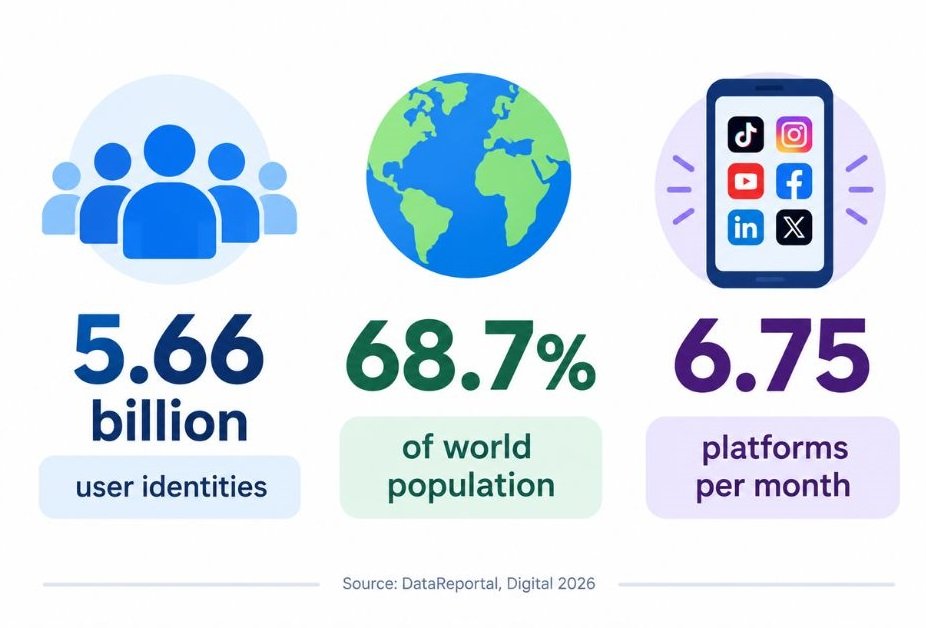
The scale is hard to ignore. According to DataReportal’s Digital 2026 report, there were 5.66 billion social media user identities in October 2025, equal to 68.7% of the world’s population. DataReportal points out that these are accounts rather than unique people, so duplicate and fake profiles inflate the figure.
Attention is the better number. The same report found that online adults use an average of 6.75 social platforms each month, and spend well over two and a half hours a day on social and video platforms combined. That’s a lot of time to be absent from.
Here’s how the rest of this article is organised. Benefits 1 to 5 help individuals. Benefits 6 to 10 help businesses reach and win customers. Benefits 11 to 15 cover what happens behind the scenes: data, research, partnerships, hiring and crisis response. Each benefit names the tools that deliver it.
Social media reaches roughly 68.7% of the world’s population, according to DataReportal’s Digital 2026 report, and online adults use about 6.75 platforms a month. For individuals and businesses, the question is no longer whether to be present but which benefit to pursue and with which tool.
Which Social Media Benefits Help Individuals the Most?
For individuals, social media delivers five main benefits: staying close to people, learning for free, building a career profile, earning from your skills, and finding community. Each works best with a small set of tools, not every app on your phone.
1. Stay Close to the People Who Matter, Whatever the Distance
Picture an Indian family with relatives across three countries. The WhatsApp family group is usually the one thread that holds everyone together, from birthday wishes to hospital updates.
WhatsApp is the workhorse here. It supports group chats, voice and video calls, and Status updates that disappear after 24 hours. Personal messages are end-to-end encrypted by default, which means only the people in the chat can read them.
Instagram suits a different job. Its Close Friends list lets you share Stories with a small chosen group, so you can post unfiltered updates without broadcasting them to colleagues or distant acquaintances.
Facebook still earns a place for older relatives and for finding old school and college friends through search and groups. It’s less fashionable than it was. It’s also where many parents and uncles actually are.
2. Learn Almost Any Skill for Free
A decent tutorial on nearly anything now sits one search away. That alone has changed how people pick up cooking, coding, languages and design.
YouTube is the biggest classroom. Playlists let you build your own course, chapters let you jump to the part you need, and playback speed settings let you move faster through material you already know. Auto-captions and translation help when the best explainer isn’t in your language.
X Lists solve a different problem: noise. You can build a private list of experts in your field and read only their posts, skipping the main feed completely. It takes ten minutes to set up and saves hours.
Reddit works well for specific questions, because subreddit communities are organised by topic and searchable. Read the community rules first, and treat any advice as a lead to verify, not a final answer. Anyone can post anything, and credentials are rarely visible.
3. Build a Personal Brand and Career Visibility
Recruiters and clients search your name before they call you. Your social profiles decide what they find.
LinkedIn is the main tool. Write a headline that says what you do and for whom, not just a job title. Use the Featured section to pin your best post, portfolio link or case study, and consider LinkedIn newsletters if you can write consistently. A steady rhythm of two or three posts a week beats a burst of ten followed by silence.
Behance, owned by Adobe, is a portfolio platform for designers, illustrators, photographers and motion artists. It displays full project case studies rather than single images, which gives hiring managers more context than an Instagram grid can.
Canva helps non-designers make clean carousels, profile banners and quote graphics from templates. The free version covers most personal needs, though paid plans add extras like brand kits. A caution: portfolios go stale quickly. A profile last updated in 2022 does more harm than having none.
4. Earn Money From What You Know
Social platforms have turned skills into small businesses. Teachers, fitness coaches, editors, chefs and coders now earn from audiences they built from a phone.
YouTube Partner Program pays creators a share of ad revenue and adds options like channel memberships and Super Chat during live streams. Eligibility thresholds change, so check YouTube’s current requirements on its help centre before planning around them.
Instagram’s creator tools connect you with brands through its creator marketplace, where brands can search for creators by audience and interests. For many smaller creators, brand deals pay more than platform payouts. That’s worth knowing before you build a plan around views alone.
CapCut, the video editor from ByteDance, helps you produce Reels and Shorts quickly with templates, auto-captions and effects. The free version handles most work, with extra features behind a paid tier.
Linktree gives you a single link for your bio that points to your store, newsletter or booking page. Simple, but it removes friction at the exact moment someone is ready to act.
5. Find Community, Support and Belonging
Some of the most useful social media benefits have nothing to do with followers. People living with rare conditions, new parents, first-time founders and career switchers find others in the same position, often within minutes.
Facebook Groups offer admin tools such as membership questions, rules and moderator roles, which keep good groups useful. Many local and professional groups in India still run on Facebook.
Discord organises conversation into channels, with roles for members and voice rooms for live chat. It started with gamers but now hosts study groups, creator communities and developer circles.
WhatsApp Communities let an admin bundle several related groups under one umbrella, with a single announcement channel. It suits schools, housing societies and small clubs.
Quality varies enormously. Pick moderated communities with clear rules, and leave quietly when a group turns negative.
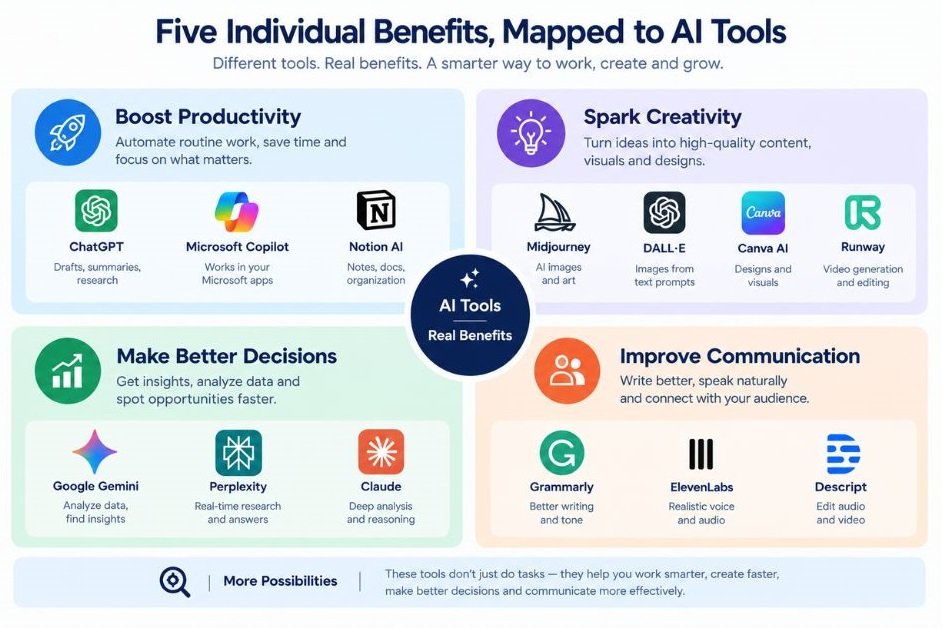
Individuals gain five things from social media: connection with distant people, free learning, career visibility, income from skills and community. Tools like WhatsApp, YouTube, LinkedIn, the YouTube Partner Program and Facebook Groups each deliver one of these, and most people only need two or three of them.
How Does Social Media Help Businesses Reach and Win Customers?
For businesses, social media delivers five commercial benefits: low-cost awareness, precise ad targeting, direct sales and lead generation, public customer service, and flexible budgets that let you test fast. The next five sections cover each one, with the tools that deliver it.
6. Build Brand Awareness Without a Big Budget
Duolingo turned its owl mascot into a running joke on TikTok and built an audience far beyond language learners. Nobody needed a television budget to make that happen.
Indian brands play the same game on Instagram Reels and YouTube Shorts, since TikTok isn’t available in India. Swiggy’s social team is known for quick, playful posts tied to news and trends, and it shows how personality can do the work that ad spend usually does.
Instagram Reels and YouTube Shorts are short-video formats that are shown to people who don’t follow you. That’s the real value. A small account can reach strangers if the first few seconds hold attention, which a static post rarely achieves.
Meta Business Suite is the free dashboard for managing Facebook and Instagram together. You can schedule posts, read messages from both platforms in one inbox and view basic performance insights, so a one-person team doesn’t need to jump between apps.
7. Reach Exactly the Right Audience With Targeted Ads
Traditional advertising buys attention and hopes the right people are in it. Paid social lets you choose who sees the ad, which changes how much waste you accept.
Meta Ads Manager is the control panel for Facebook and Instagram ads. You can target by location, age and interests, build Custom Audiences from your customer list or website visitors, and create Lookalike Audiences that mirror your best buyers. Advantage+ campaigns hand more of the audience and placement decisions to Meta’s automation, which works well once you have enough conversion data.
Meta Pixel and Conversions API report what happens after the click, such as purchases and sign-ups, back to your ad account. Without this tracking, the ad system optimises blindly.
LinkedIn Campaign Manager lets you target by job title, seniority, company size and industry. Lead Gen Forms prefill a person’s profile details, so they don’t have to type anything. Clicks usually cost more than on Meta, so it fits high-value B2B offers better than low-priced consumer products.
TikTok Ads Manager offers Spark Ads, which boost an existing organic post, including one made by a creator. It’s useful outside India, but unavailable to Indian advertisers.
8. Generate Leads and Sell Directly
Social platforms used to send people elsewhere to buy. Now the buying often happens in the chat, the shop tab or the DM.
The numbers back this up. In Sprout Social’s 2025 Index, based on a survey of 4,044 consumers in the US, UK, Canada and Australia, 81% said social media drives them to make impulse purchases. The sample covers only people who follow at least five brands, so treat it as a signal, not a universal rate.
Instagram Shopping and Facebook Shops let you tag products in posts and Stories and list a catalogue on your profile. Features and checkout options vary by country, so check what’s live in your market.
WhatsApp Business matters especially in India, where many shoppers prefer to message a seller before paying. The app adds a product catalogue, quick replies for common questions, labels to sort customers and away messages for off-hours. Click-to-WhatsApp ads open a chat directly from an Instagram or Facebook ad.
Nykaa shows the model well: product demos and creator tutorials on Instagram and YouTube that point people toward the app. Content does the selling before the checkout page ever appears.
9. Offer Customer Service Where Customers Already Are
People complain on social media because it works. A public post gets answered faster than a ticket buried in an email queue.
Sprout Social’s 2025 Index found that 73% of consumers would buy from a competitor if a brand didn’t respond to them on social. That’s a high price for silence.
Meta Business Suite Inbox pulls Messenger and Instagram messages into one view, with saved replies for repeat questions. For a small team, that’s often enough.
Sprout Social’s Smart Inbox merges messages from multiple networks into one stream. Teammates can assign conversations, add tags and see message history, which matters once more than two people share the workload. It’s a paid tool, and pricing suits teams rather than solo owners.
Hootsuite Inbox offers a similar shared view alongside scheduling, so teams already using Hootsuite for publishing can answer messages in the same place.
My recommendation: set a response target, such as under one hour during business hours, and stick to it. Speed beats perfect wording.
10. Keep Costs Flexible and Test Ideas Quickly
You can test a marketing idea on social media for the price of a modest ad budget and see results within days. Try getting that from print or outdoor advertising.
A caveat. For most business pages, organic reach is limited, so a purely free strategy rarely scales. Treat organic posting as the testing ground and paid spend as the amplifier.
Buffer uses a queue-based approach: you set posting slots, add content, and it publishes at those times across channels. There’s a free plan with limits on channels and scheduled posts, and the analytics are basic but clear.
Later is built around visual planning. Its Instagram grid preview and drag-and-drop calendar suit brands that care about how a feed looks as a whole.
Meta Ads Manager also includes an A/B test feature, which splits your budget between two versions of an ad so you can see which wins. Test one variable at a time, such as the headline or the image, or you won’t know what made the difference.
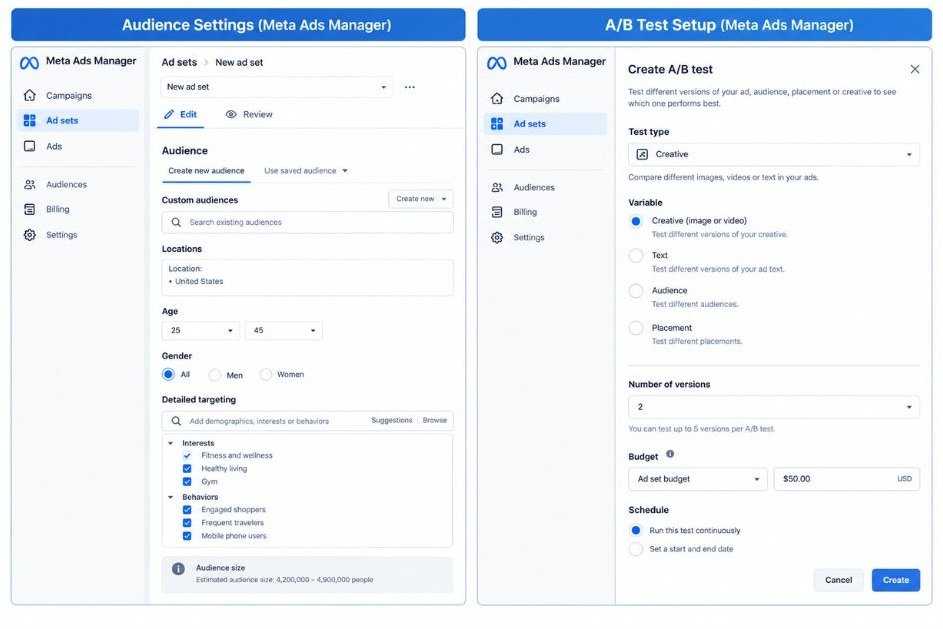
Businesses use social media to build awareness, target buyers precisely, sell through chats and shops, answer customers publicly and test ideas cheaply. Sprout Social’s 2025 Index found 81% of surveyed consumers make impulse purchases through social media and 73% would switch to a competitor if a brand ignored them.
What Do Social Platforms Give Your Team Behind the Scenes?
Behind the visible posts, social media gives teams five operating benefits: real analytics, free market research, creator partnerships, a hiring channel and an early warning system for trouble. They’re discussed less than reach and followers, and they’re often worth more.
11. Get Analytics That Show What Actually Works
Likes feel good and prove little. The useful numbers sit deeper: saves, shares, watch time and clicks.
Instagram Insights, available on professional accounts, shows reach, follows, saves and shares by content type. Saves and shares tell you more than likes, because they signal that someone found the post worth keeping or passing on.
YouTube Studio shows impressions, click-through rate, average view duration and an audience retention graph. The retention graph is the single most useful chart for improving videos, since it shows the exact second people leave.
Google Analytics 4 shows what social visitors do after they click, such as which pages they view and whether they convert. For that to work, add UTM parameters to your links. UTM parameters are short tags added to a URL, such as utm_source and utm_campaign, that tell your analytics tool which post sent the visitor. Google’s free Campaign URL Builder creates them.
12. Do Market Research and Listen to Your Audience
Social listening is the practice of tracking mentions of your brand, competitors and topics across social platforms to understand what people think. It turns public conversation into market research you didn’t have to commission.
Brandwatch is an enterprise listening platform that tracks mentions and sentiment at large scale, so it suits bigger organisations with research budgets.
Mention targets smaller teams, with keyword alerts for your brand name, competitors and industry terms across social platforms and the web.
Meta Ad Library is free and shows the active ads any brand is running on Facebook and Instagram. Before launching a campaign, spend twenty minutes looking at what your competitors are testing.
TikTok Creative Center is also free. It lists top-performing ads and trending hashtags and sounds, which helps you spot formats before they get crowded. It’s most useful for brands outside India, given TikTok’s status there.
Don’t overlook comments. Reading the objections customers raise under a competitor’s post can tell you more than a survey.
13. Partner With Creators and Turn Customers Into Marketers
Creators already hold the trust and attention you’re paying to borrow. User-generated content, or UGC, means photos, videos and reviews made by customers or creators rather than by your brand.
boAt built much of its early reputation through creator and celebrity-led content on Instagram and YouTube. Mamaearth also leaned heavily on creators and customer content to reach new buyers. Both show that trust travels through people, not logos.
Instagram’s creator marketplace lets brands search for creators by audience, location and interests, and manage collaboration requests inside Instagram.
Upfluence is a paid influencer platform for finding creators, managing outreach and tracking campaigns. It suits brands running programmes with dozens of creators, not a one-off collaboration.
Meta partnership ads let you run ads through a creator’s handle, so the ad looks like the creator’s post. These often feel more natural than ads from a brand page.
Two practical rules. Agree usage rights in writing before you reuse a creator’s content in ads. And make sure partnerships are disclosed: in India, the Advertising Standards Council of India (ASCI) requires influencers to label paid collaborations.
14. Hire Better and Strengthen Your Employer Brand
Candidates judge your company by what your people post, often more than by your careers page.
LinkedIn Jobs lets you post roles and reach candidates through the platform and its network, while LinkedIn Recruiter is a paid tool for searching candidates by skills and experience, saving searches and sending InMail messages. Recruiter suits companies hiring regularly, because it’s priced per seat.
Hootsuite Amplify is an employee advocacy tool. You prepare approved posts, and staff share them to their own networks with one click. Posts from employees often get more engagement than posts from the company page, which makes the tool a low-cost way to widen reach.
Instagram and YouTube work for behind-the-scenes content: office days, team projects and honest looks at the work. It doesn’t need polish. It needs to be real.
15. Spot Trends Early and Manage a Crisis Faster
Bad news travels on social media first. So does good news, and trends move even faster.
Sprout Social and Brandwatch both offer alerts that notify you when mentions of your brand spike. A sudden jump at 2 a.m. is worth knowing about before your first customer service message arrives.
Hootsuite streams let you monitor keywords, hashtags and accounts live in one dashboard. Native search on X and Instagram is a free alternative for smaller brands.
Meta Business Suite and Buffer let you pause or delete scheduled posts. This sounds minor until a national tragedy hits and your cheerful promotion goes live anyway. Many brands now pause all scheduled content the moment major bad news breaks.
Build a crisis checklist before you need one. Decide who approves public statements, who monitors replies and when to move a complaint to a private channel. Writing it during a crisis is too late.
Behind the scenes, social media gives teams analytics through tools like Instagram Insights and Google Analytics 4, research through social listening, creator partnerships, hiring reach through LinkedIn and an early warning system for crises. These benefits depend on tracking and process, not follower count.
Which Social Media Tool Fits Which Goal?
Pick tools by goal, not by popularity. For awareness, use Meta Business Suite plus a design and video editor. For paid growth, use Meta Ads Manager or LinkedIn Campaign Manager. For service, use a shared inbox. For measurement, use native insights plus Google Analytics 4.
| Goal | Tools | Best for | Main limitation |
|---|---|---|---|
| Scheduling and planning | Buffer, Later, Meta Business Suite | Small teams posting a few times a week | Free plans cap channels or features |
| Design and video | Canva, CapCut | Non-designers making Reels and carousels | Popular templates make brands look alike, so customise |
| Paid ads | Meta Ads Manager, LinkedIn Campaign Manager, TikTok Ads Manager | Targeted growth | Costs rise as audiences saturate; TikTok is unavailable in India |
| Customer messages | WhatsApp Business, Sprout Smart Inbox, Hootsuite Inbox | Fast replies and team assignment | Team features usually need paid plans |
| Listening and research | Brandwatch, Mention, Meta Ad Library | Tracking mentions and competitors | Enterprise tools cost more |
| Analytics | Instagram Insights, YouTube Studio, Google Analytics 4 | Showing what drives results | GA4 needs UTM discipline to be useful |
| Hiring | LinkedIn Jobs, LinkedIn Recruiter, Hootsuite Amplify | Employer brand and recruiting | Recruiter is a paid seat |
| Creator partnerships | Instagram creator marketplace, Upfluence, partnership ads | Influencer programmes | Vetting takes time; some tools charge fees |
Most teams don’t need everything on this list. A solo founder can run on Meta Business Suite, Canva, CapCut and Google Analytics 4, all with free options. Add paid tools only when a specific problem justifies them, such as a shared inbox once two people handle messages.
What Are the Downsides You Should Plan For?
Social media’s main downsides are lost time, dependence on algorithms you don’t control, privacy and misinformation risks, and reputational exposure. None cancels the benefits above, but each needs a plan.
Time is the first one. Built-in controls such as Instagram’s time management settings and your phone’s Screen Time tools can cap daily use. Use them. Honestly, most people only set limits after a bad week.
Algorithm dependence is the second. A platform can change how it distributes content overnight, and your reach goes with it. The fix is to own an audience channel too, such as an email list or website, so you aren’t renting your entire customer base.
Privacy and misinformation are the third. Review your privacy settings, turn on two-factor authentication and treat unverified claims with suspicion before sharing them. Research on social media and wellbeing is mixed, and effects differ by person, but if scrolling leaves you consistently worse off, that’s useful information.
Reputation is the last. Anything you post can be screenshotted and shared out of context, which is why the crisis checklist from benefit 15 matters for individuals too.
How Do You Start Using These Benefits in 30 Days?
Start with one goal, two platforms and a simple weekly routine. Thirty days is enough to see which content earns replies, saves and clicks, which tells you where to spend more time or money.
- Pick one goal. Choose a single benefit from this article, such as getting leads, finding a job or building an audience.
- Choose two platforms. Select the ones where your audience already spends time. B2B services usually start with LinkedIn, and visual consumer products with Instagram and YouTube Shorts.
- Set up professional accounts. Switch Instagram to a professional account, create a Facebook Page or LinkedIn Page, and add a clear bio with one link.
- Build a content bank. Create 12 posts in Canva and CapCut, mixing short videos, carousels and one personal or behind-the-scenes post a week.
- Schedule the posts. Use Buffer, Later or Meta Business Suite to publish three times a week across your two platforms.
- Add tracking. Put UTM parameters on every link and check that Google Analytics 4 records the visits.
- Reply fast. Answer every comment and message within your set response window, using saved replies for common questions.
- Review in week four. Keep the formats with the most saves, shares and clicks, drop the rest, and put a small ad budget behind your best post in Meta Ads Manager.
That’s a manageable routine for one person. It’s also enough to build a real habit before you add complexity.
Conclusion
The advantages of social media only count when you pick one benefit, choose the right tool for it and measure the result. Individuals get the most from connection, learning, career visibility, income and community. Businesses get the most from targeted reach, direct sales, public service, fast testing and the data that sits behind every post.
Three things matter most. Match the tool to the goal, not to the trend. Track what happens after the click, with UTM links and Google Analytics 4. And plan for the downsides before they show up, because algorithm changes and bad news both arrive without warning.
So here’s your next step: pick one benefit from this list and run the 30-day plan on it. Two platforms, three posts a week, one goal. You’ll learn more from a month of doing it than from another month of reading about it.
FAQs
What is social media, and how do businesses actually use it?
Social media is any online platform where people create, share and react to content and message each other. Businesses use it to publish content, run targeted ads, answer customer questions and measure results. In practice, that means posting on a few platforms, replying in comments and DMs, and tracking clicks with tools like Meta Business Suite and Google Analytics 4.
Which social media platform is best for a small business?
It depends on where your customers spend time. Visual consumer products usually do well on Instagram and YouTube Shorts, B2B services on LinkedIn, and local businesses on Facebook and WhatsApp Business. Start with two platforms rather than five, since consistency beats spreading yourself thin.
Instagram vs Facebook: which should I start with?
Instagram tends to suit younger audiences and visual content such as Reels and product photos. Facebook tends to suit local communities, older audiences and group-based selling. Meta Business Suite lets you manage both from one dashboard, so you can begin where your customers already are and add the other later.
How much time should I spend on social media each day?
For a small business running two platforms, 30 to 45 minutes a day is workable if you plan and schedule content weekly instead of posting ad hoc. For personal use, set a limit that fits your life and use your phone’s Screen Time or app time management tools to enforce it. The right number is the one that leaves you feeling better, not worse.
Can social media actually help me get a job?
Yes, mainly through LinkedIn. Recruiters search by skills and job titles, so a clear headline, an updated profile and a Featured section with your best work all help. Designers and creatives can add a Behance portfolio. Still, referrals and direct applications matter too, so treat social media as one channel, not the whole search.
Is social media marketing even worth it?
It’s worth it when you tie it to a measurable goal and have the capacity to post consistently and reply promptly. Sprout Social’s 2025 Index found 81% of surveyed consumers make impulse purchases through social, so the buying behaviour exists. But organic reach is limited, and if you can’t track results, you can’t tell whether it’s working. If you can’t commit the time, it probably isn’t worth starting.
How do I track sales that come from social media?
Add UTM parameters to every link you share, then check the traffic and conversions in Google Analytics 4. Install the Meta Pixel and Conversions API so Meta Ads Manager can see purchases after an ad click. For chat-based sales, use a unique discount code or a dedicated WhatsApp Business number per campaign, so you can match sales to sources.
Why is nobody seeing my posts?
Common causes are a new account with little history, content that doesn’t earn saves, shares or watch time, inconsistent posting and a hook that doesn’t grab attention in the first three seconds. Check Instagram Insights for how much reach comes from non-followers, then test shorter videos with a stronger opening. Collaborating with other creators also helps new accounts reach new audiences.
Do I need paid tools like Hootsuite or Sprout Social to start?
No. Meta Business Suite, YouTube Studio, the free plans of Buffer and Canva, and CapCut cover most beginner needs. Upgrade when a specific problem appears, such as needing approval workflows, a shared inbox for several teammates or social listening across many keywords.
How do I protect my privacy on social media?
Run each platform’s privacy checkup, turn on two-factor authentication and review which third-party apps can access your account. Limit who can see your tagged photos and location, and avoid posting your travel plans in real time. If you run a business, keep your personal and professional accounts separate.


Scope Of Marketing In 2026: Career Opportunities, Skills
October 9, 2026 - 9:44 am[…] Social Media Manager […]
What Is PR In Social Media? A Complete Beginner's Guide
October 16, 2026 - 8:38 am[…] Social media PR adds a direct line to audiences. You can respond in minutes, see reactions in real time, and talk to the same people who read the coverage. The two overlap constantly, because a good post can earn a mention and a good mention gets shared on social. […]