
Most YouTube videos don’t fail because the content is weak. They fail because the right viewer never sees them. Someone types a query, YouTube shows a handful of results, and yours isn’t among them because the title, description and topic didn’t match what that viewer wanted. The right YouTube SEO Tools shorten that guessing game, and they do it with real search data instead of instinct.
This guide covers 20 tools, from free options inside YouTube Studio to paid suites, keyword platforms and newer AI products built around outlier videos. Each entry tells you what the tool does, who it suits and where it falls short. Prices moved a lot through 2025 and 2026 (vidIQ, for instance, now meters its AI features through monthly credits), so we describe plan structure rather than quote numbers that go stale. Check each tool’s site for current pricing before you pay.
We grouped the tools by the job they do, not by a ranking. A free tool you open every week beats a paid suite you open twice. By the end you’ll know which two or three tools to start with and which ones to ignore for now.
What Should You Check Before Paying for Any Tool?
Check four things: whether the tool uses YouTube-specific data, whether it fits the way you already work, whether its free plan lets you test it properly, and whether its advice actually changes what you publish. If a tool only hands you scores you never act on, it isn’t worth the subscription.
Here’s the context that makes those checks matter. YouTube matches a viewer’s query to your title, description and the content of the video, then watches how viewers respond. Do they click? Do they keep watching? No tool controls that second half. Tools help with the first half and give you faster feedback on the second.
YouTube’s own testing feature shows how much the response side counts. According to YouTube’s Help documentation, Test & Compare picks a preferred thumbnail based on watch time share, not raw click-through rate. That design avoids rewarding clickbait, and it’s a good rule for judging any tool: does it push you toward clicks only, or toward videos people finish?
Keyword data is where tools differ most. Good YouTube Keyword Research Tools show you search volume or a close proxy, competition and related queries. Weak ones show a single score with no explanation of how it was calculated.
Before you buy anything, run through this list:
- Data source: Does the tool use YouTube search data, autocomplete suggestions or general web estimates?
- Workflow fit: Does it sit inside YouTube Studio as a browser extension, or live in a separate dashboard you’ll forget to open?
- Free plan depth: Can you test the one feature you actually need without paying?
- Actionability: Does it tell you what to change on a specific video?
- Pricing model: Is it flat, per channel, per seat or metered by credits?
Judge any YouTube optimization tool by whether its advice changes what you publish, not by how many scores it shows. YouTube’s own Test & Compare feature selects winners by watch time share rather than click-through rate, so tools that chase clicks alone can mislead you. Use YouTube-specific data wherever you can, and treat estimates as directional.
Quick Comparison: All 20 Tools at a Glance
This table sorts each tool by its strongest use and notes whether you can start without paying. Shortlist two or three here, then read those entries in full, because the details under each tool decide whether it fits your channel.
| # | Tool | Best for | Free way to start | Group |
|---|---|---|---|---|
| 1 | YouTube Studio | First-party data, Research tab, testing | Yes, free | Native |
| 2 | Google Trends | Validating topic demand and seasonality | Yes, free | Native |
| 3 | Social Blade | Benchmarking channel growth | Yes, basic stats | Native |
| 4 | AnswerThePublic | Question-based topic ideas | Limited free searches | Native |
| 5 | vidIQ | Research, ideas, competitor tracking | Free plan with limits | Suite |
| 6 | TubeBuddy | Bulk edits and in-Studio workflow | Free plan with limits | Suite |
| 7 | Morningfame | Plain-language analytics guidance | Trial, check site | Suite |
| 8 | TubeRanker | Rank tracking and channel audits | Free audit and tag tools | Suite |
| 9 | Ahrefs | Search volume and cross-channel SEO | Free tools, core paid | Keyword |
| 10 | Semrush | Teams linking video and web SEO | Check site | Keyword |
| 11 | Keyword Tool | Long-tail autocomplete mining | Free suggestions, volume paid | Keyword |
| 12 | Keywords Everywhere | Volume data inside YouTube search | Check site | Keyword |
| 13 | Taja AI | Automated metadata drafts | Trial, check site | AI |
| 14 | OutlierKit | Outlier videos and low-competition keywords | Trial credits | AI |
| 15 | 1of10 | Outlier video discovery | Free plan with limits | AI |
| 16 | Subscribr | Research-to-script workflow | Check site | AI |
| 17 | Rapidtags | Quick tag suggestions | Yes, free | Support |
| 18 | YT Cockpit | Niche analysis | Trial, check site | Support |
| 19 | Canva | Thumbnail design | Free plan | Support |
| 20 | Metricool | Cross-platform reporting | Check site | Support |
Which Free and Native Tools Should Every Channel Start With?
Start with YouTube Studio and Google Trends. Both are free, and between them they show what your own viewers did and whether demand for a topic is rising. Add Social Blade for benchmarks and AnswerThePublic when you’re short on question-style video ideas.
1. YouTube Studio (Research Tab, Analytics and Test & Compare)
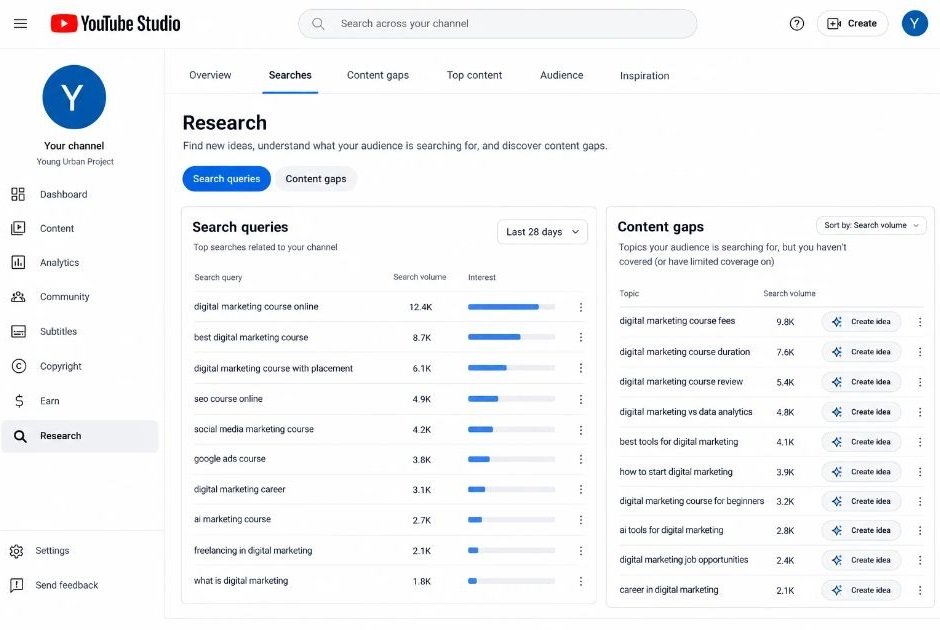
YouTube Studio is the only tool here that knows exactly what YouTube’s own viewers did, which is why it comes first. The Research tab inside Analytics shows what viewers search for across YouTube, including topics where demand looks bigger than the supply of videos. The Traffic Source report lists the search terms that already bring people to your existing videos.
The newer piece is Test & Compare. You can test up to three thumbnails on a video, and per Toptal’s creator guide it expanded in late 2025 to cover titles and title-thumbnail combinations. You need YouTube Partner Program access and advanced features enabled, and the feature currently works on the desktop version of Studio. Expect a test to take days, sometimes up to about two weeks, to settle.
MrBeast reportedly runs up to 20 thumbnail variations per video with a dedicated team, according to Social Media Today. You don’t need that scale. Testing two versions of your next thumbnail costs nothing.
The limit is scope. Studio shows your channel’s data and general search interest, not competitor keyword scores.
Best for: every channel, from day one.
2. Google Trends
Google Trends answers a question Studio can’t: is interest in this topic rising or fading? Switch the search type to YouTube Search and you get relative interest on a 0 to 100 scale, plus seasonality and regional breakdowns.
Try comparing two phrasings head to head, like “home workout” and “gym workout at home.” The winner tells you which wording viewers use more. For creators in India, filtering by state is useful because search habits shift across regions and languages.
Here’s the catch. Trends shows relative popularity, not search volume. A topic scoring 100 can still be tiny, so pair it with a volume tool from the keyword section.
Best for: validating a topic and timing seasonal uploads.
3. Social Blade
Social Blade tracks public channel statistics: subscriber and view trends, rankings and growth history. That makes it a quick benchmark. If a rival channel’s growth jumped after a format change, you can see roughly when, then watch what they changed.
It won’t give you keywords, and its earnings estimates are rough guesses, so don’t build a business case on them. Treat it as a mirror for competitor momentum.
Best for: benchmarking channels in your niche.
4. AnswerThePublic
AnswerThePublic turns a seed topic into the questions, comparisons and prepositions people type into search engines. Feed it “meal prep” and you’ll get “how,” “why” and “vs” style phrases that map neatly to video titles and chapters.
One caution: its data comes from search-engine autocomplete, not YouTube’s own suggestions. Take its ideas, then check them in YouTube’s search bar to confirm viewers use the same wording. Free searches are limited, so batch your topics.
Best for: question-led video ideas and FAQ chapters.
YouTube Studio’s Research tab, Traffic Source report and Test & Compare feature give creators first-party data that no third-party tool can fully match. As of late 2025, Test & Compare supports titles and thumbnails, and it selects winners by watch time share. Pair Studio with Google Trends to check demand before you invest in a video.
Which All-in-One Suites Handle Daily Optimization?
vidIQ leans toward research and ideas, TubeBuddy toward in-Studio workflow and bulk edits, Morningfame toward explaining your analytics in plain language, and TubeRanker toward rank tracking. Pick the one whose strongest feature matches the job you do every upload.
These YouTube video optimization tools sit closest to your publishing routine, which is both their strength and their risk. They’re easy to use daily, and they’re easy to over-trust. Treat their scores as prompts to check, not verdicts.
5. vidIQ
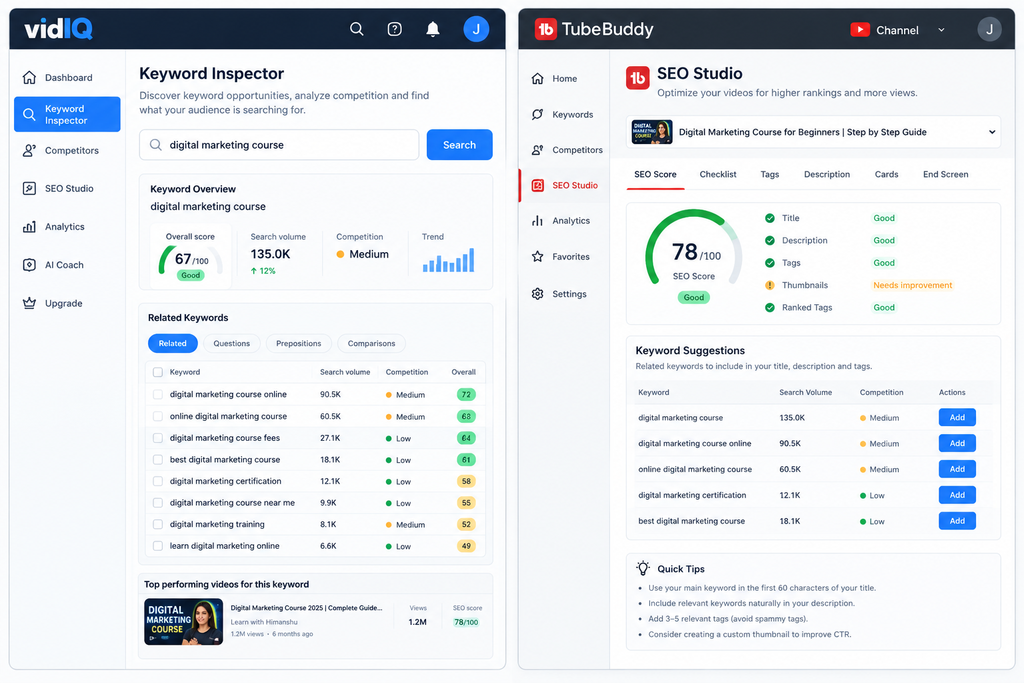
vidIQ works as a browser extension and a full web app, so you can research without opening YouTube. Its keyword inspector shows search volume, competition and an overall score per term. It also tracks competitor channels and serves daily AI-generated video ideas.
Pricing needs a careful look. As of mid-2026, vidIQ meters AI features through monthly credits, and plan names have changed over time, so confirm what each tier includes. A Capterra reviewer in April 2026 called the paid plans expensive for smaller creators and some AI suggestions generic.
One more detail. vidIQ’s own comparison page says it doesn’t offer a dedicated title or thumbnail split-testing tool, so use YouTube’s Test & Compare for that.
Best for: deciding what to make next.
6. TubeBuddy
TubeBuddy runs as an overlay inside YouTube Studio, so its tools appear where you already edit. Keyword Explorer returns search volume, competition and related terms. SEO Studio walks you through optimizing a video, and bulk processing lets you update descriptions, cards or end screens across many videos at once.
That bulk editing is the reason many established channels keep it. Some reviewers point out that YouTube’s free Test & Compare overlaps with TubeBuddy’s A/B testing, which shifts the paid pitch toward catalog management. TubeBuddy’s displayed prices also vary by region, so check your own checkout page.
Best for: channels with a large back catalog to clean up.
7. Morningfame
Morningfame takes the opposite approach to dashboard-heavy suites. It reads your channel analytics and explains in plain language what’s working, what isn’t and what to try on specific videos. That helps newer creators who stare at Studio and can’t tell what matters.
It offers less raw research depth than vidIQ or the keyword platforms. Think of it as an analyst who summarizes your channel rather than a database you query. A free trial has been available, but check the site for the current offer.
Best for: small channels that want guidance, not more charts.
8. TubeRanker
TubeRanker focuses on rank tracking: you enter a video and target keywords, and it shows where that video appears in YouTube search over time. It also runs channel audits and offers tag and keyword tools, some of them free.
Rank tracking sounds minor until you need it. It tells you whether the title change you made last week moved the video up, or whether you were just seeing normal fluctuation. The downside is a narrower feature set than the bigger suites.
Best for: checking whether your optimizations actually moved rankings.
Which Tools Find Keywords People Actually Search?
Use a mix of YouTube autocomplete, a volume tool such as Ahrefs or Keywords Everywhere, and Google Trends. Autocomplete shows what people type, volume tools show how often, and Trends shows direction. No single source gives all three.
The best YouTube Keyword Research Tools combine real query data with competition signals. You can start free: type your topic into the YouTube search bar, note the suggestions that appear, then repeat with a letter added at the end. The tools below speed that process up and add numbers.
9. Ahrefs
Ahrefs is known for web SEO, but its Keywords Explorer includes YouTube as a search engine option, and it also offers a free YouTube keyword tool. Its strength is a transparent approach to search volume and keyword difficulty, plus the ability to see whether Google shows video results for a query.
That last point matters. A keyword where Google puts YouTube videos in its results can bring traffic from two search engines. The drawback is cost: paid plans make little sense if you only need YouTube data.
Best for: creators or teams who already use Ahrefs for a website.
10. Semrush
Semrush offers YouTube keyword data alongside its Google research, which suits teams that connect video to blog and landing page strategy. You can find a topic’s keywords once and plan the video, article and short clips together.
Reviewers consistently note that its YouTube depth is lighter than vidIQ’s or TubeBuddy’s, and the interface can feel heavy for a solo creator. Choose it for agency-style work where Google and YouTube share one plan.
Best for: agencies and in-house marketing teams.
11. Keyword Tool (keywordtool.io)
Keyword Tool mines YouTube autocomplete at scale. Enter a seed phrase and it returns hundreds of long-tail variations, with language and country settings so you can target a specific audience. Free use shows suggestions; search volume sits behind paid plans.
Long-tail phrases are where smaller channels win. A query with fewer searches but little competition can rank a new video faster than a broad term dominated by large channels. Verify volume on the paid tier before you commit to a title.
Best for: finding low-competition, long-tail phrases.
12. Keywords Everywhere
Keywords Everywhere is a browser extension that adds search data to pages you already visit, including YouTube search results. Type a query and you see related keywords and volume figures without opening another tab.
It’s convenient for quick checks during scripting. Its credit-based pricing and its dependence on estimates mean you should treat numbers as directional and confirm with YouTube’s autocomplete. Check the current plan details on its site.
Best for: fast keyword checks while you write.
Do AI-Powered Tools Actually Help You Rank?
They help you work faster, not think better. AI-powered YouTube SEO tools can draft titles, spot outlier videos and suggest keywords in minutes. They can’t judge whether an idea fits your audience, and their output often reads generic until you edit it.
An outlier is a video that performs far above its channel’s usual average. Studying outliers tells you which topics and packaging work beyond one channel’s loyal audience, which is a better signal than a competitor’s top video alone.
13. Taja AI
Taja AI focuses on automated metadata: titles, descriptions and tags drafted from your video’s topic. Some reviewers rank it highly for creators who dislike writing descriptions and want a first draft quickly.
Treat the output as a starting point. AI-written descriptions can sound alike across channels, and YouTube’s systems have no reason to reward sameness. Edit the first lines by hand, since those appear in search results.
Best for: drafting metadata fast on high-volume upload schedules.
14. OutlierKit
OutlierKit centers on outlier detection, low-competition keyword discovery and competitor analysis. You scan a niche for videos that beat their channel’s average, then check which keywords sit behind them.
Much of the public comparison content about OutlierKit comes from its own blog, so weigh those claims accordingly and test it on a trial. Its trial runs on credits, which lets you check fit before paying.
Best for: finding proven video angles in a new niche.
15. 1of10
1of10 popularized outlier video discovery as a product. It surfaces videos that outperform their channels, so you can see patterns in topics, titles and thumbnails that travel beyond one audience.
A free plan with limits exists, and paid pricing has been a point of debate in reviews, so compare it against OutlierKit and vidIQ’s outlier features before you subscribe. It’s a research tool, not a metadata editor.
Best for: idea discovery from videos that beat the odds.
16. Subscribr
Subscribr sits on the creation side of the workflow. It helps you research a topic and turn it into a script, which means your keyword and structure decisions happen before filming, where they matter most.
It doesn’t replace research tools. A common pairing is an outlier or keyword tool for deciding what to make, then Subscribr for shaping the script. Check the current plans on its site.
Best for: turning research into a structured script.
Which Tools Cover Tags, Niches, Thumbnails and Reporting?
Use Rapidtags for tag ideas, YT Cockpit for niche analysis, Canva for thumbnails and Metricool for cross-platform reporting. None of them is a full suite, but each fills a gap the bigger tools handle less well.
17. Rapidtags
Rapidtags generates tag suggestions from a topic, free of charge. It’s fast, which is its main appeal.
Keep expectations low. YouTube’s Help documentation says tags have minimal impact on discovery and mostly help with commonly misspelled terms. Spend your time on the title, thumbnail and first lines of the description instead, and use tags as a small finishing step.
Best for: quick tag ideas at upload time.
18. YT Cockpit
YT Cockpit is built for niche analysis: it helps you see how crowded a topic is and where smaller channels are finding traction. That’s useful before you commit to a content direction.
It’s a narrower tool than the big suites, and it’s less widely reviewed. Use the trial to test one niche you’re seriously considering, then decide.
Best for: validating a niche before you build a series.
19. Canva
Canva has no SEO data, yet it belongs here because thumbnails decide whether a ranking turns into a click. Its templates, free plan and drag-and-drop editor let you produce several versions quickly, which is exactly what Test & Compare needs.
Design three distinct options, not three near-copies. Tests tell you little when the variations barely differ.
Best for: producing thumbnail variations to test.
20. Metricool
Metricool handles analytics, scheduling and reporting across social platforms. If YouTube sits beside Instagram, LinkedIn and other channels, one report saves real time.
Don’t expect deep YouTube keyword research from it. It earns its place for teams who must show stakeholders cross-channel results every month.
Best for: agencies and brands reporting across platforms.
How Do You Pick the Right Stack for Your Channel?
The best YouTube SEO tools for you depend on channel size and budget. A new channel needs only free tools. A solo creator adds one paid suite. A team adds a keyword platform and a reporting tool. Buy in that order, not all at once.
Here are three stacks that work:
- Free stack: YouTube Studio, Google Trends, YouTube autocomplete and Rapidtags.
- Solo creator stack: the free stack plus vidIQ or TubeBuddy, and Canva for thumbnails.
- Team stack: Ahrefs or Semrush for cross-channel keywords, a suite for daily optimization, and Metricool for reporting.
Add one of the AI-powered YouTube SEO tools only after you have a working process to speed up. Otherwise you automate guesswork.
Then run the same routine on every upload:
- Step 1: Pick a topic and check demand in Google Trends and YouTube autocomplete.
- Step 2: Confirm volume and competition in one of your YouTube Keyword Research Tools.
- Step 3: Write a title that leads with the main phrase and promises a clear result.
- Step 4: Place the main phrase and a short value statement in the first two lines of the description.
- Step 5: Create two or three distinct thumbnails and start a Test & Compare run.
- Step 6: Review Studio’s Traffic Source report after two weeks and adjust.
Your YouTube video optimization tools only speed up steps three to five. The thinking in steps one and two is still yours.
A free stack of YouTube Studio, Google Trends and autocomplete covers the research and testing a new channel needs. Solo creators gain most from adding one suite such as vidIQ or TubeBuddy, while teams benefit from a keyword platform and cross-channel reporting. Add AI tools only once you have a repeatable process to speed up.
What Mistakes Make These Tools Useless?
The most common failure is buying before you have a process. Tools amplify a routine; they don’t create one. The other mistakes are trusting scores blindly, chasing high-volume keywords you can’t win, and skipping thumbnails and the first lines of the description.
Here’s the problem with the first one. People subscribe to YouTube SEO Tools, run one keyword search and then never open them again. Pick one task per upload, like checking the keyword before you title the video, and make it a habit.
Trusting scores blindly is the second trap. A “keyword score” blends volume and competition using each tool’s own formula, so two tools can disagree on the same phrase. Use scores to shortlist, then judge with your own eyes: look at who ranks, how old their videos are and whether you can offer something better.
Third, many creators chase the biggest keyword. A new channel competing for a head term against channels with millions of subscribers rarely wins. Long-tail phrases are slower to find but faster to rank.
Last, tools can’t fix weak packaging. If the thumbnail doesn’t earn the click, ranking higher only produces more impressions that go nowhere. Fix the video’s promise first.
Final Takeaways
Three ideas matter most. Start with YouTube Studio and Google Trends, because first-party data and demand checks cost nothing. Add one paid suite only when you have a routine it can speed up. And use AI tools for drafts and ideas, never as the final word on what your audience wants.
The best YouTube SEO tools are the ones you open every week. Pick two from this list, run them on your next five uploads, and compare the results in Studio’s Traffic Source report. Then keep what moved your numbers and drop the rest.
Search is the one growth channel on YouTube where careful work compounds, since a ranked video keeps bringing viewers long after upload.
FAQs
What is YouTube SEO?
YouTube SEO is the practice of optimizing your titles, descriptions, thumbnails and video content so YouTube’s search and recommendation systems can match your videos to viewers’ queries. It also covers how viewers respond, such as clicks and watch time. Tools help you find the right keywords and check your work.
Do I really need a paid tool to rank on YouTube?
No. YouTube Studio, Google Trends and YouTube’s search suggestions cover the core research for a new channel. Paid tools save time and add competitor data, so they pay off once you upload often enough to use them weekly.
vidIQ vs TubeBuddy: which one is better?
It depends on your main job. vidIQ is stronger for research, ideas and competitor tracking, while TubeBuddy is stronger for in-Studio workflow and bulk edits across many videos. Many established creators try both free plans, then keep one.
Is vidIQ worth it for small channels?
It can be, if you’ll use the keyword and idea features weekly. Start with the free plan, check how fast you use up the AI credits, and upgrade only if you hit limits on something you actually need. Reviewers often say paid tiers feel pricey for very small channels.
Which is the best free tool to start with?
YouTube Studio. It uses first-party data from your own viewers, includes the Research tab and Traffic Source report, and gives you Test & Compare once your channel qualifies. Add Google Trends to check topic demand.
How do I find keywords for a new video?
Type your topic into YouTube’s search bar and note the autocomplete suggestions, then check demand in Google Trends. Next, confirm volume and competition in a keyword tool like Ahrefs, Keyword Tool or vidIQ. Pick a phrase you can realistically win, then use it in the title and first lines of the description.
Do tags still matter on YouTube?
Only a little. YouTube’s Help documentation says tags have minimal impact and mainly help with commonly misspelled terms. Put your effort into the title, thumbnail and description first.
Who should use outlier discovery tools like OutlierKit or 1of10?
Creators picking a new niche or looking for fresh angles get the most from them. If you already know your audience and topics well, a simpler keyword tool is often enough. They’re research tools, not metadata editors.
Why isn’t my video ranking even after I optimized it?
Check four things. Is the keyword too competitive for your channel’s size? Does the thumbnail earn clicks? Do viewers stay past the first minute? And did you give it enough time? Use rank tracking such as TubeRanker’s to see whether position is moving, then change one element at a time.
Can these tools hurt my channel?
Reputable tools use YouTube’s approved access, and the risk is usually poor advice rather than damage. Don’t stuff keywords, copy competitor titles word for word, or accept AI-written metadata without editing. Review permissions when you connect a tool and remove any you no longer use.

