
Most AI products don’t fail because the model was weak. They fail because nobody agreed on the problem, the data was a mess, or the launch plan stopped at “release it and see.” If you’re a product manager, founder or marketer building something with AI inside it, the AI Product Development Lifecycle is the map that keeps you from those three traps.
It’s different from a normal software lifecycle. Your output is probabilistic, your data is a living dependency, and your product can get worse after launch without a single line of code changing.
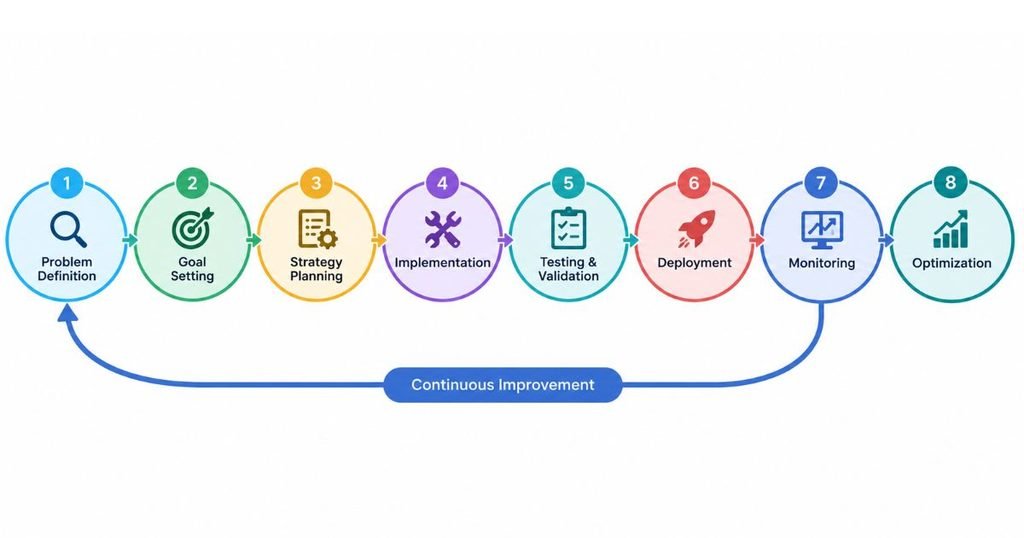
This guide walks through eight stages, from the first idea to post-launch monitoring. Each stage names the tools practitioners actually use, what each one does, and where it falls short.
Why Do Most AI Products Fail Before They Launch?
Most AI products fail because of unclear problems, poor data and missing success metrics, not because of weak algorithms. The technology is rarely the bottleneck.
The numbers are blunt. RAND Corporation research found that over 80% of AI projects fail, about twice the failure rate of IT projects that don’t involve AI. RAND’s interviews with 65 data scientists and engineers pointed to one root cause: teams weren’t clear on the problem the AI was supposed to solve.
Generative AI shows the same pattern. Gartner predicted in 2024 that at least 30% of generative AI projects would be abandoned after the proof-of-concept stage by the end of 2025. A later Gartner analysis put the actual figure at at least 50%, citing poor data quality, weak risk controls, rising costs and unclear business value.
Look at that list again. Data, risk, cost, value. Not one of them is “the model wasn’t smart enough.”
Research from RAND and Gartner shows that most AI projects stall because of unclear problem definition, poor data quality, weak risk controls and unmeasured business value. Model capability is rarely the deciding factor. A structured lifecycle exists to catch these issues before money is spent on production.
So the lifecycle below is built around the places projects break, not around the places engineers like to spend time.
Stage 1: How Do You Define the Problem and Test Feasibility?
You define the problem by writing down who has it, how they handle it today, and what measurable outcome would prove the AI is worth building. Then you test whether AI is even the right answer.
Start with a plain sentence: “Support agents spend 11 minutes per ticket finding the right help article, and we want that under 3.” That’s a problem. “We want to add AI to support” is a wish.
Duolingo is a good example of the discipline. When it launched Duolingo Max in 2023 on top of OpenAI’s GPT-4, it didn’t bolt on a general chatbot. It built two narrow features: explaining why an answer was wrong, and role-play conversation practice. Each one targeted a specific gap in how language learners get feedback.
Run every idea through this feasibility check before it gets a budget:
- Write the user problem and the current workaround in one sentence each.
- Define one primary success metric and one guardrail metric (for example, resolution time and customer satisfaction).
- Confirm the data you need exists, you’re allowed to use it, and it’s good enough.
- Check whether a rules-based or non-AI solution would work at lower cost.
- List the ways the AI can be wrong and what each error costs the user.
Honestly, step 4 kills more ideas than any other, and that’s a good thing.
Dovetail
Dovetail is a research repository where you store interview recordings, transcripts, notes and survey responses, then tag and cluster them into themes. It’s useful at this stage because AI problem statements should come from evidence, not opinions. Its built-in AI summaries speed up the first pass, but you still need to read raw quotes before trusting a theme. Small teams may find it more than they need.
Miro
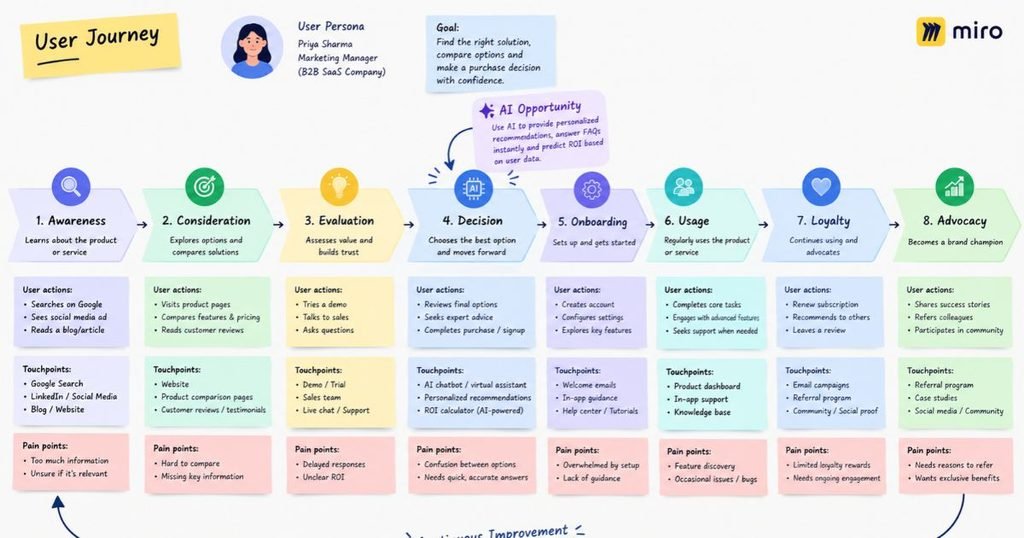
Miro is an online whiteboard where teams map user journeys, sketch opportunity trees and run prioritisation workshops together. Use it to lay out the current workflow and mark exactly where an AI step could remove effort. Its strength is speed and collaboration. Its weakness is that boards turn into clutter if nobody owns them, so name one person to keep the final version clean.
Stage 2: How Do You Build a Data Foundation You Can Trust?
A trustworthy data foundation means your data is relevant, labelled correctly, validated automatically and versioned so you can reproduce any past result. If you skip this stage, every later stage inherits the damage.
Data work is where timelines slip. Collecting is the easy part. Cleaning, labelling, checking rights and handling personal information take longer than anyone budgets for. And in India, remember that the Digital Personal Data Protection Act, 2023 shapes what you can collect and how you must handle it, so involve legal early.
Three tools cover the core jobs.
Label Studio
Label Studio is an open-source data labelling tool from HumanSignal that supports text, images, audio, video and time-series data. You define a labelling interface, assign tasks to annotators, and export clean datasets. It can also connect to a model to pre-label items so humans only correct them, which cuts effort. The catch: label quality depends on your guidelines, so write them down and measure agreement between annotators.
Great Expectations
Great Expectations is an open-source Python library for data validation. You write “expectations” such as “this column has no nulls” or “values fall between 0 and 100,” and it checks every new batch against them and produces readable reports. It catches broken pipelines before they quietly poison a model. It won’t tell you whether data is representative or fair, so it complements human review rather than replacing it.
DVC (Data Version Control)
DVC works alongside Git to version large datasets and model files that Git can’t handle, storing them in cloud storage like Amazon S3 or Google Cloud Storage while tracking small pointer files in your repository. That means you can answer “which data trained the model we shipped in March?” in seconds. It has a learning curve for non-engineers, but for any team retraining models, it’s close to mandatory.
Data readiness is the most common hidden blocker in AI product work. Teams need labelled, validated and versioned data before modelling begins. Tools like Label Studio, Great Expectations and DVC cover labelling, validation and reproducibility respectively.
Stage 3: How Do You Prototype an AI Product Fast?
You prototype by building the smallest working version that real users can try, using existing models and simple interfaces, within days rather than months. The goal is to learn whether the idea works, not to build the final architecture.
Here’s the trap. Teams spend three months on infrastructure for an idea that users reject in the first afternoon. Prototype first with a hosted model or an open-source one, put it in front of ten real users, and watch where it breaks.
Spotify’s AI DJ followed a similar logic. It launched in beta in early 2023 to a limited audience, combining personalisation signals with a synthetic voice, and the company learned from listener behaviour before widening access.
Hugging Face Hub
Hugging Face Hub hosts hundreds of thousands of open models and datasets, plus the Transformers library for loading them in a few lines of code. It’s where you test whether an open model can handle your task before paying for a proprietary API. Model quality and licences vary widely, so check each model card and its licence terms before building a business on it.
Gradio
Gradio is a Python library, now part of Hugging Face, that turns a model into a shareable web interface with a few lines of code, including a temporary public link. It’s ideal for putting a prototype in front of stakeholders by Friday afternoon. It isn’t designed for polished production interfaces, and you’ll rebuild the front end later.
Figma
Figma is the standard interface design tool, and for AI products it earns its place by letting you design the uncomfortable states: loading, low confidence, wrong answer, and “I can’t help with that.” Most AI prototypes only show the happy path. Design the error states early and your users will trust the product far more at launch.
Stage 4: How Do You Build and Track Models and Prompts?
You build and track by running controlled experiments, recording every setting and result, and keeping a registry of which model or prompt version is approved. Without records, nobody can reproduce a good result or explain a bad one.
Whether you train a model, fine-tune one, or build on a hosted large language model (LLM), the discipline is the same. Change one thing at a time. Log it. Compare against a fixed test set.
MLflow
MLflow is an open-source platform, started at Databricks, for tracking experiments, packaging models and managing a model registry where versions move from staging to production. Newer releases also add tracing and evaluation for LLM applications. It’s flexible and free to self-host, though you’ll manage the infrastructure yourself unless you use a managed version.
Weights & Biases
Weights & Biases (W&B) is an experiment-tracking platform known for clean dashboards that compare training runs side by side, plus hyperparameter sweeps and artifact tracking. Researchers like it because charts update live during training. Its LLM tooling, called Weave, traces prompts and outputs. It’s a paid product at scale, so check whether your team will use enough features to justify it.
LangChain
LangChain is an open-source framework for building LLM applications, with ready-made components for prompts, retrieval, tools and memory, and a companion library called LangGraph for stateful, multi-step agents. It saves weeks of plumbing work. The trade-off is abstraction: layers can hide what’s actually being sent to the model, so keep tracing switched on while you debug.
Pinecone
Pinecone is a managed vector database. It stores numerical representations of your documents (called embeddings) and finds the closest matches to a user’s question in milliseconds, which is the backbone of retrieval-augmented generation (RAG), where an LLM answers using your own documents. It removes the burden of running search infrastructure. The downside is vendor dependence, so compare it with open-source options like pgvector if portability matters.
| Tool | Main job | Hosting model | Best fit |
|---|---|---|---|
| MLflow | Experiment tracking, model registry, model evaluation, and lifecycle management | Open-source, self-hosted, or managed cloud | Teams managing ML experiments and production model lifecycles. |
| Weights & Biases (W&B) | Experiment tracking, metric visualization, hyperparameter sweeps, and collaboration | Primarily hosted cloud service, with enterprise deployment options | ML teams that need experiment comparison, visual dashboards, and collaborative model development. |
| LangChain | Connects LLMs with prompts, external tools, data sources, and agent workflows | Open-source framework run within your application; deployment depends on your infrastructure or hosting provider | Developers building AI chatbots, AI agents, and retrieval-augmented generation (RAG) applications. |
| Pinecone | Stores and searches vector embeddings for semantic retrieval | Managed cloud service | Applications needing scalable vector search, semantic search, and RAG knowledge retrieval. |
Stage 5: How Do You Evaluate Quality, Safety and Bias?
You evaluate by building a fixed test set from real user scenarios, scoring outputs automatically and by hand, and probing the system for harmful, biased or false responses before any user sees it.
Accuracy alone isn’t enough. A support bot can be 95% accurate and still cause damage with the other 5%. In 2024, a Canadian tribunal held Air Canada responsible after its website chatbot gave a customer wrong information about bereavement fares. The ruling made one thing clear: the company owns what its AI says.
For governance, the NIST AI Risk Management Framework 1.0, published in January 2023, gives a structure with four functions: govern, map, measure and manage. Regulation is also tightening, including the phased rollout of the EU AI Act, so check current timelines for any market you serve.
promptfoo
promptfoo is an open-source tool for testing prompts and models from the command line. You define test cases and assertions in a configuration file, run them across several models, and compare results in a table. It also includes red-team features that probe for jailbreaks and data leaks. It works best as an automated check in your deployment pipeline, running every time a prompt changes.
Ragas
Ragas is an open-source library for evaluating RAG systems. It scores metrics such as faithfulness (does the answer stick to the retrieved sources?), answer relevancy and context precision. That tells you whether a bad answer came from poor retrieval or poor generation, which are different fixes. Its scores come partly from an LLM acting as judge, so spot-check them against human ratings.
AI evaluation needs a fixed test set, automated scoring and adversarial testing before launch. Tools like promptfoo and Ragas make this repeatable, while frameworks like NIST AI RMF 1.0 provide governance structure. Companies remain accountable for what their AI says, as the 2024 Air Canada chatbot ruling showed.
Stage 6: How Do You Deploy an AI Product to Production?
You deploy by packaging the model or application in a container, running it on scalable infrastructure with autoscaling and rollback, and exposing it through a monitored API. Latency, cost per request and uptime become product requirements, not afterthoughts.
Here’s where prototypes meet reality. A demo serves one user. Production serves thousands at once, and every extra second of response time costs you engagement.
Docker
Docker packages your code, model and dependencies into a container that runs identically on a laptop, a test server and the cloud. It ends the “works on my machine” problem. Large model images can be heavy, so keep images lean and pull model weights at startup from storage when it makes sense.
Kubernetes
Kubernetes is an orchestration system that runs containers across many machines, restarts failed ones and scales up when traffic spikes. It supports GPU workloads through device plugins. It’s powerful but operationally heavy. If your team has no one who has run it before, a managed platform is usually the smarter first step.
Amazon SageMaker
Amazon SageMaker is AWS’s managed machine learning platform, covering training jobs, pipelines, a model registry and one-click hosted endpoints with autoscaling. It fits teams already living on AWS who want to avoid managing servers. The cost can climb quietly with always-on endpoints, so set budgets and alerts from day one.
Google Vertex AI
Vertex AI is Google Cloud’s equivalent, with managed training, pipelines, endpoints and Model Garden, a catalogue of models you can deploy directly. It integrates tightly with BigQuery, which helps if your data already sits there. Like SageMaker, it rewards teams who commit to one cloud, and it makes switching later more work.
Stage 7: How Do You Launch an AI Product Without Losing Trust?
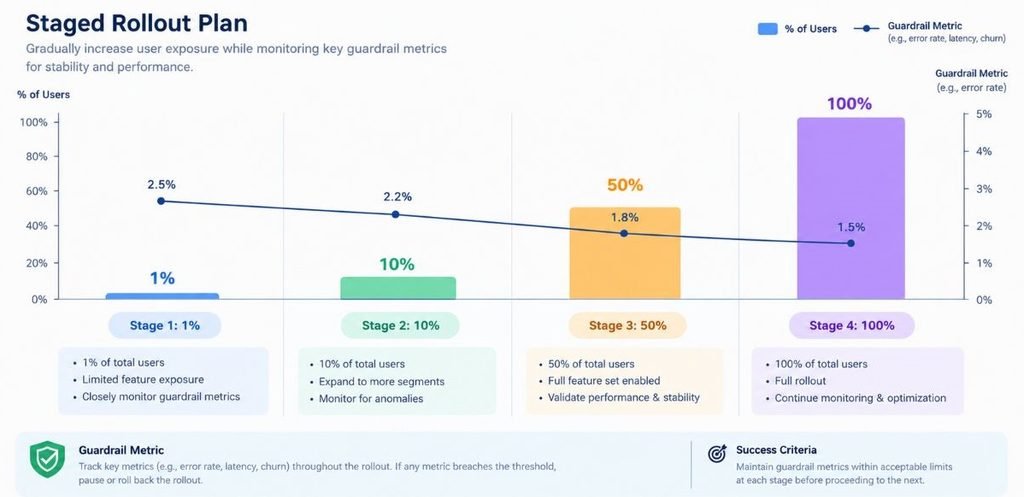
You launch in stages: internal testing, a small beta, a gradual percentage rollout, then general availability, with a kill switch ready at every step. AI errors are public and memorable, so a controlled rollout protects your reputation.
Zepto-style speed matters in quick commerce, but it’s the wrong instinct for AI launches. Trust builds slowly and breaks in a single screenshot. Tell users clearly that AI is involved, show what it can’t do, and give them an easy way to report a bad answer.
Define in advance what would make you pause the launch. For example: complaint rate above a set threshold, or a guardrail metric dropping for two days running.
LaunchDarkly
LaunchDarkly is a feature-flag platform. You wrap the AI feature in a flag, then release it to 1% of users, then 10%, then everyone, and switch it off instantly if something goes wrong, without a new deployment. It’s the practical form of a kill switch. It adds a paid dependency, and flags need cleanup after launch or your code fills up with dead switches.
Amplitude
Amplitude is a product analytics platform for tracking funnels, retention, cohorts and experiments. For AI features it answers the questions that matter: do users who try the feature come back, and do they complete the task faster? Pair behaviour data with thumbs-up and thumbs-down feedback. Analytics tells you what users did. Feedback tells you why.
Stage 8: How Do You Monitor and Improve After Launch?
You monitor by tracing every request, measuring quality, cost and latency continuously, watching for data drift, and feeding real failures back into your test set. Launch is the start of the work, not the end of it.
AI products decay. User language shifts, source documents change, and a provider updates the underlying model. What passed your tests in March can quietly fail by June. That’s why monitoring closes the loop and sends you back to Stage 1 with new evidence.
Evidently AI
Evidently AI is an open-source library that generates reports on data drift, prediction drift and model quality, plus evaluation checks for LLM outputs. You schedule it to compare today’s data against your training baseline and get alerted when they diverge. It’s strong for classic machine learning models. For complex agent workflows, you’ll likely want tracing tools alongside it.
Arize Phoenix
Arize Phoenix is an open-source observability tool built around tracing, so you can see each step of an LLM request: the retrieval, the prompt, the model call and the response. It’s built on OpenTelemetry standards, which keeps you from being locked in. It’s excellent for debugging why a specific answer went wrong. It’s a development-focused tool, so large teams may pair it with a hosted platform.
Langfuse
Langfuse is an open-source LLM engineering platform you can self-host or use as a cloud service. It combines tracing, prompt management, user feedback capture and evaluation scores in one place. Product managers like it because they can edit and version prompts without a code release. Self-hosting gives you data control, but it means you own the maintenance.
Post-launch monitoring for AI products covers tracing, drift detection, cost and quality scoring. Evidently AI, Arize Phoenix and Langfuse are open-source options that make failures visible, so real user problems can become new test cases for the next release.
Tool Stack Summary by Stage
Here’s the full stack at a glance. Treat it as a menu, not a checklist. A small team might use five of these and do well.
| Stage | Main Goal | Tools Covered |
|---|---|---|
| 1. Problem and feasibility | Prove the problem is real and AI is the right fit | Dovetail, Miro |
| 2. Data foundation | Get clean, labelled, versioned data | Label Studio, Great Expectations, DVC |
| 3. Prototype | Test the idea with real users fast | Hugging Face Hub, Gradio, Figma |
| 4. Build and track | Run reproducible experiments | MLflow, Weights & Biases, LangChain, Pinecone |
| 5. Evaluate | Test quality, safety and bias | promptfoo, Ragas, NIST AI RMF |
| 6. Deploy | Run reliably at scale | Docker, Kubernetes, SageMaker, Vertex AI |
| 7. Launch | Release gradually with a kill switch | LaunchDarkly, Amplitude |
| 8. Monitor | Catch drift and feed failures back | Evidently AI, Arize Phoenix, Langfuse |
Conclusion
Three ideas carry the whole article. Start with a problem you can measure, not a technology you want to use. Treat data and evaluation as first-class work, not cleanup tasks. And plan for life after launch, because the product that ships is never the product you’ll be running six months later.
The AI Product Development Lifecycle works as a loop rather than a straight line. Monitoring feeds back into problem definition, and each pass makes the product sharper. Pick one stage where your team is weakest today, whether that’s evaluation or rollout, and fix that before adding new features.
FAQs
What is the AI product lifecycle?
It’s the set of stages an AI product moves through from the first idea to long-term operation: problem definition, data preparation, prototyping, model building, evaluation, deployment, launch and monitoring. Unlike traditional software, it loops back on itself, because live user data keeps changing how the product performs.
How is building an AI product different from building regular software?
Regular software behaves the same way every time for the same input. AI output varies, depends heavily on data, and can degrade after release. That means you need evaluation sets, drift monitoring and staged rollouts in addition to normal testing and QA.
How long does it take to build an AI product from idea to launch?
A narrow prototype can take one to four weeks. A production-ready product with proper data work, evaluation and a staged launch commonly takes three to nine months, depending on data readiness and risk level. Regulated industries like finance and healthcare run longer.
Do I need a data scientist to build an AI product?
Not always. If you’re building on a hosted LLM through an API, strong software engineers and a product manager who understands evaluation can ship a good first version. You’ll want a data scientist or ML engineer when you train custom models, fine-tune, or need rigorous statistical evaluation.
What’s the difference between a prototype and an MVP in AI?
A prototype answers “can this work at all?” and may run on hand-picked examples. An MVP answers “will real users get value?” and needs real data, basic safeguards, feedback capture and a way to measure outcomes. Many AI projects stall because teams treat a demo as an MVP.
How do I know if my AI product is ready to launch?
It’s ready when it beats your agreed baseline on a fixed test set, handles known failure cases safely, has monitoring in place, and has a working kill switch. If you can’t describe how you’d notice and reverse a bad release, it isn’t ready yet.
Is it better to fine-tune a model or use prompts with RAG?
Start with prompting and RAG. They’re cheaper, faster to change and easier to debug. Consider fine-tuning only when you’ve hit a clear quality ceiling, need a specific style or format at scale, or must reduce latency and cost with a smaller model.
Why do so many AI projects fail?
Research from RAND and Gartner points to the same causes: unclear problems, poor data quality, escalating costs, weak risk controls and no measurable business value. Technical limits are far less common. Fixing the first stages of the lifecycle prevents most of these failures.
What should I monitor after launching an AI product?
Track output quality scores, user feedback, task completion rates, latency, cost per request and data drift. For LLM products, also review sampled conversations weekly. Real failures should become new test cases so the same mistake doesn’t ship twice.
Is a lifecycle framework worth it for a small team or startup?
Yes, in a lighter form. A two-person team doesn’t need every tool here, but it still needs a clear problem statement, a small test set, a staged rollout and basic monitoring. Skipping those steps usually costs more time later than doing them costs now.


