
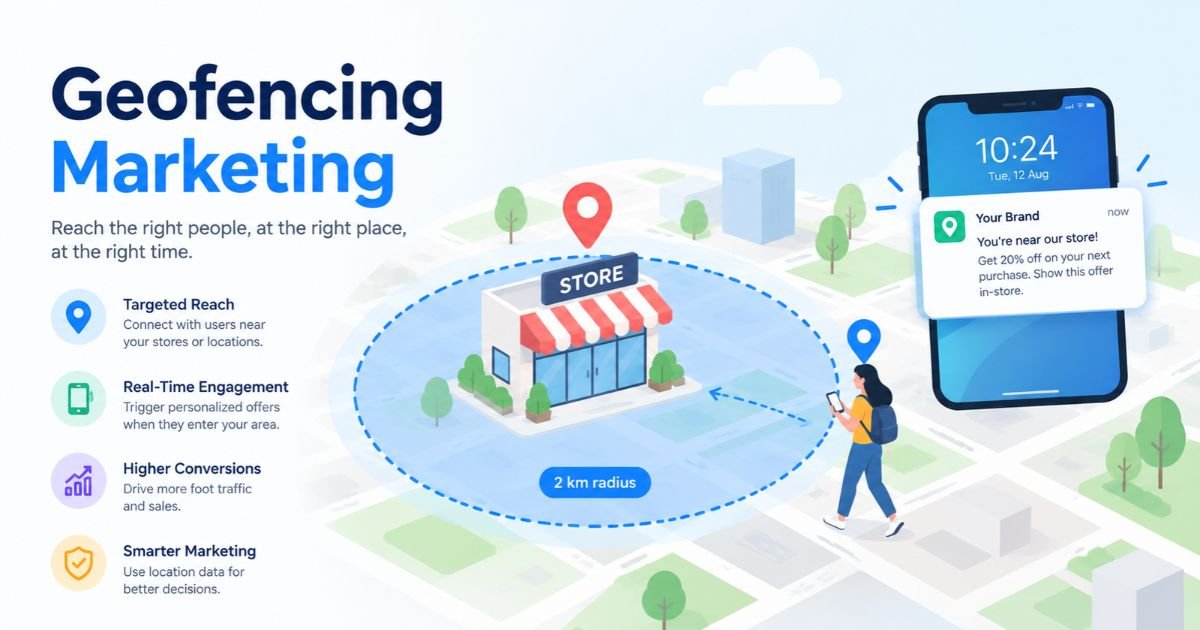
Your customer is standing 200 metres from your store, phone in hand, with no idea you exist. A competitor’s ad is about to reach them first. That gap between being nearby and being noticed is exactly where geofencing marketing earns its budget.
A geofence is a virtual boundary drawn around a real place. When a phone enters it, stays inside it, or leaves it, something happens: a push notification, a mobile ad, an SMS, or a silent audience tag you can retarget later. Done well, you reach people at the exact moment location says something about their intent. Done badly, it feels like being followed around a mall by a salesperson.
This guide explains how the technology works, the tools behind it (from GPS and Bluetooth beacons to Google Ads, Meta Ads, Radar and Braze), the benefits and the honest limits, real campaigns with numbers, and a step-by-step launch plan. It also covers the privacy rules that now shape every location campaign, including India’s DPDP Rules 2025. Everything here reflects what’s true as of October 2026.
What Is Geofencing and How Does It Actually Work?
Geofencing is a location technology that creates a virtual perimeter around a real place and triggers a pre-set action when a mobile device crosses that perimeter. In marketing, the action is almost always an ad, a notification, or an audience tag.
So, what is geofencing marketing in practice? It’s the use of those virtual perimeters to send timely messages, or to build audiences, based on where people physically go. A coffee chain fences its own stores. A phone retailer fences competitor showrooms. A concert promoter fences the venue and the metro stations around it.
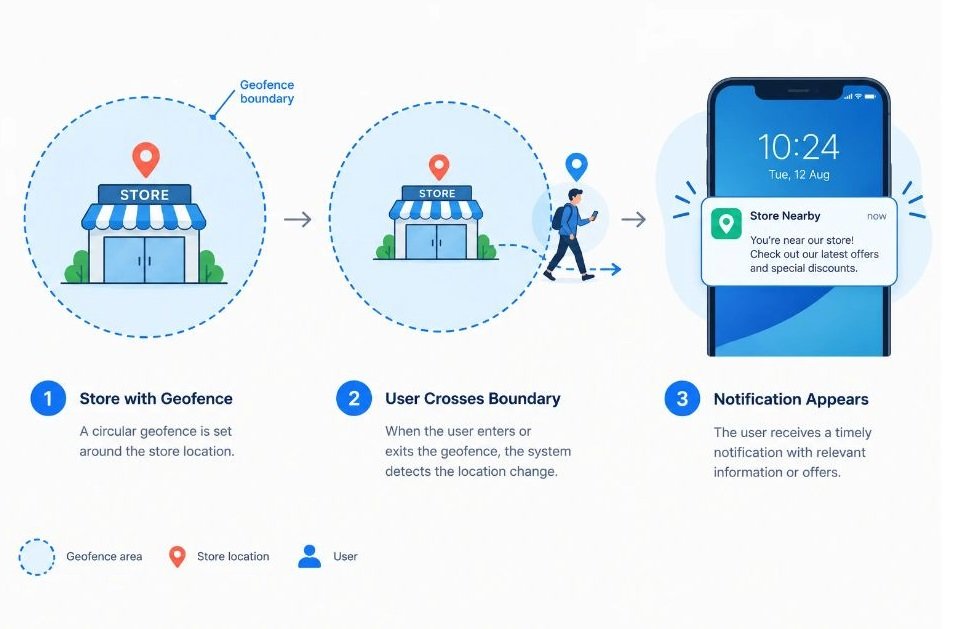
Every geofence fires on one of three moments:
- Entry: the device crosses into the zone. This is the classic “you’re nearby” trigger.
- Dwell: the device stays inside for a set time, say five or ten minutes. It filters out people who just drove past.
- Exit: the device leaves. This is the moment for a thank-you, a review request, or a follow-up offer.
First-party and third-party geofencing
There are two ways to run a geofence, and they work very differently.
First-party geofencing runs inside your own mobile app. The phone’s operating system watches the boundary and wakes your app when someone crosses it. You need an app, and you need the user’s location permission, but the data is yours.
Third-party geofencing runs through an ad platform or a location data provider. They collect location signals from many apps, match devices to your fence, and let you serve ads or build audiences without owning an app. Reach is bigger. Control is lower, and you’re trusting the provider’s data quality.
The basic flow
- You pick a place and draw a boundary around it, either a circle with a radius or a custom polygon.
- A device reports its location through GPS, Wi-Fi, cell towers or a nearby beacon.
- The system compares that location with your boundary.
- If the device crosses the boundary and the user has given permission, the trigger fires.
- The action runs: an ad is served, a notification is sent, or the device joins an audience.
- Visits, clicks and conversions are logged so you can measure what happened.
Geofencing draws a virtual boundary around a physical place and fires an action when a phone enters, dwells in, or exits that boundary. It can run inside your own app using the phone’s operating system, or through an ad platform that uses location data from many apps. Both versions depend on user permission for location access.
Which Technologies Power a Geofence?
A geofence is only as good as the signal that detects the phone. Five technologies do the detecting, and each trades accuracy against range, cost and battery drain.
| Technology | Typical Accuracy | Typical Range | Best Use | Main Drawback |
|---|---|---|---|---|
| GPS | 3–10 metres outdoors | Global coverage | Outdoor navigation, vehicle tracking, and route planning | Weak or unreliable indoors; affected by buildings and obstructions |
| Wi-Fi | 3–10 metres, depending on setup | Around 30–100 metres | Indoor positioning in offices, malls, and public buildings | Accuracy depends on access-point density, signal interference, and calibration |
| Cellular | Tens to hundreds of metres | Hundreds of metres to several kilometres per cell | Wide-area tracking, emergency location, and location services without GPS | Generally less accurate, especially in areas with sparse cell towers |
| Bluetooth beacons (BLE) | Around 1–5 metres | Typically 10–50 metres | Indoor navigation, proximity marketing, and asset tracking | Requires beacon deployment; walls and interference can affect accuracy |
| RFID | Zone-level to a few metres, depending on system | Centimetres to several metres for common passive systems; longer for active RFID | Inventory management, warehouse tracking, and access control | Requires readers and tags; passive RFID range is limited |
| NFC | Very close-range detection, typically centimetres | Usually up to about 4 cm | Contactless payments, access cards, and tap-to-connect interactions | Requires the device or tag to be brought very close to the reader |
Note: These are approximate practical ranges, not guaranteed specifications. Actual accuracy and range depend on hardware,
GPS (Global Positioning System)
GPS uses satellite signals to calculate a phone’s position. According to GPS.gov, a US government source, smartphones are typically accurate to within about 5 metres under open sky. That makes GPS the default for outdoor fences around stores, stadiums, campuses and highways.
The weak spots are indoors, in dense city canyons and in malls, where the signal bounces or disappears. GPS also drains battery if an app polls it constantly, which is why operating systems throttle it.
Wi-Fi positioning
Phones can estimate location by recognising nearby Wi-Fi networks and comparing them with a database of known access points. This works well indoors and in cities, where GPS struggles, and typically places a device within tens of metres.
It needs Wi-Fi scanning switched on, which many users disable. It also works better in dense areas with many access points than in a quiet village.
Cellular network (cell tower triangulation)
When GPS and Wi-Fi aren’t available, a phone’s position can be estimated from the cell towers it connects to. Accuracy ranges from a few hundred metres in cities to several kilometres in rural areas.
That’s too coarse for a store-level fence. It’s useful for city-level or neighbourhood-level targeting, and as a fallback signal.
Bluetooth Low Energy beacons
A beacon is a small battery-powered transmitter that broadcasts a short ID. When a phone with your app detects it, the app knows the person is within a few metres of that exact shelf, counter or entrance. Typical ranges run from a few metres to roughly 30 metres, depending on power settings.
Beacons are the most precise option indoors. They also cost money to buy, install and maintain, and they need your app (or a partner app) on the shopper’s phone with Bluetooth enabled. Hardware vendors such as Estimote and Kontakt.io sell them for retail, events and airports.
RFID and NFC
Radio-frequency identification (RFID) tags and near-field communication (NFC) chips respond over very short distances, from a few centimetres to a few metres. NFC taps, for example, need the phone almost touching the tag.
These aren’t geofences in the strict sense. They’re proximity triggers, useful for tap-to-view posters, product packaging and check-ins at a counter. Pair them with wider GPS fences for a layered setup.
Which Geofencing Tools and Platforms Should You Know?
Tools fall into four groups: ad platforms, location-data and ad-tech vendors, app engagement platforms, and the phone operating systems themselves. You’ll probably use more than one.
Google Ads (radius and location targeting)
Google Ads lets you target countries, cities, or a radius around a point, which is the closest thing the platform has to a self-serve fence. Per Google’s own Help documentation, radius targeting requires a radius of at least 1 km. If you pick a very small area, ads may show only intermittently or not at all.
There’s a second setting that matters just as much. “Presence or interest” reaches people who are in, regularly in, or have shown interest in your location. “Presence” limits delivery to people who are actually there. Google says advertisers in Travel, Real Estate and Education who switched from Presence to Presence or interest saw 5% more conversions on Search campaigns. For a store-visit goal, though, many local advertisers choose Presence so budget doesn’t leak to people searching from another city.
Meta Ads (drop pin and radius)
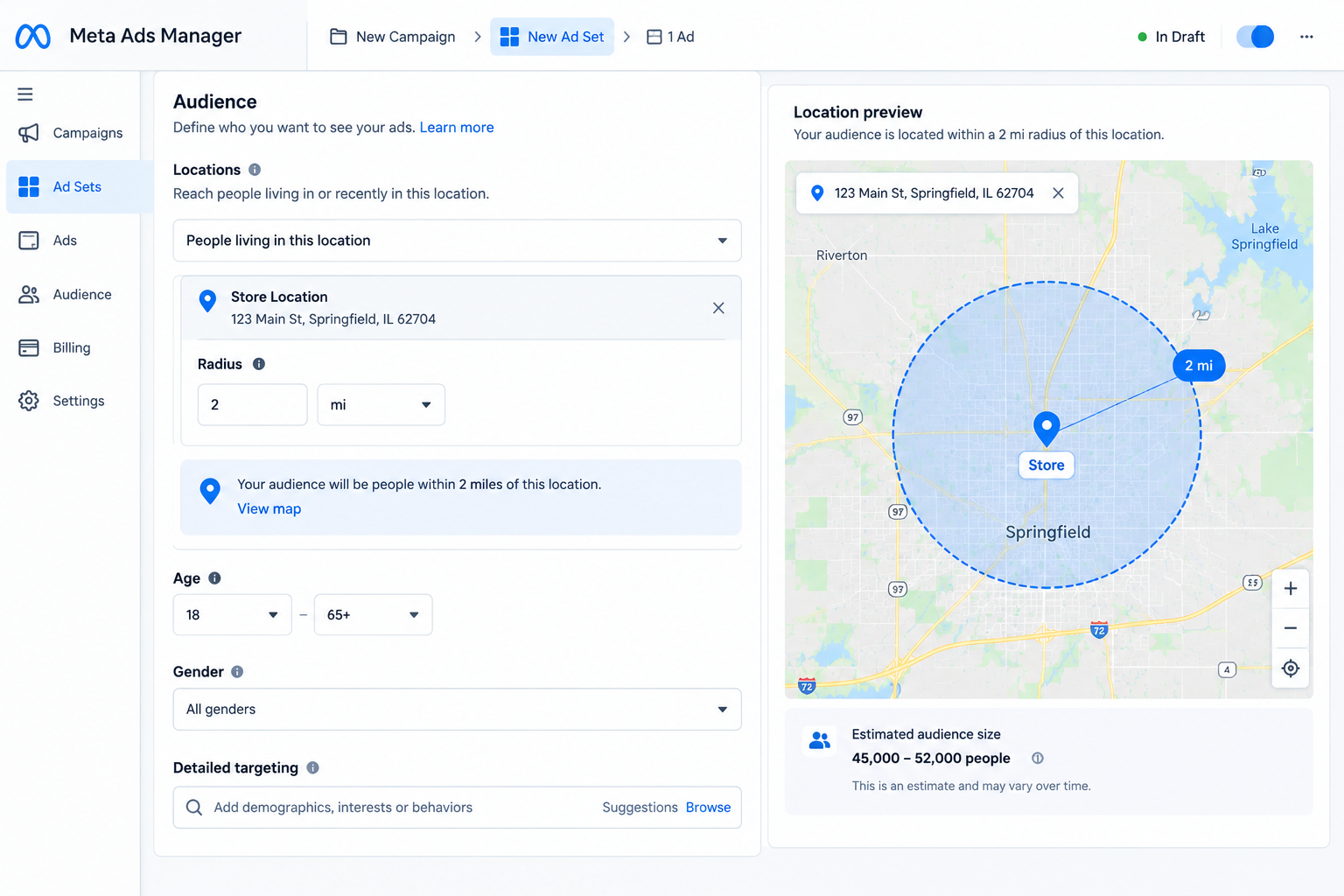
In Meta Ads Manager you drop a pin on a map and choose a radius from 1 mile to 50 miles. You can also exclude areas inside the radius to shape the zone. That’s useful for hyperlocal Geofencing Advertising on Facebook and Instagram, such as a gym, a salon or a restaurant.
One thing changed in 2023. Meta removed the separate options for “living in”, “recently in” and “traveling in”, and now offers a single combined setting, “living in or recently in this location,” according to analysis from Meta ads specialist Jon Loomer. So you can’t isolate visitors from residents the way you once could. Agency write-ups also report that Advantage+ targeting may treat a small radius as a soft edge, so check delivery breakdowns by location before trusting the fence.
Radar (geofencing platform and SDK)
Radar is a location platform for developers and marketers building first-party geofences in apps. It supports circular and polygon geofences, SDKs for iOS, Android, web and cross-platform frameworks such as React Native and Flutter, and APIs for entry, dwell and exit events.
Its main selling point is working around phone limits. According to Radar’s own documentation, iOS lets an app monitor only 20 regions at once, whereas Radar says it doesn’t cap active geofences. That matters if you run hundreds of store fences. Treat vendor accuracy claims as marketing until you’ve tested them on your own streets.
Braze (geofence-triggered messaging)
Braze is a customer engagement platform. You upload locations into geofence sets and attach them to campaigns, so a push notification or in-app message fires when a customer in your app crosses a fence. Each set can hold up to 10,000 geofences, per Braze’s documentation.
The documentation is also honest about limits. iOS apps can monitor up to 20 geofences at a time and Android apps up to 100, and Braze recommends a minimum radius of 100 to 150 metres per fence. Smaller fences fire unreliably.
Foursquare (places data and location advertising)
Foursquare is best known for its database of real-world places and for audience and attribution products built on it. In New Zealand, Parex, the brand behind the InSinkerator Multitap tap, used Foursquare-enabled geofencing alongside a Hivestack footfall study for a digital out-of-home campaign. It reported a 37% increase in store visits and a 25% rise in sales at Harvey Norman stores (The Drum Awards, APAC 2022).
Think of Foursquare-style tools as the “who visited where” layer. They tell you which place a device was at, and they sit behind many programmatic ad buys.
Reveal Mobile VISIT Local and other self-serve geofence platforms
Platforms such as Reveal Mobile’s VISIT Local let advertisers draw fences around their own stores and competitors’ stores, build audiences from the devices that visit, and receive attribution reports. Reveal says it reports foot traffic accurate to the metre, and cites a restaurant client whose target audience was 27% more likely to visit after a TikTok campaign.
Both numbers come from the vendor, so verify them with a holdout test of your own. Similar tools include Simpli.fi and GroundTruth, which offer address-level targeting through programmatic buying.
Pushwoosh and in-app push tools
Pushwoosh is one of several push-notification platforms with geo-campaign features. It frames geofencing around the same three moments covered earlier: entry, dwell and exit. If you already have an app and a push tool, check whether it supports geofences before buying anything new. Indian engagement platforms such as MoEngage and CleverTap also offer location-triggered messaging, though feature sets change, so confirm the current docs.
Apple Core Location and Android Geofencing API
Underneath most first-party tools sit the phone’s own frameworks. Apple’s Core Location monitors circular regions, and Google’s Geofencing API does the same on Android. Android 10 and above requires background location permission (the “Allow all the time” choice) for geofences to work properly, and Android’s background delivery is batched, so events can arrive minutes late rather than instantly.
That delay surprises many first-time advertisers. If you promise “a coupon the second they walk in,” test it on real devices first.
The main geofencing tools fall into four groups: ad platforms like Google Ads and Meta Ads, location-data vendors like Foursquare and Reveal Mobile, app engagement platforms like Braze and Radar, and the phone operating systems themselves. Phones cap active geofences at 20 on iOS and 100 on Android per app, so large retail networks need tools that rotate fences based on the user’s position.
What Are the Real Benefits, and Where Does Geofencing Fall Short?
The main benefit of geofencing is relevance at the right moment: your message reaches someone who is physically near your business, which is a stronger intent signal than most demographic filters. It also gives offline marketing something it rarely has, which is measurable store visits.
The benefits
- Timing you can’t get elsewhere. A lunch offer lands when someone is two streets from your restaurant at 12:40, not a week earlier in a feed.
- Lower waste. You pay to reach people in a defined area rather than a whole city.
- Competitor conquesting. You can reach people who are standing in a rival’s showroom, with an alternative.
- Offline attribution. Visit measurement, ideally with a control group, lets you tie ad exposure to store footfall.
- Audience building. Devices that visited an event or a competitor become a retargeting audience for weeks afterwards.
- Flexible budgets. A small shop can test a single fence for a few thousand rupees. That’s not an enterprise-only tactic.
The limits
Geofencing isn’t magic, and anyone who tells you otherwise is selling a platform. Accuracy is the first issue. Indoors, in tall buildings or in dense lanes, a phone’s reported position can be off by far more than your fence radius, so people in the next building may trigger your fence.
Second, permission. Most first-party fences need the user to say yes to location access, and the permission rules keep tightening. On iOS 14 and Android 12 and above, users can grant approximate rather than precise location, and on Android 13 and above the operating system blocks further in-app prompts after a user declines twice, according to Braze’s documentation.
Third, audience size. A tight fence around a single shop can produce too few devices for ad platforms to optimise on. And fourth, the creepiness line. A message that proves you know exactly where someone is can backfire.
Even the good results are often modest, which is worth knowing before you promise your boss miracles. In a controlled Facebook test by WPP Media for Circle K in Denmark, geofenced audiences produced a 4% incremental footfall lift. That was still over 4,000 extra store visits across 124 locations. Small percentage, real money.
How Do You Set Up a Geofence Campaign Step by Step?
You set up a geofence campaign by choosing a goal, drawing the fences, picking a platform, writing location-aware creative, and measuring visits against a control group. The order matters, because most failed campaigns skip step one or step seven.
- Define one goal. Store visits, app downloads, coupon redemptions or event registrations. Pick one. A single geofence shouldn’t try to do all four.
- Choose which places to fence. Your own stores, competitor stores, event venues, malls, colleges, transit hubs or workplaces. Start with five to ten, not five hundred.
- Set the radius. Dense city centre: 200 to 500 metres. Suburbs: 1 to 3 km. Remember the platform minimums, such as Google Ads’ 1 km and Braze’s recommended 100 to 150 metres.
- Pick the platform. If you own an app, use first-party fences through Braze, Radar or your push tool. If you don’t, use Google Ads, Meta Ads or a programmatic geofence vendor.
- Write creative that fits the place. “Ten minutes from our Model Town store, show this ad for a free coffee” beats a generic brand message. Reference the place, the time or the action.
- Set frequency and timing. Cap how often one device sees the ad. Match the hours to when the place is busy, not 24/7.
- Measure with a control group. Compare visits from exposed devices with visits from similar, unexposed devices. Without a holdout, you’re counting people who were coming anyway.
- Review and adjust. Check which fences produce visits, shrink or drop the ones that don’t, and rewrite the creative every few weeks.
Here’s a sanity check before you launch. Walk the fence yourself with a test phone. Does the trigger fire where you expect? How long does it take? You’ll catch map errors and delays that no dashboard shows you.
Which Strategies Work Best?
The best Geofencing Marketing Strategies match the fence to a specific customer moment, not just a location. Six are worth testing, in roughly this order of difficulty.
Fence your own stores to drive the last mile
This is the simplest play. Target people within a short radius of your location with an offer that has a reason to act today: a happy-hour discount, a flash sale, a “we’re open late” nudge. It works best for businesses with impulse visits, like cafes, salons, pharmacies and quick service restaurants.
Conquest competitors
Draw fences around competing stores and serve an alternative to people inside them. Burger King’s Whopper Detour, covered below, is the famous version. It works best when you’ve got a clear reason to switch, such as a lower price, faster service or a better product.
Check your platform’s rules and local laws, and keep the message about your strength rather than their weakness.
Target events and venues
Fence a stadium, exhibition ground, wedding venue district or college fest. Event audiences are concentrated and time-bound, which makes them cheap to reach. A nearby restaurant can run a “post-match dinner” ad for the two hours around the final whistle.
Use dwell time to separate browsers from buyers
A person who spends 15 minutes inside a car showroom is a different lead from someone who walked past it. Trigger a follow-up only after a dwell threshold, such as a test-drive offer by SMS or push, so you don’t waste messages on passers-by.
Message on exit
Exit triggers are underused. Right after someone leaves your store, send a review request, a “forgot something?” reminder or an app-install prompt. The visit is fresh and the person is still nearby.
Build audiences now, advertise later
Use fences to collect devices that visited a venue and then run Geofencing Advertising to them over the next two to four weeks, away from the location. A phone retailer might fence competing showrooms and then retarget those visitors with an exchange offer on search, social and display.
No single one of these Geofencing Marketing Strategies wins everywhere. Run two in parallel for a month, compare visits against a holdout group, and double down on the one that pays.
The best geofencing strategies tie a boundary to a customer moment: proximity to your store, presence at a competitor, attendance at an event, dwell time inside a venue, or exit after a visit. Pair fences with a measurable goal and a control group, and keep radius, timing and creative matched to the place.
What Do Real Campaigns Look Like? Examples With Numbers
The strongest Geofencing Marketing Examples share one trait: the offer only makes sense because of the place. Here are five, with the caveat that several of these figures are reported by the brands or agencies that ran them.
Burger King, Whopper Detour (USA, 2018)
Between December 4 and 12, 2018, Burger King offered a one-cent Whopper through its app, but only to people within 600 feet of a McDonald’s. Once the order was placed, the app steered the customer to the nearest Burger King to collect it. According to Marketing Dive, Restaurant Brands International CEO José Cil told analysts in February 2019 that the campaign drove 1.5 million app downloads and took the app to the top of Apple’s App Store. The campaign’s Cannes Lions entry claimed geofences around about 14,000 McDonald’s restaurants and a 37:1 return on investment.
The lesson is that the fence was the idea, not a delivery mechanism for an ad.
Circle K (Denmark)
WPP Media worked with Adsquare for visit measurement and Smartly for execution to A/B test geofenced Facebook audiences, within 10 km of selected stores, against standard regional targeting. Across 124 locations the geofenced approach produced a 4% incremental footfall lift and more than 4,000 incremental visits, with 94% statistical significance. It’s a good reminder that rigorous measurement beats big claims.
IKEA UAE
MEmob+ built tight fences around IKEA’s four UAE stores, their catchment areas and competitor stores, then measured footfall and dwell time against a control group. The agency reported a 28% lift in visitation among exposed devices and a cost per footfall three times lower than the category benchmark. It’s an agency-reported result, but the control-group method is the part to copy.
Nokia phones (India)
Xaxis and Wavemaker ran a nationwide campaign for HMD Global in India, applying geofencing to Nokia phone retail stores and partner locations to measure how digital ads influenced store traffic. The agencies also reported awareness increases of 13% for the Nokia 6.2 and 18% for the Nokia 7.2. For Indian marketers, it shows the same method working outside Western malls: fence the retail points, then measure.
adidas NMD (Middle East and North Africa)
Blis geofenced adidas stockists and fitness and fashion locations, including Dubai Mall, to find the right audience, then served rich media ads to those people later while they were at home. Blis reported a 22% footfall uplift against a control group. It’s a textbook “build the audience at the place, advertise later” setup.
These Geofencing Marketing Examples also show a pattern: the winners test against a control group, they tie the creative to a physical place, and they treat the fence as one input rather than the whole plan. Apps like Zepto and Swiggy Instamart run on a related idea in daily life. Your location decides which store, stock and delivery promise you see.
How Do Privacy and Consent Rules Affect Your Campaigns?
Location data is personal data, and regulators treat it that way. In India, the Digital Personal Data Protection (DPDP) Rules, 2025 were notified in November 2025 and phase in over roughly 18 months. They require clear notices, specific consent, easy withdrawal of consent and breach reporting, and they discourage bundled consent. In practice, a pre-ticked “allow location for everything” box is a risk.
Here’s what to do about it:
- Ask for location in context. Explain why you want it (“to alert you to offers near your nearest store”) before the system prompt appears.
- Make withdrawal as easy as consent. Link to a settings page in the app, and honour the choice quickly.
- Collect only what you need. If a 500 metre fence is enough, don’t store continuous location trails.
- Set retention limits. Delete visit data you no longer use.
- Vet your vendors. Ask third-party providers how they source location signals and what consent they hold. Your brand is the one on the ad.
- Follow platform rules. Apple and Google both publish location permission policies, and violations can get an app pulled.
Rules differ by country, and this is a general overview, not legal advice. If you operate across India, the EU or the US, get your counsel to check the current requirements before launch.
Conclusion
Three things matter most. First, the fence is only as good as the signal and the permission behind it, so match your technology to your accuracy needs and be honest about the limits. Second, the best results come from offers that only make sense in that place, plus a control group to prove the lift. Third, privacy isn’t a footnote anymore. Consent, clear notices and vendor checks decide whether a campaign survives scrutiny.
That’s why geofencing marketing works best as one layer in a wider plan, rather than a standalone trick. Start small this week: pick one location, one goal and a radius you can defend, then run a two-week test with a holdout group and see what the data says before you scale.
Frequently Asked Questions
What does geofencing mean in marketing terms?
Ask ten marketers what is geofencing marketing and you’ll get ten answers, but the core idea is the same: draw a virtual boundary around a real place and use it to trigger a marketing action, like an ad or push notification, when a phone enters, stays in or leaves that area. The goal is to reach people when their location suggests they might buy.
How accurate is geofencing?
It depends on the signal. GPS is typically accurate to about 5 metres in open sky, according to GPS.gov, but indoors and in dense areas the error can be much larger. Wi-Fi gives tens of metres, and cell towers hundreds of metres or more. That’s why platforms recommend minimum radii, such as 100 to 150 metres in Braze.
Do you need a mobile app to run geofence campaigns?
No. First-party fences need your own app, but you can run geofence-style campaigns through Google Ads, Meta Ads or programmatic vendors without one. These rely on the platform’s or provider’s location data, so you get wider reach with less control.
How big should a geofence be?
Match the radius to how far people will really travel. In a busy city centre, 200 to 500 metres often makes sense. Suburbs or smaller towns may need 1 to 3 km. Also respect platform limits: Google Ads needs at least 1 km for radius targeting, and Meta’s drop-pin radius starts at 1 mile.
How much does geofence advertising cost?
Costs vary by platform, location and competition, so any single number would be a guess. On Google Ads and Meta Ads you pay your usual auction rates, and a small local test can run on a modest daily budget. Programmatic vendors and app engagement platforms usually charge platform fees or minimum spends on top. Always ask for a trial budget before signing a long contract.
Is geofencing legal and safe for user privacy?
It’s legal when you have proper consent and follow local data protection law. In India that means complying with the DPDP Rules, 2025 as they phase in, and elsewhere with laws such as GDPR or state privacy laws. Be transparent about why you collect location, let users withdraw consent easily and keep only what you need.
What’s the difference between geofencing and geotargeting?
Geotargeting is the broad idea of showing content based on location, such as a country, city or postcode. Geofencing is a tighter version that draws a specific boundary and often triggers an action in real time when a device crosses it. Radius targeting in Google Ads and Meta sits somewhere between the two.
Does geofencing actually work?
It can, but results are usually moderate unless the offer is tied to the place. Circle K’s controlled test produced a 4% incremental footfall lift, while stunt-style campaigns like Burger King’s Whopper Detour reached far higher engagement. Test with a control group so you know what the fence caused.
Why isn’t my geofence triggering or reaching people?
The usual culprits are permissions, radius and delay. On Android 10 and above, background location must be allowed. Fences smaller than a platform’s recommended minimum fire unreliably. Android also batches background updates, so alerts may arrive late. Test with a real phone and widen the radius if needed.
Which businesses benefit most from geofencing?
Businesses with physical locations and impulse or time-sensitive visits benefit most: restaurants, retail chains, car dealerships, salons, gyms, real estate and event organisers. Online-only brands can use it too, for example by fencing competitor stores or trade shows to build retargeting audiences.

