

Most marketing applications look the same. A list of certificates, a row of tool logos, and a line about being passionate about growth. Hiring managers can’t tell who has actually spent money, broken a campaign, and fixed it. A digital marketing project closes that gap, because it gives you something concrete to show: a result, a number, and a story about what you changed.
This guide covers 12 projects, split into beginner, intermediate, and advanced levels. Each one lists the exact tools you’ll need, explains what every tool does and where it falls short, gives you numbered steps, and tells you what to measure. You’ll also learn how to choose the right project for your level and how to present it so employers and clients take it seriously.
Why Does a Hands-On Project Matter More Than a Certificate?
A hands-on project proves you can run a campaign and read the results, while a certificate only proves you finished a course. Employers hire for the first one.
Think about what an interviewer can actually ask about. A certificate invites no follow-up questions. A project invites ten: why did you pick that keyword, what did the first week of data look like, what would you change? Those answers show judgment, and judgment is the thing nobody can teach in a video lesson.
From what we’ve seen with YUP learners, the ones who land interviews fastest usually have one live campaign they can walk through screen by screen, even if the budget was tiny.
There’s also a practical reason. Tools change every year. Google Optimize shut down on 30 September 2023, and Universal Analytics stopped processing data on 1 July 2023, according to Google. People who had only studied those tools had to start over. People who had run projects simply learned the replacement and kept going.
A marketing project proves you can plan, run, and measure a campaign, which a certificate cannot show. Employers use projects to test judgment, because every project produces decisions you can be questioned about. Projects also outlast tool changes, since the thinking behind them transfers to new platforms.
How Do You Choose the Right Project for Your Level?
Choose a project by matching three things: your current skill level, the budget you can spend, and the job you want. A beginner with no budget should start with SEO or email. A professional with ad spend should start with measurement or paid media.
Here’s a quick way to compare the options before you commit to one of these digital marketing project ideas.
| Level | Typical time | Budget needed | Best for |
|---|---|---|---|
| Beginner | 2 to 4 weeks | Zero to low | Students, career switchers, first jobs |
| Intermediate | 4 to 8 weeks | Low to medium | Executives moving to specialist roles |
| Advanced | 8 to 12 weeks | Medium to high | Managers, freelancers, agency leads |
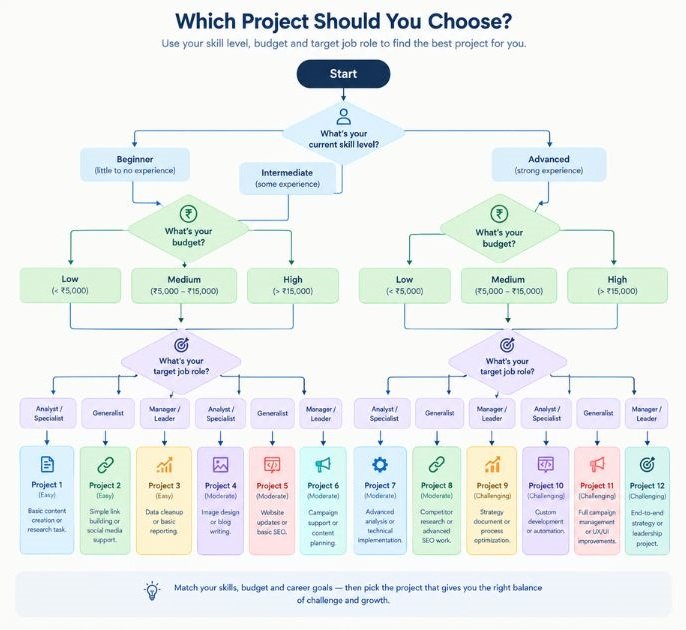
Let the target job decide the channel. Applying for an SEO executive role? Do the audit. Targeting performance marketing? Skip the blog and run a small paid campaign. A project that matches the job description is worth three that don’t.
One limitation to keep in mind. Free projects on your own site often have too little traffic to produce clean data. That’s fine for learning, but if you can, borrow a real small business as your test case, with their written permission.
Beginner Projects That Build Core Skills
These five digital marketing project ideas need little or no budget, and each one teaches a skill that shows up in almost every entry-level job description.
1. SEO Audit and Keyword Plan for a Local Business
SEO stands for search engine optimization, the practice of improving a website so it appears higher in search results. This project asks you to audit one small business website and fix the biggest problems.
Nykaa is a good model to study here. Its editorial content hub, Nykaa Beauty Book, targets the questions shoppers search before they buy, which is exactly the thinking you’ll practise on a small scale.
Follow these steps:
- Pick a small local site, such as a gym, a coaching centre, or a neighbourhood cafe, and get written permission.
- Crawl the site with Screaming Frog and export the errors.
- Connect the site to Google Search Console and record the baseline clicks and impressions.
- Build a list of 30 target keywords in Google Keyword Planner.
- Fix the top issues on three pages: titles, meta descriptions, headings, and internal links.
- Track results for 60 days and write up the changes.
Google Search Console is a free Google tool that shows which queries bring people to your site, how many clicks and impressions each page gets, and which pages Google has indexed. It keeps about 16 months of data. The catch: you can only use it on a site you can verify ownership of, so you’ll need access to the site.
Screaming Frog SEO Spider is a desktop crawler that scans a website like a search engine would. It flags broken links, missing page titles, duplicate meta descriptions, and long redirect chains. The free version crawls up to 500 URLs, which is plenty for a small business site.
Google Keyword Planner lives inside Google Ads and suggests keywords with search volume ranges. Without active ad spend, it shows wide ranges such as 1K to 10K instead of exact numbers, so treat it as directional.
Yoast SEO is a WordPress plugin that checks page titles, meta descriptions, and readability as you edit. It’s a helper, not a ranking guarantee. A green light from Yoast doesn’t mean a page will rank.
Measure impressions, clicks, average position, and the number of indexed pages, before and after.
2. Niche Blog With a 30-Day Content Plan
Pick a narrow topic, publish 8 to 12 useful articles, and track what happens. Narrow wins here. A blog about running shoes for flat feet has a better shot than one about fitness.
- Choose a niche you can write about with some authority.
- Research topics in Google Trends and AnswerThePublic.
- Plan 12 articles and map one target keyword to each.
- Publish on WordPress and design simple images in Canva.
- Submit the sitemap to Google Search Console after the second post.
- Review impressions every week and update the weakest post.
WordPress is the content management system behind a large share of the web. It lets you publish posts, install plugins, and control page structure without code. The free WordPress.org version needs hosting, while the hosted option is easier to start but has fewer plugin choices on lower plans.
Google Trends shows how interest in a search term rises and falls over time and by region. Use it to check whether a topic is growing, seasonal, or fading. It shows relative interest on a 0 to 100 scale, not absolute search counts.
AnswerThePublic turns a seed keyword into the questions and phrases people type around it. It’s very good for finding article angles. The free tier limits daily searches.
Canva is a browser-based design tool with templates for blog images, social posts, and thumbnails. The free plan covers most beginner needs, though some stock elements are locked behind a paid plan.
Measure indexed pages, impressions, and average time on page.
3. Social Media Calendar and 60-Day Growth Experiment
One account, one platform, one hypothesis. That’s the whole trick. Swiggy built a reputation for witty, fast social posts, and you can borrow the discipline behind that without borrowing the budget: a clear voice and a consistent schedule.
- Choose a platform and write one hypothesis, such as “short tips Reels will get more reach than static posts.”
- Build a four-week content calendar with three content formats.
- Design posts in Canva and schedule them in Meta Business Suite or Buffer.
- Post for 60 days and log reach and saves weekly.
- Compare formats and write what you’d keep, cut, and test next.
Meta Business Suite is Meta’s free tool for managing Facebook and Instagram posts, messages, and insights in one place. You can schedule posts and see reach and engagement by format. It only covers Meta platforms.
Buffer schedules posts across several networks, including LinkedIn and X. The free plan allows a small number of connected channels, so check current limits before you plan your calendar.
Instagram Insights shows reach, saves, shares, and follower activity by time of day. It needs a professional account. Saves and shares tell you more about content value than likes do.
Measure reach, saves, shares, profile visits, and follower growth.
4. Email Welcome Sequence
A welcome sequence is a short series of automated emails sent after someone joins your list. It’s one of the most useful beginner projects because the whole thing is measurable.
- Create a simple lead magnet, such as a one-page checklist.
- Build a signup form in Mailchimp or Brevo.
- Write five emails: welcome, value, story, offer, and follow-up.
- Set the automation delays, for example day 0, 2, 4, 7, and 10.
- Send test emails to three inboxes and check on mobile.
- Run it for 30 days and compare each email’s click rate.
Mailchimp is an email platform with forms, automations, and basic reports. Its free plan has contact and send limits that have changed over the years, so check the current terms.
Brevo (formerly Sendinblue) offers email automation with a free plan that caps daily sends. It’s a good fit when you want to practise workflows without paying.
Litmus previews how an email renders across devices and inboxes. It’s paid, so on a zero budget, send tests to a Gmail, an Outlook, and a phone instead.
Watch click rate more than open rate. Apple’s Mail Privacy Protection, introduced in 2021, inflates opens by auto-loading images, which makes open rate unreliable.
5. Google Ads Search Campaign on a Small Budget
This is your first taste of paid media. A tight budget forces good habits, because you can’t hide poor targeting behind big spend.
- Choose one product or service and one conversion goal, such as a form fill.
- Build a keyword list in Keyword Planner and group it into two or three themes.
- Create a Search campaign in Google Ads with three ad variations per group.
- Set up conversion tracking with Google Analytics 4.
- Review the search terms report every few days and add negative keywords.
- Run for two to four weeks and document every change you made.
Google Ads is Google’s auction-based advertising platform. For Search campaigns, you bid on keywords and your ads appear above or below organic results. It has a steep learning curve and defaults that favour spending, so switch off options such as broad auto-expansion until you understand them.
Google Analytics 4 (GA4) is Google’s event-based analytics platform. It records what users do after clicking your ad, including the conversions you define. It takes setup effort, and reports can take hours to update.
Measure click-through rate, cost per click, conversion rate, and cost per conversion.
Intermediate Projects That Show Measurable Results
Intermediate projects add measurement, testing, and automation. They show you can do more than launch something. They show you can prove whether it worked.
6. GA4 and Looker Studio Reporting Dashboard
Picture a founder who asks, “How is marketing doing?” and gets a 40-slide deck. Now picture one clean dashboard instead. That’s the skill this project builds.
- Define five business questions, such as which channel drives the most leads.
- Set up key events in GA4 for form fills, purchases, or sign-ups.
- Install tracking through Google Tag Manager.
- Connect GA4 and Google Search Console to Looker Studio.
- Build one page per question, with a clear title and a short note on what to do.
- Share a view-only link and review it with a real stakeholder.
Google Tag Manager (GTM) is a free tool that lets you add and edit tracking tags without changing site code. It uses tags, triggers, and variables. Its preview mode is very helpful for debugging, but a wrong trigger can double-count events, so test every one.
Looker Studio is Google’s free reporting tool for building dashboards from sources like GA4, Search Console, Google Ads, and spreadsheets. It’s flexible, but slow dashboards usually come from too many charts on one page.
Measure whether stakeholders can answer their own questions without asking you.
7. Landing Page A/B Test
An A/B test compares two versions of a page to see which produces more conversions. The catch: it only works when you have enough traffic. With a few dozen visitors, results are noise.
- Choose a page with at least a few hundred visits a month.
- Study behaviour first, using heatmaps and session recordings.
- Write a hypothesis, for example “a shorter form will raise sign-ups.”
- Build variant B and split traffic evenly.
- Run the test until you reach a pre-set sample size, not until you see a winner.
- Record the result, even if the variant lost.
Microsoft Clarity is a free behaviour tool that gives heatmaps and session recordings. It shows where people click and where they leave. It has no traffic cap on the free plan, according to Microsoft, which makes it a strong first pick.
Hotjar offers heatmaps, recordings, and on-page surveys. Its free plan is limited, so it suits small tests.
VWO (Visual Website Optimizer) runs A/B and multivariate tests with a visual editor and built-in statistics. It’s paid, but a trial is enough for one portfolio test.
A lost test is still a strong story. It shows you test with discipline instead of guessing.
8. Lead-Nurturing Automation
Connect a form to a CRM (customer relationship management system, which stores contact and deal data) and build a follow-up flow that treats warm and cold leads differently.
- Create a form with two or three qualifying questions.
- Send submissions into HubSpot as contacts.
- Score leads based on answers, such as budget or timeline.
- Trigger different email sequences for high and low scores.
- Alert a sales owner by email or Slack when a hot lead arrives.
- Review conversion from lead to meeting after 30 days.
HubSpot offers a free CRM with forms, contact records, and basic email. Automated workflows sit in paid tiers, so you may need a trial to complete the flow.
Zapier connects apps without code through “if this, then that” triggers. For example, a new form entry can create a CRM contact and post to Slack. The free plan limits tasks and steps, so keep flows short.
Measure form-to-lead rate, lead-to-meeting rate, and response time.
Advanced Projects for Working Professionals
Advanced projects involve real spend, real attribution trouble, and decisions with money attached. They fit professionals building a case for a promotion, a freelance rate, or a leadership role.
9. Full-Funnel Meta Ads Build
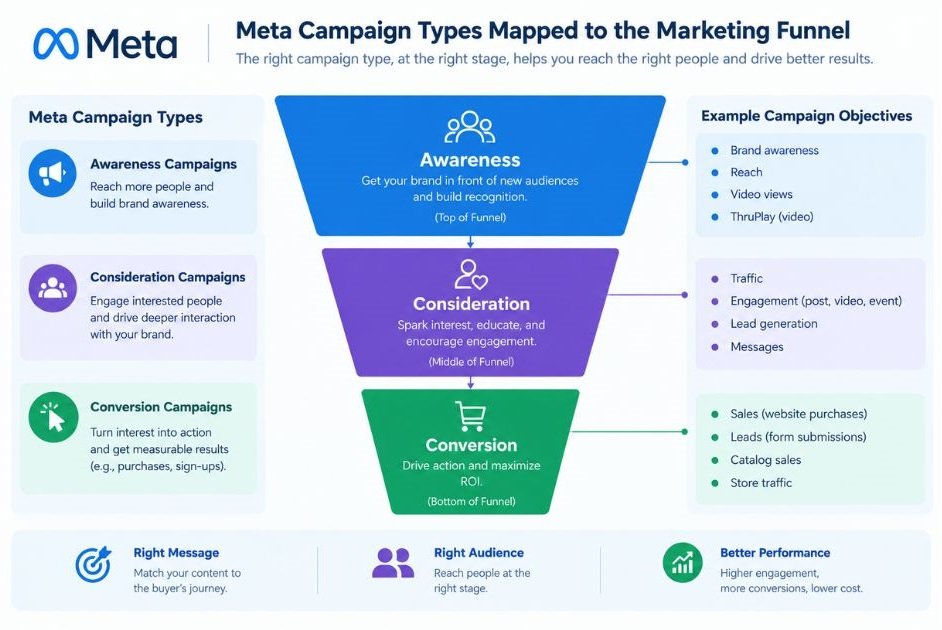
Most advertisers run one campaign and hope. A full-funnel build maps ads to the stages: awareness, consideration, and conversion.
Mamaearth is useful to study for how a D2C brand mixes creator content with performance ads across stages. You don’t need its budget to copy its structure.
- Install the Meta Pixel and set up the Conversions API.
- Build three audiences: broad prospecting, engaged users, and website visitors.
- Launch a prospecting campaign with video creative.
- Launch a retargeting campaign with product or offer creative.
- Test an Advantage+ shopping campaign against your manual structure.
- Compare cost per purchase and return on ad spend after two weeks.
Meta Ads Manager is the control centre for Facebook and Instagram ads. You set objectives, audiences, placements, and budgets here. Its automated options save time, though they also hide some of the choices, so keep a manual campaign as your control.
Meta Pixel and Conversions API send conversion data from your site and server to Meta. Running both improves signal quality, especially when browsers block cookies. Setup errors are common, so verify events in Meta’s Events Manager.
Advantage+ shopping campaigns, launched by Meta in 2022, use automation to handle audience and placement for e-commerce. They’re worth testing, but you shouldn’t assume they beat manual setups for every account.
10. AI-Assisted Content and Reporting Workflow
This project proves you can use AI as a process, not a party trick. You’ll build a repeatable workflow with human checks built in.
- Pick one repeated task, such as weekly reporting or content briefs.
- Write a clear prompt template with role, context, format, and examples.
- Use Claude or ChatGPT to draft the output from your inputs.
- Automate the handoff with n8n or Make.
- Add a human review step before anything gets published or sent.
- Time the old and new workflows and record the difference.
Claude and ChatGPT are large language model assistants that draft, summarize, and analyze text. They’re fast, but they can state wrong facts with confidence, so verify numbers and claims before they leave your desk.
n8n is a workflow automation tool with a visual builder and a self-hosted option. It gives more control than most no-code tools but needs more technical comfort.
Make is a visual automation platform that connects apps through scenarios. It’s easier to start with, though complex scenarios get hard to read.
Measure hours saved per week and error rate after human review.
11. MER and Attribution Study
MER (Marketing Efficiency Ratio) is total revenue divided by total ad spend across all channels. Platform dashboards each claim credit for the same sale, so MER gives you a number that doesn’t depend on any one platform’s attribution.
- Collect 90 days of revenue and spend data from every channel.
- Export GA4 data to BigQuery, Google’s data warehouse.
- Calculate daily and weekly MER.
- Compare it with each platform’s reported return on ad spend.
- Visualize the gap in Looker Studio.
- Recommend a budget shift and track MER for the next 30 days.
BigQuery stores and queries large datasets with SQL. GA4 can export raw event data to it, which is useful when the GA4 interface isn’t flexible enough. Costs depend on queries run, so keep them small.
GA4 and Looker Studio do the collection and the display, as covered in the dashboard project above.
This is a strong project to show to founders. It speaks their language: revenue and spend.
MER is total revenue divided by total ad spend across all channels. It needs no attribution model, which makes it a useful check against inflated platform-reported results. Marketers can compare MER with each platform’s ROAS to spot over-credited channels.
12. Influencer and UGC Campaign
UGC means user-generated content, which is content made by customers or creators rather than the brand. boAt built early momentum through creator and celebrity partnerships, and the lesson is that fit matters more than follower count.
- Define a campaign goal and a simple creator brief.
- Shortlist creators by audience fit and engagement quality in Modash.
- Create unique tracking links with Google’s Campaign URL Builder.
- Manage outreach, deadlines, and deliverables in Notion.
- Collect content, and test the best pieces as paid ads.
- Compare cost per click and conversion by creator.
Modash is an influencer discovery platform with audience data. It’s a paid tool, so you may use a trial for a portfolio run.
Campaign URL Builder adds UTM parameters to links so GA4 can tell you which creator drove which visit. Forget this step and you lose attribution.
Notion works as a lightweight project tracker for briefs, contracts, and deadlines.
How Do You Present Your Project to Employers and Clients?
Present a project as a short case study with four parts: problem, action, result, and learning. Keep it to one page and lead with the number.
Here’s a structure that works:
- Problem: state the goal and starting baseline in one or two sentences.
- Action: list what you did, in order, with the tools you used.
- Result: show before and after numbers with a screenshot.
- Learning: say what you’d change and what you’d test next.
Publish it where people can find it: a Notion page, a WordPress post, or a LinkedIn article. Hide any private client data. And be honest about failures. A project that says “conversion dropped 12% and here’s why” earns more trust than one that only shows wins.
Mistakes That Make a Marketing Project Look Weak
Most weak projects fail in the same few ways. Fix these and you’re already ahead of most applicants.
- No baseline, so you can’t prove anything changed
- Vanity metrics such as likes, with no link to business results
- Too many channels at once, which makes results impossible to explain
- Stopping after one week, before the data means anything
- Copying templates without explaining the decisions behind them
- No documentation, so the work can’t be shown later
The thing is, none of these are skill problems. They’re habit problems, and habits are fixable.
Conclusion
The best portfolio is a short one with real numbers. Pick one project that matches your level and your target role, run it long enough to produce data, and document every decision. A single well-explained digital marketing project beats a page of certificates.
If you’re not sure where to start, begin with the SEO audit or the email sequence. Once you’ve finished one, the next gets much easier.
FAQ
What is a marketing project in digital marketing?
A marketing project is a time-boxed piece of work with a goal, a channel, a budget (even zero), and a measured result. Examples include an SEO audit, an email sequence, or a paid campaign. It becomes portfolio-ready when you document what you did and what changed.
Which project should a complete beginner start with?
Start with the SEO audit or the email welcome sequence. Both need little money and teach fundamentals you’ll use in every later project. If you’re still choosing between digital marketing project ideas, pick the one closest to the job you want.
Do I need a budget to do these projects?
Not for the beginner ones. Google Search Console, Screaming Frog’s free version, Canva, Microsoft Clarity, and Looker Studio are free or have free plans. Paid media projects need some ad spend, but a few thousand rupees is enough to learn from.
Is an SEO project better than a Google Ads project for my portfolio?
It depends on the role. SEO projects show patience and content skill, but results take weeks or months. Google Ads projects show faster results and budget control, but cost money. For a broad profile, do one of each.
How long should a project run?
Run it long enough to collect meaningful data. Email and ads projects need two to four weeks, SEO and content projects need 60 to 90 days, and tests need to reach a pre-set sample size. Stopping early is the most common reason results look random.
Can I do a project without a real client?
Yes. Use your own site, a niche blog, or a friend’s small business with written permission. Real clients add credibility, but a well-documented personal project with honest numbers still shows how you think.
Are marketing projects actually worth the time?
Yes, if you document them. A project gives you interview material, proof of tool skills, and real numbers to discuss. A course alone gives you none of those. Time spent without notes or screenshots is mostly wasted, though.
What metrics should I put in my case study?
Pick metrics tied to the goal. For SEO, use impressions, clicks, and average position. For email, use click rate and conversions. For ads, use cost per conversion and return on ad spend. Always show a before and after.
Why did my project show no results?
Usually one of four reasons: too little traffic, too short a run, no baseline, or broken tracking. Check your GA4 events and tags first. A project with no uplift is still useful if you can explain why.
Which tools should professionals focus on in 2026?
Focus on measurement and automation: GA4, Google Tag Manager, Looker Studio, BigQuery, and a workflow tool such as n8n or Make. Platform tools like Meta Ads Manager and Google Ads still matter, but the ability to measure across them is what separates senior marketers.


